EMS VM镜像升级
EMS VM镜像升级
安装说明
由于当前的软件版本老旧,想要通过手动升级设备的系统软件版本。
重要
- 在设备升级前,请针对服务器做好快照/服务器备份
- 升级会造成FortiClient和EMS之间连接中断,会在升级完成后恢复;
- 该升级步骤仅供通过VM模板部署在7.4单台服务器(SA,没有HA数据库)的环境中升级, 其他7.4架构情况,请提交Ticket咨询TAC
先决条件
FortiClient EMS正常运行
确认客户拥有超级管理员权限
有一台EMS网络可达的FTP/SFTP/SCP服务器用于EMS拉取对应的镜像包
完成网络连接,EMS在安装过程中请确保能够访问互联网,以下载对应的依赖
注
在EMS7.4.6以后的版本,Fortinet提供离线依赖包
安装过程
1. 获取EMS安装包
可从 Fortinet 技术支持网站 下载安装包。以 FortiClient 7.4.7 为例。
注意
forticlientems_x.x.x.xxxx.amd64.bin对应X86架构的linux服务器
forticlientems_x.x.x.xxxx.arm64.bin对应arm架构的linux服务器,请注意甄别
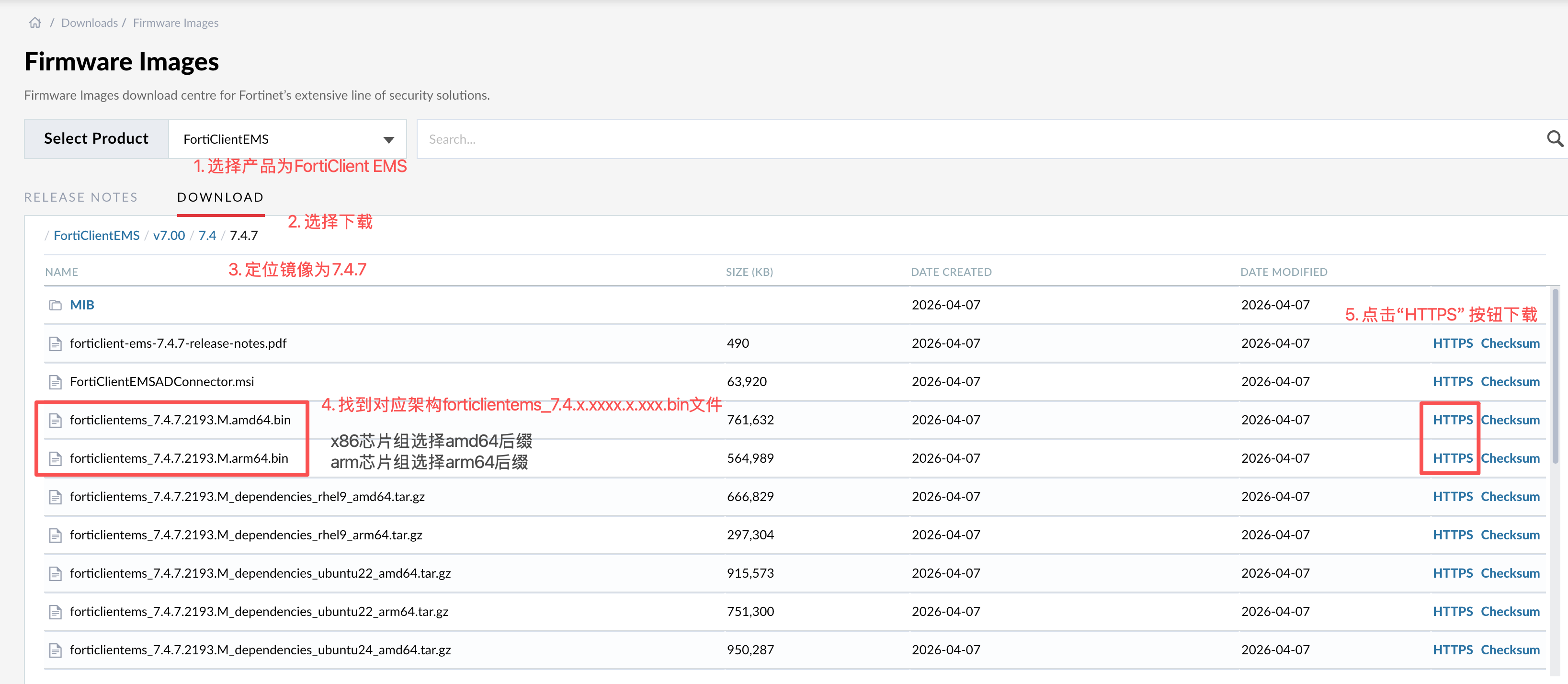
下载完成后存放到FTP/SFTP/SCP服务器中
2. 登录到EMS后台
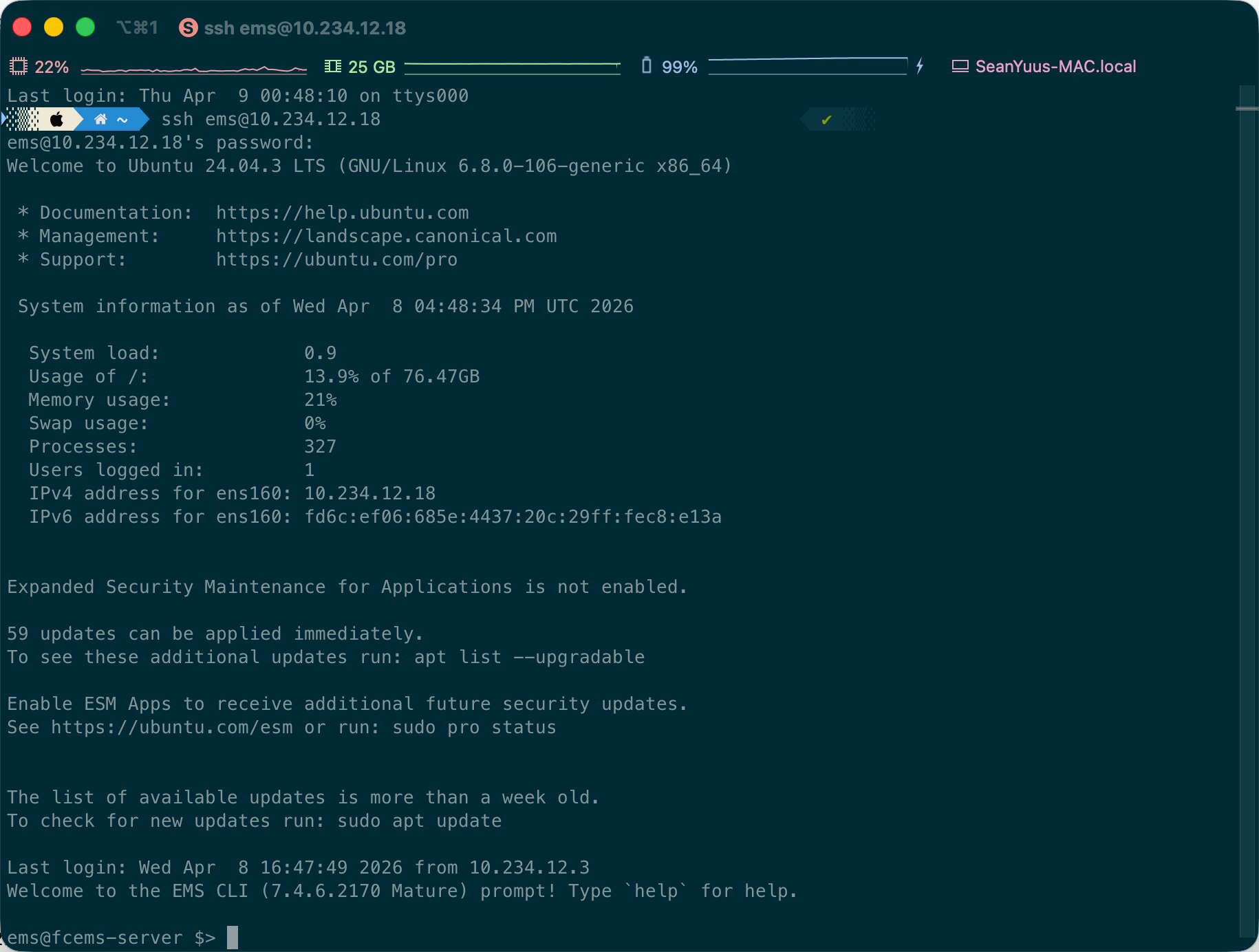
通过SSH或者VM Console工具登录到EMS的后台,本例以SSH工具连接到EMS后台
3. 执行EMS升级
使用以下命令来升级EMS
ems@fcems-server $> execute upgrade ems --copy.service <server type> --remote.ip <IP> --remote.user <username> --remote.password <password> --remote.file <remote file path>其中:
- --copy.service [server type] 代表使用协议,可以使用ftp/sftp/scp
- --remote.ip [IP]代表远端服务器的IP地址,后面跟上IP地址
- --remote.user [username]代表远端服务器的用户名,后面跟上用户名
- (可选)--remote.password [password](在远端服务器用户存在密码的时候使用)代表远端服务器用户的密码,后面跟上密码
- --remote.file [remote file path]代表远端服务器上存储的EMS镜像,后面跟上完整的镜像名称,注意文件扩展名也要加上
- (可选)--offline.bundle [remote file path](在存在网络限制的时候使用该参数)代表远端服务器上存储的离线依赖,后面跟上完整的离线依赖名称,注意文件扩展名也要加上
操作结果参考:
ems@fcems-server $> execute upgrade ems --copy.service ftp --remote.ip  10.234.12.101 --remote.user zhangsan --remote.password password --remote.file forticlientems_7.4.7.2193.M.amd64.bin
Connectivity test using service 'ftp' to remote host 10.234.12.101 with user zhangsan passed !
Starting EMS upgrade. Current version: '7.4.6.2170'
Verifying archive integrity...  100%   MD5 checksums are OK. All good.
Uncompressing Forticlient EMS installation package 7.4.7.2193.M  100%
This is a Debian-based system.
...
中间安装过程略
等待升级完成
结果验证
1. 检查EMS服务是否正常运行
在执行完安装后,使用命令检查EMS是否能够正常运行:
service get --all下面是EMS主机参考结果:
ems@fcems-server $> service get --all
[fcems_wspgbouncer]   -> [PID: 185861][active] [running] [CPU: 0.5%, RAM: 0.1%] -> Wed 2026-04-08 17:23:17 UTC; 3min 23s ago
[fcems_ka]            -> [PID: 190807][active] [running] [CPU: 1.5%, RAM: 0.7%] -> Wed 2026-04-08 17:25:39 UTC; 1min 1s ago
[fcems_monitor]       -> [PID: 189092][active] [running] [CPU: 5.4%, RAM: 0.8%] -> Wed 2026-04-08 17:25:23 UTC; 1min 16s ago
[redis-server]        -> [PID: 192266][active] [running] [CPU: 1.7%, RAM: 0.2%] -> Wed 2026-04-08 17:26:11 UTC; 29s ago
[postgresql@18-main]  -> [PID: 186560][active] [running] [CPU: 0.2%, RAM: 1.9%] -> Wed 2026-04-08 17:24:09 UTC; 2min 31s ago
[fcems_reg]           -> [PID: 190969][active] [running] [CPU: 1.3%, RAM: 0.7%] -> Wed 2026-04-08 17:25:40 UTC; 59s ago
[fcems_notify]        -> [PID: 192966][active] [running] [CPU: 0.7%, RAM: 0.4%] -> Wed 2026-04-08 17:26:12 UTC; 27s ago
[fcems_das]           -> [PID: 189037][active] [running] [CPU: 7.4%, RAM: 1.5%] -> Wed 2026-04-08 17:25:21 UTC; 1min 19s ago
[fcems_tag]           -> [PID: 190897][active] [running] [CPU: 1.3%, RAM: 0.7%] -> Wed 2026-04-08 17:25:39 UTC; 1min 1s ago
[fcems_ecsocksrv]     -> [PID: 192495][active] [running] [CPU: 1.6%, RAM: 0.8%] -> Wed 2026-04-08 17:26:12 UTC; 28s ago
[apache2]             -> [PID: 192467][active] [running] [CPU: 0.0%, RAM: 0.0%] -> Wed 2026-04-08 17:26:12 UTC; 28s ago
[fcems_pgbouncer]     -> [PID: 185823][active] [running] [CPU: 2.8%, RAM: 0.1%] -> Wed 2026-04-08 17:23:16 UTC; 3min 24s ago
[fcems_probe]         -> [PID: 190424][active] [running] [CPU: 0.4%, RAM: 0.7%] -> Wed 2026-04-08 17:25:38 UTC; 1min 2s ago
[fcems_ztna]          -> [PID: 191660][active] [running] [CPU: 0.9%, RAM: 0.7%] -> Wed 2026-04-08 17:25:48 UTC; 52s ago
[fcems_chromebook]    -> [PID: 193607][active] [running] [CPU: 1.2%, RAM: 0.6%] -> Wed 2026-04-08 17:26:17 UTC; 23s ago
[fcems_dbop]          -> [PID: 191562][active] [running] [CPU: 0.9%, RAM: 0.7%] -> Wed 2026-04-08 17:25:44 UTC; 56s ago
[fcems_sip]           -> [PID: 191615][active] [running] [CPU: 11.5%, RAM: 6.4%] -> Wed 2026-04-08 17:25:45 UTC; 55s ago
[fcems_upload]        -> [PID: 190373][active] [running] [CPU: 1.0%, RAM: 0.7%] -> Wed 2026-04-08 17:25:37 UTC; 1min 3s ago
[fcems_adevtsrv]      -> [PID: 193766][active] [running] [CPU: 1.6%, RAM: 0.6%] -> Wed 2026-04-08 17:26:23 UTC; 17s ago
[fcems_installer]     -> [PID: 193681][active] [running] [CPU: 2.1%, RAM: 0.7%] -> Wed 2026-04-08 17:26:21 UTC; 20s ago
[fcems_forensics]     -> [PID: 191643][active] [running] [CPU: 0.8%, RAM: 0.7%] -> Wed 2026-04-08 17:25:46 UTC; 54s ago
[fcems_mdmproxy]      -> [PID: 191526][active] [running] [CPU: 0.1%, RAM: 0.3%] -> Wed 2026-04-08 17:25:42 UTC; 59s ago
[fcems_task]          -> [PID: 190956][active] [running] [CPU: 4.9%, RAM: 0.7%] -> Wed 2026-04-08 17:25:40 UTC; 1min 1s ago
[fcems_addaemon]      -> [PID: 193780][active] [running] [CPU: 1.8%, RAM: 0.7%] -> Wed 2026-04-08 17:26:24 UTC; 17s ago
[fcems_adconnector]   -> [PID: 193803][active] [running] [CPU: 0.4%, RAM: 0.4%] -> Wed 2026-04-08 17:26:24 UTC; 17s ago
[fcems_scep]          -> [PID: 191548][active] [running] [CPU: 0.2%, RAM: 0.2%] -> Wed 2026-04-08 17:25:43 UTC; 58s ago
[fcems_update]        -> [PID: 190329][active] [running] [CPU: 0.9%, RAM: 0.8%] -> Wed 2026-04-08 17:25:36 UTC; 1min 5s ago
[fcems_deploy]        -> [PID: 190343][active] [running] [CPU: 0.7%, RAM: 0.7%] -> Wed 2026-04-08 17:25:36 UTC; 1min 5s ago
[fcems_ftntdbimporter]-> [PID: 191554][active] [running] [CPU: 6.8%, RAM: 3.3%] -> Wed 2026-04-08 17:25:43 UTC; 57s ago
[fcems_adtask]        -> [PID: 193789][active] [running] [CPU: 1.8%, RAM: 0.7%] -> Wed 2026-04-08 17:26:24 UTC; 17s ago
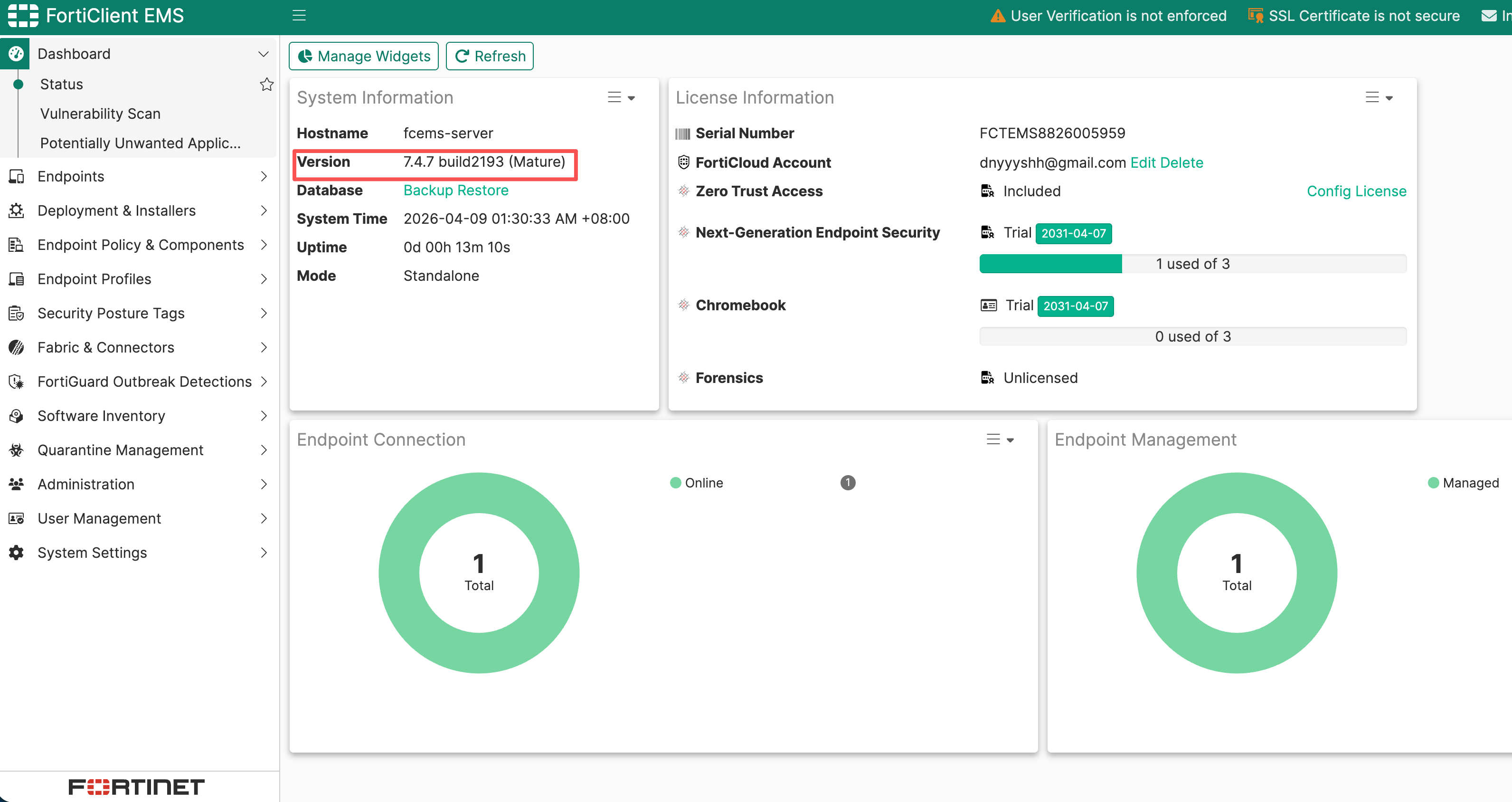
2. 进入EMS控制台检查
在进入EMS控制台之后可以看到EMS版本以及变更
更新历史
| Ver | Description | Author | Rev | Date |
|---|---|---|---|---|
| 1.0 | First Complete | ysheng | tanga | 2026.04.09 |