EMS 添加Hotfix补丁
EMS 添加Hotfix补丁
说明
某些时候EMS会提供一些针对于当前版本的优化方案或者补丁方案,这时候没有新版本的发布,或者因为一些其他原因,例如没有足够长的变更窗口的情况,暂不升级 EMS 主版本、但需要修复当前版本问题时,可按 Fortinet 提供的说明安装相应 Hotfix。
Hotfix的命名方式:
因为发布途径的不同, hotfix分为公开发布和非公开发布两种:
公开发布:用于紧急解决部分漏洞的hotfix,命名为:forticlientems_x.x.x(版本号).yyyy(build)_zzzzzzz(具体hotfix版本信息)。可以在psirt/release note中找到对应的信息。例如针对FG-IR-26-099的Hotfix。
forticlientems_7.4.5.2111_1277073.zipforticlientems_7.4.6.2170_1277073.zip非公开发布:用于解决某些BUG,由研发帮助推送的临时解决用hotfix,命名为:forticlientems_x.x.x(版本号)_hotfixes_package_y(具体hotfix第几个版本包)_z(兼容的芯片组,amd64或者arm64).zip
需要注意的是, 最新的hotfix会囊括之前的hotfix集合,例如:forticlientems_7.4.1_hotfixes_package_3_amd64.zip
也囊括了以下hotfix:
forticlientems_7.4.1_hotfixes_package_1_amd64.zip
forticlientems_7.4.1_hotfixes_package_2_amd64.zip
Hotfix的安装方法
重要
- 在设备安装hotfix前,请针对服务器做好快照/服务器备份
- hotfix会带来进程的重启,虽然时间很短,一般打hotfix重启进程在1分钟左右
- 在Fortinet官方公开的hotfix包,可以在 Fortinet 技术支持网站 下载,一般随在当前版本的下载目录下
- 有些hotfix不会直接公开,如果实际上需要,请联系Fortinet TAC,并说明需要hotfix的原因
先决条件
- FortiClient EMS正常运行
- 确认EMS和当前补丁包的版本匹配
- 确认客户拥有root权限
- 传输工具如FileZilla、winscp
如果EMS是从Linux操作系统安装的环境并且版本在7.4.1-7.4.3之间
1. 上传hotfix包
因为补丁需要上传到EMS中,需要winscp/FileZilla等工具,将安装包发送至EMS服务器中。并修改权限为root
注意
请注意需要安装的补丁包和EMS当前版本相同:
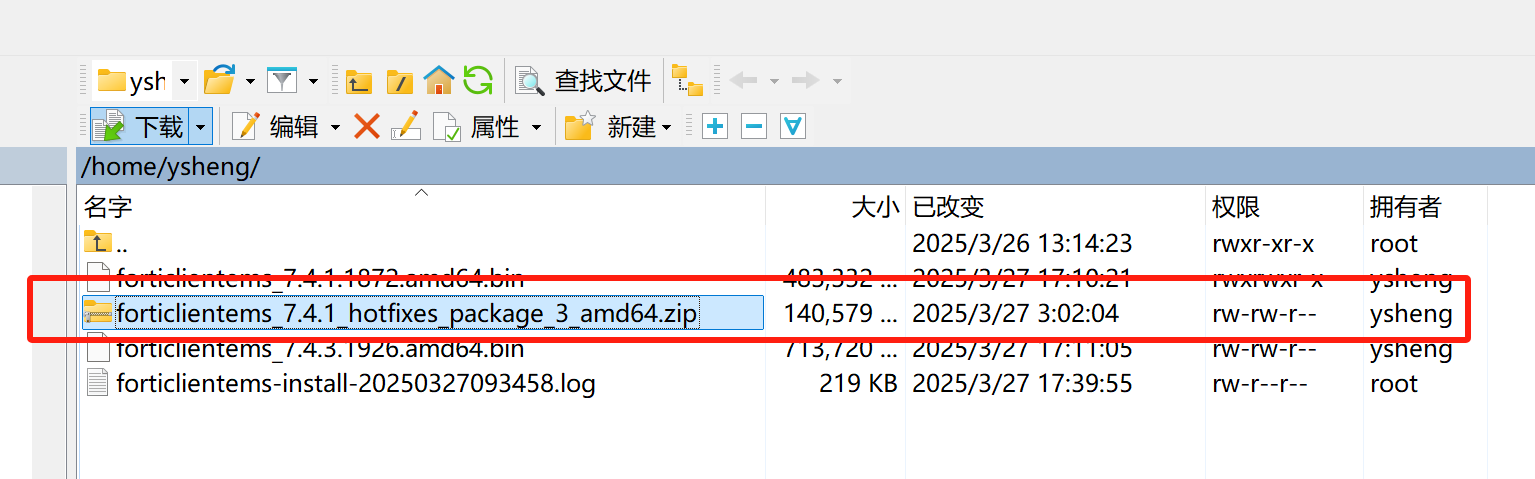
上传完成后也能在客户端中通过ll命令查看:
root@ems74:~#
root@ems74:~# pwd
/root
root@ems74:~# ls
forticlientems_7.4.1_hotfixes_package_3_amd64.zip
root@ems74:~#
root@ems74:~#
2. 提权
因为是/opt/forticlientems/目录的所有者是forticlientems和root, 所以需要提权到root才能够操作成功
使用命令sudo -i来提权
3. 执行hotfix工具来添加补丁
使用命令:
/opt/forticlientems/bin/hotfixer --apply (路径)/forticlientems_xxx_hotfixes_package_x_amd64.zip
参考的操作过程:
root@ems74:~#
root@ems74:~# /opt/forticlientems/bin/hotfixer --apply forticlientems_7.4.1_hotfixes_package_3_amd64.zip
2025/03/29 14:56:31 FortiClient EMS Hotfixer - 7.4.1.1872
2025/03/29 14:56:31 Will apply hotfix [forticlientems_7.4.1_hotfixes_package_3_amd64.zip]
2025/03/29 14:56:36 Patch has check sum: 0722a93432f5e06c8be954def5430b3d
2025/03/29 14:56:36 Directory [/opt/forticlientems/hotfixes/0722a93432f5e06c8be954def5430b3d] created successfully!
     ...中间略...
2025/03/29 14:56:40 Creating link /opt/forticlientems/bin/uploadworker_linux_amd64 to /opt/forticlientems/hotfixes/0722a93432f5e06c8be954def5430b3d/bin/uploadworker_linux_amd64
2025/03/29 14:56:40 Changing ownership of directory [/opt/forticlientems/hotfixes] to forticlientems:forticlientems
2025/03/29 14:56:40 starting service [fcems_monitor]
2025/03/29 14:56:40 bye!
root@ems74:~#
至此hotfix安装完成。
如果EMS是从Linux操作系统安装的环境并且版本在7.4.4+
1. 上传hotfix包
因为补丁需要上传到EMS中,需要winscp/FileZilla等工具,将安装包发送至EMS服务器中。
注意
请注意需要安装的补丁包和EMS当前版本相同:
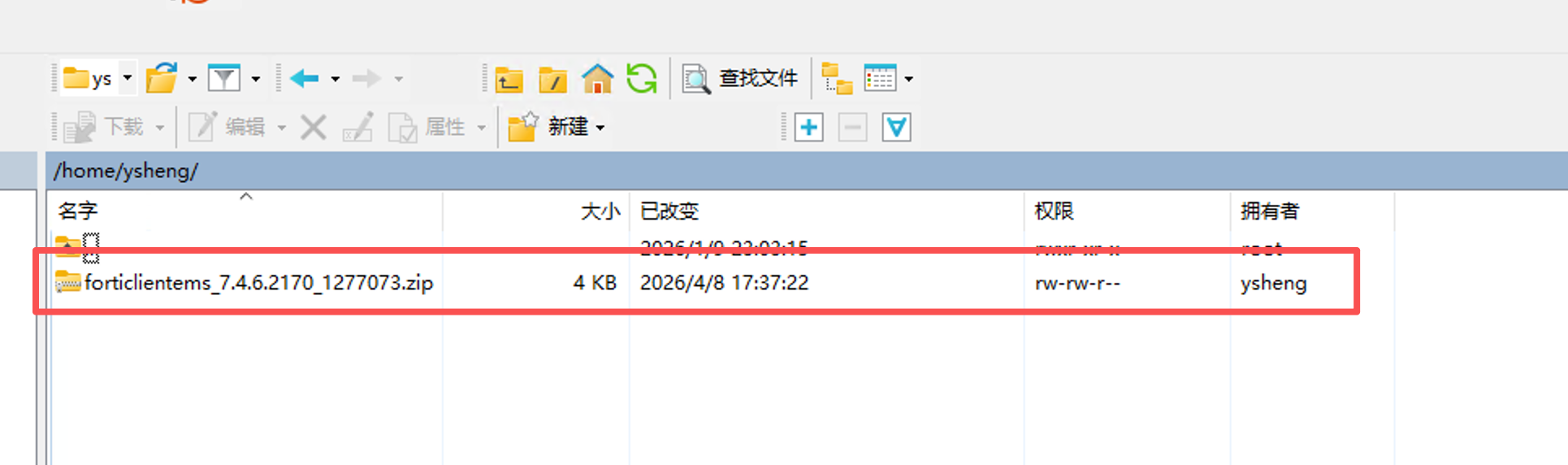
上传完成后也能在客户端中通过ll命令查看:
root@EMS74:~# pwd
/root
root@EMS74:~#
root@EMS74:~# ll | grep for
-rw-r--r--  1 root root 3588 Apr  8 15:28 forticlientems_7.4.6.2170_1277073.zip
root@EMS74:~#
2. 提权
因为是/opt/forticlientems/目录的所有者是forticlientems和root, 所以需要提权到root才能够操作成功。
使用命令sudo -i来提权
3. 执行hotfix工具检查补丁安装列表
使用命令emscli execute hotfix --list可以检查安装了哪些hotfix
如果没有安装hotfix,则显示以下内容:
root@EMS74:~# emscli execute hotfix --list
2026/04/08 10:54:57 FortiClient EMS Hotfixer - 7.4.6.2170
2026/04/08 10:54:57 bye!
4. 执行hotfix工具来添加补丁
使用命令:
emscli execute hotfix --apply (路径)/(Hotfix包)
操作结果参考:
root@EMS74:~# emscli execute hotfix --apply /root/forticlientems_7.4.6.2170_1277073.zip
2026/04/08 15:32:00 FortiClient EMS Hotfixer - 7.4.6.2170
2026/04/08 15:32:00 Will apply hotfix [/root/forticlientems_7.4.6.2170_1277073.zip]
2026/04/08 15:32:00 Patch has check sum: 5d00b0161b4f2ac171dd4a650707e8d6
2026/04/08 15:32:00 Directory [/opt/forticlientems/hotfixes] created successfully!
2026/04/08 15:32:00 Directory [/opt/forticlientems/hotfixes/5d00b0161b4f2ac171dd4a650707e8d6] created successfully!
2026/04/08 15:32:00 Directory [/opt/forticlientems/hotfixes/5d00b0161b4f2ac171dd4a650707e8d6/bkp] created successfully!
2026/04/08 15:32:00 Unzipping hotfix...
2026/04/08 15:32:00 Patch already exists? false
2026/04/08 15:32:00 MANIFEST:
Description: EMS 7.4.6 hotfix for cert chain vulnerability
Applicable to Versions: [7.4.6.2170]
Restart services [apache2]
Backup files []
Replace files [fcm/middlewares/auth_middleware.pyc -> fcm/fcm/middlewares/auth_middleware.pyc]
Execute DB scripts
[fcm - []
vdom - []]
Execute shell scripts
[Script: scripts/modify_apache_conf/apply.sh ]
2026/04/08 15:32:00 Stopping services: [apache2]. fcems_monitor is always stopped by Default
2026/04/08 15:32:00 stopping services [fcems_monitor,apache2]
2026/04/08 15:32:02 checking for DB changes to apply...
2026/04/08 15:32:02 Successfully retrieved host: localhost
2026/04/08 15:32:02 Successfully retrieved port: 5432
2026/04/08 15:32:02 Got DB name: fcm
2026/04/08 15:32:02 node is primary or standalone type. running db scripts
2026/04/08 15:32:02 Applying changes for DB fcm - not a VDOM DB
2026/04/08 15:32:02 Applying changes for DB vdom - vdom DB
2026/04/08 15:32:02 Running shell script: /opt/forticlientems/hotfixes/5d00b0161b4f2ac171dd4a650707e8d6/scripts/modify_apache_conf/apply.sh
2026/04/08 15:32:02 Backing up files (before applying replacements listed in files section of manifest) ...
2026/04/08 15:32:02 Backed up /opt/forticlientems/fcm/fcm/middlewares/auth_middleware.pyc to /opt/forticlientems/hotfixes/5d00b0161b4f2ac171dd4a650707e8d6/bkp/opt/forticlientems/fcm/fcm/middlewares/auth_middleware.pyc
2026/04/08 15:32:02 Applying replacements (listed in files section of manifest) ...
2026/04/08 15:32:02 Deleting file /opt/forticlientems/fcm/fcm/middlewares/auth_middleware.pyc
2026/04/08 15:32:02 Creating link /opt/forticlientems/fcm/fcm/middlewares/auth_middleware.pyc to /opt/forticlientems/hotfixes/5d00b0161b4f2ac171dd4a650707e8d6/fcm/middlewares/auth_middleware.pyc
2026/04/08 15:32:02 Changing ownership of directory [/opt/forticlientems/hotfixes] to forticlientems:forticlientems
2026/04/08 15:32:02 starting service [fcems_monitor]
2026/04/08 15:32:02 bye!
5. 检查hotfix是否安装成功
使用命令:
emscli execute hotfix --list
操作结果参考:
root@EMS74:~# emscli execute hotfix --list
2026/04/08 15:34:18 FortiClient EMS Hotfixer - 7.4.6.2170
Patch: 5d00b0161b4f2ac171dd4a650707e8d6	Status:applied	Date:2026-04-08 15:32:00.517229976 +0000 UTC m=+0.168998705	Description:EMS 7.4.6 hotfix for cert chain vulnerability	Versions:7.4.6.2170
2026/04/08 15:34:18 bye!
至此hotfix安装完成。
如果EMS是通过VM模板部署
1. 准备FTP/SFTP/SCP服务器
因为VM版本的EMS只有内建的emscli作为命令行,不能直接通过SCP/SFTP/FTP上传,只能通过emscli来拉取对应的包。所以需要部署一个FTP/SFTP/SCP服务器,且EMS对其网络可达。
注
具体部署服务器过程略
2. 从服务器拉取hotfix包
使用命令:
execute <server type> –-read –-remote.ip <IP> –-remote.user <username> --remote.password <password> -–remote.file "<remote file path>" –-local.file "<local file path>"
其中下列参数:
- [server type] 代表使用协议,可以使用ftp/sftp/scp
- --remote.ip [IP]代表远端服务器的IP地址,后面跟上IP地址
- --remote.user [username]代表远端服务器的用户名,后面跟上用户名
- (可选)--remote.password [password]代表远端服务器用户的密码,后面跟上密码
- --remote.file [remote file path]代表远端服务器上存储hotfix包的名称,后面跟上完整的hotfix包的名称,注意文件扩展名也要加上
- --local.file [remote file path]代表拉取后在EMS上存储hotfix包的名称,后面跟上完整的hotfix包的名称,注意文件扩展名也要加上
执行过程参考:
ems@fcems-server $> execute ftp  --read --remote.ip 10.234.12.101 --remote.user zhangsan --remote.password password --remote.file forticlientems_7.4.6.2170_1277073.zip --local.file forticlientems_7.4.6.2170_1277073.zip
Connectivity test using service 'ftp' to remote host 10.234.12.101 with user zhangsan for reading file forticlientems_7.4.6.2170_1277073.zip passed !
File forticlientems_7.4.6.2170_1277073.zip:10.234.12.101 successfully copied to /exchange/forticlientems_7.4.6.2170_1277073.zip
ems@fcems-server $>拉取的安装包会默认存放在/exchange目录下。
3. 执行hotfix工具检查补丁安装列表
使用命令execute hotfix --list可以检查安装了哪些hotfix。
如果没有安装hotfix,则显示以下内容:
ems@fcems-server $> execute hotfix --list
2026/04/08 16:08:17 FortiClient EMS Hotfixer - 7.4.6.2170
2026/04/08 16:08:17 bye!
ems@fcems-server $>
4. 执行hotfix工具来添加补丁
使用命令:execute hotfix --apply (路径)/(Hotfix包)
操作结果参考:
ems@fcems-server $> execute hotfix --apply forticlientems_7.4.6.2170_1277073.zip
2026/04/08 16:22:46 FortiClient EMS Hotfixer - 7.4.6.2170
2026/04/08 16:22:46 Will apply hotfix [/home/ems/exchange/forticlientems_7.4.6.2170_1277073.zip]
2026/04/08 16:22:46 Patch has check sum: 5d00b0161b4f2ac171dd4a650707e8d6
2026/04/08 16:22:46 Directory [/opt/forticlientems/hotfixes] created successfully!
2026/04/08 16:22:46 Directory [/opt/forticlientems/hotfixes/5d00b0161b4f2ac171dd4a650707e8d6] created successfully!
2026/04/08 16:22:46 Directory [/opt/forticlientems/hotfixes/5d00b0161b4f2ac171dd4a650707e8d6/bkp] created successfully!
2026/04/08 16:22:46 Unzipping hotfix...
2026/04/08 16:22:46 Patch already exists? false
2026/04/08 16:22:46 MANIFEST:
Description: EMS 7.4.6 hotfix for cert chain vulnerability
Applicable to Versions: [7.4.6.2170]
Restart services [apache2]
Backup files []
Replace files [fcm/middlewares/auth_middleware.pyc -> fcm/fcm/middlewares/auth_middleware.pyc]
Execute DB scripts
[vdom - []
fcm - []]
Execute shell scripts
[Script: scripts/modify_apache_conf/apply.sh ]
2026/04/08 16:22:46 Stopping services: [apache2]. fcems_monitor is always stopped by Default
2026/04/08 16:22:46 stopping services [fcems_monitor,apache2]
2026/04/08 16:22:46 checking for DB changes to apply...
2026/04/08 16:22:46 Successfully retrieved host: 127.0.0.1
2026/04/08 16:22:46 Successfully retrieved port: 5432
2026/04/08 16:22:46 Got DB name: fcm
2026/04/08 16:22:46 node is primary or standalone type. running db scripts
2026/04/08 16:22:46 Applying changes for DB fcm - not a VDOM DB
2026/04/08 16:22:46 Applying changes for DB vdom - vdom DB
2026/04/08 16:22:46 Running shell script: /opt/forticlientems/hotfixes/5d00b0161b4f2ac171dd4a650707e8d6/scripts/modify_apache_conf/apply.sh
2026/04/08 16:22:46 Backing up files (before applying replacements listed in files section of manifest) ...
2026/04/08 16:22:46 Backed up /opt/forticlientems/fcm/fcm/middlewares/auth_middleware.pyc to /opt/forticlientems/hotfixes/5d00b0161b4f2ac171dd4a650707e8d6/bkp/opt/forticlientems/fcm/fcm/middlewares/auth_middleware.pyc
2026/04/08 16:22:46 Applying replacements (listed in files section of manifest) ...
2026/04/08 16:22:46 Deleting file /opt/forticlientems/fcm/fcm/middlewares/auth_middleware.pyc
2026/04/08 16:22:46 Creating link /opt/forticlientems/fcm/fcm/middlewares/auth_middleware.pyc to /opt/forticlientems/hotfixes/5d00b0161b4f2ac171dd4a650707e8d6/fcm/middlewares/auth_middleware.pyc
2026/04/08 16:22:46 Changing ownership of directory [/opt/forticlientems/hotfixes] to forticlientems:forticlientems
2026/04/08 16:22:46 starting service [fcems_monitor]
2026/04/08 16:22:46 bye!
ems@fcems-server $>
5. 检查hotfix是否安装成功
使用命令:
execute hotfix --list
操作结果参考:
ems@fcems-server $> execute hotfix --list
2026/04/08 16:23:45 FortiClient EMS Hotfixer - 7.4.6.2170
Patch: 5d00b0161b4f2ac171dd4a650707e8d6	Status:applied	Date:2026-04-08 16:22:46.024517468 +0000 UTC m=+0.014626729	Description:EMS 7.4.6 hotfix for cert chain vulnerability	Versions:7.4.6.2170
2026/04/08 16:23:45 bye!
ems@fcems-server $>
至此hotfix安装完成。
更新历史
| Ver | Description | Author | Rev | Date |
|---|---|---|---|---|
| 2.1 | Correct hotfix command mistakes | ysheng | tanga | 2026.04.09 |
| 2.0 | Add details for different source and add different versions procedure | ysheng | tanga | 2026.04.08 |
| 1.0 | First Complete | ysheng | tanga | 2025.03.29 |
| 0.9 | Draft Version | ysheng | tanga | 2025.03.12 |