

策略路由更新
2026/6/25Link Monitor7.X.X大约 2 分钟
策略路由更新
FortiOS 7.0.1 起,Link Monitor 支持通过 update-policy-route 控制健康检查失败时是否联动更新策略路由。关闭该选项后,即使 Link Monitor 检测失败,使用相同出接口和网关的策略路由也不会被自动禁用。
config system link-monitor
    edit <name>
        set update-policy-route {enable | disable}
    next
end
配置示例
以下拓扑中,FortiGate 通过 port22 探测服务器 10.10.100.22,网关为 10.10.202.1。同时设备上存在一条策略路由,将访问 10.20.205.10 的流量通过同一个网关和接口转发。配置 set update-policy-route disable 后,Link Monitor 失败不会禁用这条策略路由。
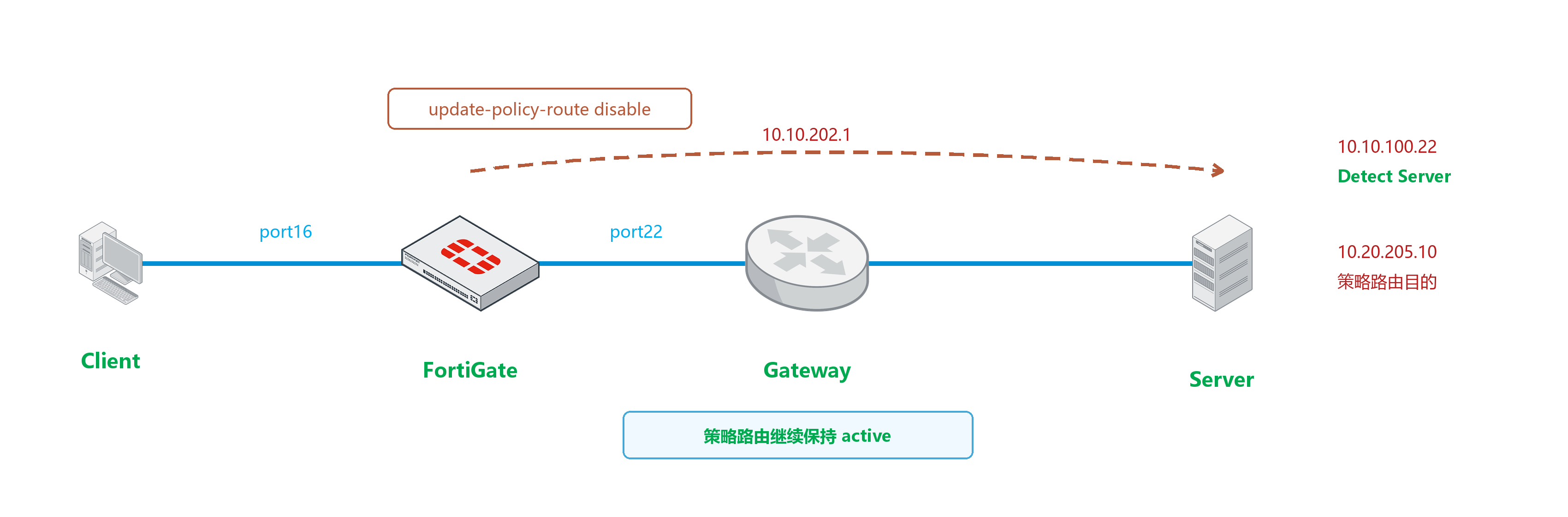
配置 Link Monitor,并关闭策略路由更新。
config system link-monitor
    edit "test-1"
        set srcintf "port22"
        set server "10.10.100.22"
        set gateway-ip 10.10.202.1
        set failtime 3
        set update-policy-route disable
    next
end
配置策略路由。
config router policy
    edit 1
        set input-device "port16"
        set dst "10.20.205.10/255.255.255.255"
        set gateway 10.10.202.1
        set output-device "port22"
        set tos 0x14
        set tos-mask 0xff
    next
end
Link Monitor 状态正常时,查看 Link Monitor 和策略路由状态。
查看 Link Monitor 状态:
# diagnose sys link-monitor status
Link Monitor: test-1, Status: alive, Server num(1), HA state: local(alive), shared(alive)
Flags=0x1 init, Create time: Fri May 28 15:20:15 2021
Source interface: port22 (14)
Gateway: 10.10.202.1
Interval: 500 ms
Service-detect: disable
Diffservcode: 000000
Class-ID: 0
  Peer: 10.10.100.22(10.10.100.22)
        Source IP(10.10.202.2)
        Route: 10.10.202.2->10.10.100.22/32, gwy(10.10.202.1)
        protocol: ping, state: alive
                Latency(Min/Max/Avg): 0.374/0.625/0.510 ms
                Jitter(Min/Max/Avg): 0.008/0.182/0.074
                Packet lost: 0.000%
                Number of out-of-sequence packets: 0
                Fail Times(0/3)
                Packet sent: 7209, received: 3400, Sequence(sent/rcvd/exp): 7210/7210/7211
查看策略路由列表:
# diagnose firewall proute list
list route policy info(vf=root):
id=1 dscp_tag=0xff 0xff flags=0x0 tos=0x14 tos_mask=0xff protocol=0 sport=0-0 iif=41 dport=0-65535 oif=14(port22) gwy=10.10.202.1
source wildcard(1): 0.0.0.0/0.0.0.0
destination wildcard(1): 10.20.205.10/255.255.255.255
hit_count=1 last_used=2021-05-27 23:04:33
Link Monitor 状态失败时,策略路由仍保持启用。
查看 Link Monitor 状态:
# diagnose sys link-monitor status
Link Monitor: test-1, Status: die, Server num(1), HA state: local(die), shared(die)
Flags=0x9 init log_downgateway, Create time: Fri May 28 15:20:15 2021
Source interface: port22 (14)
Gateway: 10.10.202.1
Interval: 500 ms
Service-detect: disable
Diffservcode: 000000
Class-ID: 0
  Peer: 10.10.100.22(10.10.100.22)
        Source IP(10.10.202.2)
        Route: 10.10.202.2->10.10.100.22/32, gwy(10.10.202.1)
        protocol: ping, state: die
                Packet lost: 11.000%
                Number of out-of-sequence packets: 0
                Recovery times(0/5) Fail Times(0/3)
                Packet sent: 7293, received: 3471, Sequence(sent/rcvd/exp): 7294/7281/7282
查看策略路由列表,
flags=0x0表示该策略路由未被禁用:# diagnose firewall proute list list route policy info(vf=root): id=1 dscp_tag=0xff 0xff flags=0x0 tos=0x14 tos_mask=0xff protocol=0 sport=0-0 iif=41 dport=0-65535 oif=14(port22) gwy=10.10.202.1 source wildcard(1): 0.0.0.0/0.0.0.0 destination wildcard(1): 10.20.205.10/255.255.255.255 hit_count=1 last_used=2021-05-27 23:04:33
如果
update-policy-route保持启用,Link Monitor 失败后对应策略路由会被禁用,输出中可以看到flags=0x8 disable。# diagnose firewall proute list list route policy info(vf=root): id=1 dscp_tag=0xff 0xff flags=0x8 disable tos=0x14 tos_mask=0xff protocol=0 sport=0-0 iif=41 dport=0-65535 oif=14(port22) gwy=10.10.202.1 source wildcard(1): 0.0.0.0/0.0.0.0 destination wildcard(1): 10.20.205.10/255.255.255.255 hit_count=1 last_used=2021-05-27 23:04:33