

SNAT 源端口保持
SNAT 源端口保持
FortiGate 做 SNAT 时,默认可能会修改报文的源端口,用于避免不同会话在 NAT 后使用相同五元组。部分业务会在载荷中携带源端口,或要求远端看到固定的源端口,此时可以在启用 NAT 的防火墙策略中控制源端口是否被保留。
常见需要保留源端口的场景包括:
- 老旧 SIP PBX 或话机注册到远端 SIP 平台,载荷中的端口与 IP 头中的源端口不一致时可能导致注册异常。
- 某些应用与数据库或专用服务通过固定端口通信,同时又需要穿越 FortiGate 做应用控制、Web 过滤或其他安全检测。
- 使用一对一 IP Pool 并要求 NAT 后源端口保持不变。
参数行为
TCP/IP 会话由源 IP、源端口、目的 IP、目的端口和协议组成。SNAT 修改源 IP 后,如果继续保留原始源端口,而另一个会话已经占用了相同的 NAT 后地址和端口,就可能发生端口冲突。
| 参数 | 适用版本 | 行为 |
|---|---|---|
set fixedport enable | 所有支持该参数的版本 | 默认关闭,强制使用原始源端口,不做冲突回退。如果 NAT 后地址和源端口已经被其他会话占用,可能导致新连接失败。 |
set port-preserve enable | FortiOS 7.4.4 及之后版本 | 默认行为。优先使用原始源端口;如果该端口已经被占用,FortiGate 会改用范围内下一个可用高端口。 |
set port-preserve disable | FortiOS 7.4.4 及之后版本 | SNAT 时总是改用范围内下一个可用高端口;到达最高可用端口后再回到范围内第一个可用端口。 |
相关信息
FortiOS 7.4.4 及之后版本中,port-preserve 只会保留 5117 到 65533 范围内的源端口。低于 5117 的源端口会按内部 SNAT 源端口算法转换为高于 5117 的端口;如果必须保留低端口,需要使用明确的端口映射方式。
配置方法
FortiOS 7.4.4 之前版本
在启用 NAT 的防火墙策略中开启
fixedport,使 FortiGate 尝试保留原始源端口。config firewall policy edit <policy_id> set nat enable set fixedport enable next end在 GUI 中确认该选项显示为“保持源端口”(
Preserve Source Port)。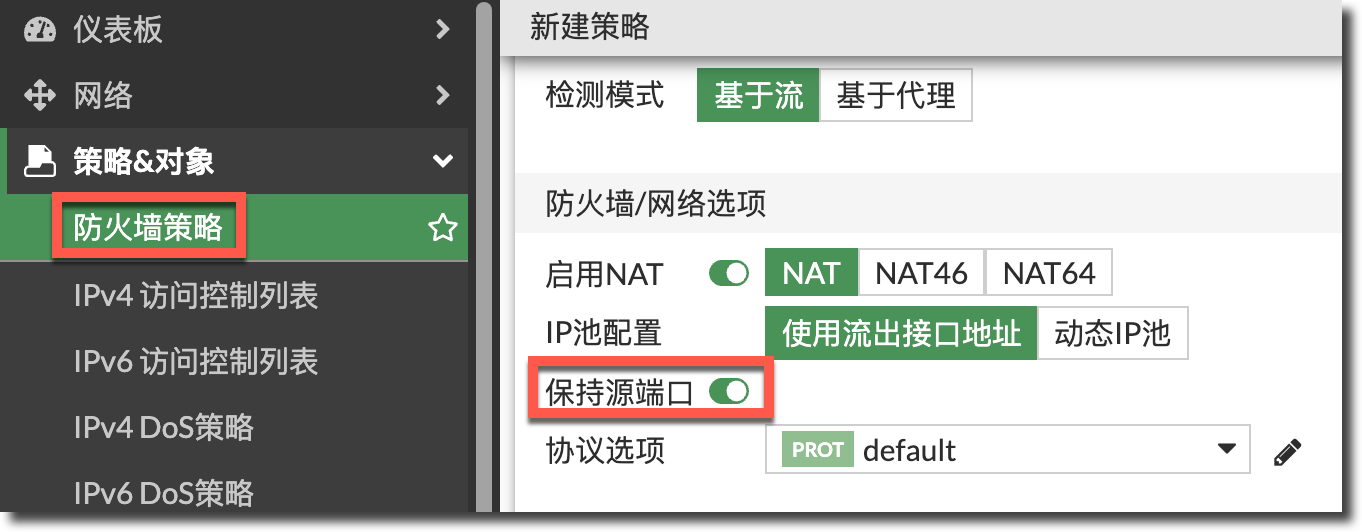
重要
fixedport 是强制保留源端口,不会在端口冲突时自动换用其他端口。只有单个本地 PBX 连接单个 SIP 服务商这类连接数量可控的场景,才比较适合直接启用。多个客户端或多个并发连接需要保留相同源端口时,应配合 IP Pool 提供足够的 NAT 后地址。
FortiOS 7.4.4 及之后版本
FortiOS 7.4.4 开始可以通过 port-preserve 更细粒度地控制 SNAT 源端口行为。
在启用 NAT 的防火墙策略中配置
port-preserve或fixedport。提示
若启用
fixedport,port-preserve选项不可见。config firewall policy edit <policy_id> set nat enable set fixedport {enable | disable} set port-preserve {enable | disable} next end如果通过 GUI 配置:
7.4.4 ~ 7.4.X:启用
Manage source port后再按需配置Fixed Port。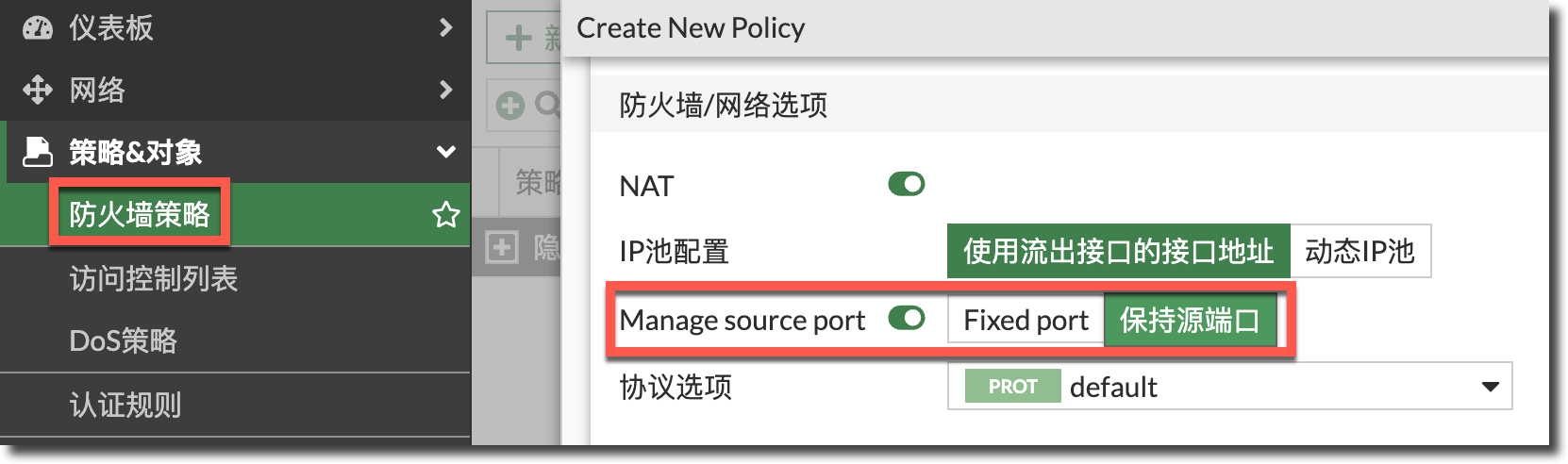
- Manage source port:对应
set fixedport disable。 - Fixed port:对应
set fixedport enable。 - 保持源端口:对应
set port-preserve enable。
- Manage source port:对应
≥ 7.6.0:
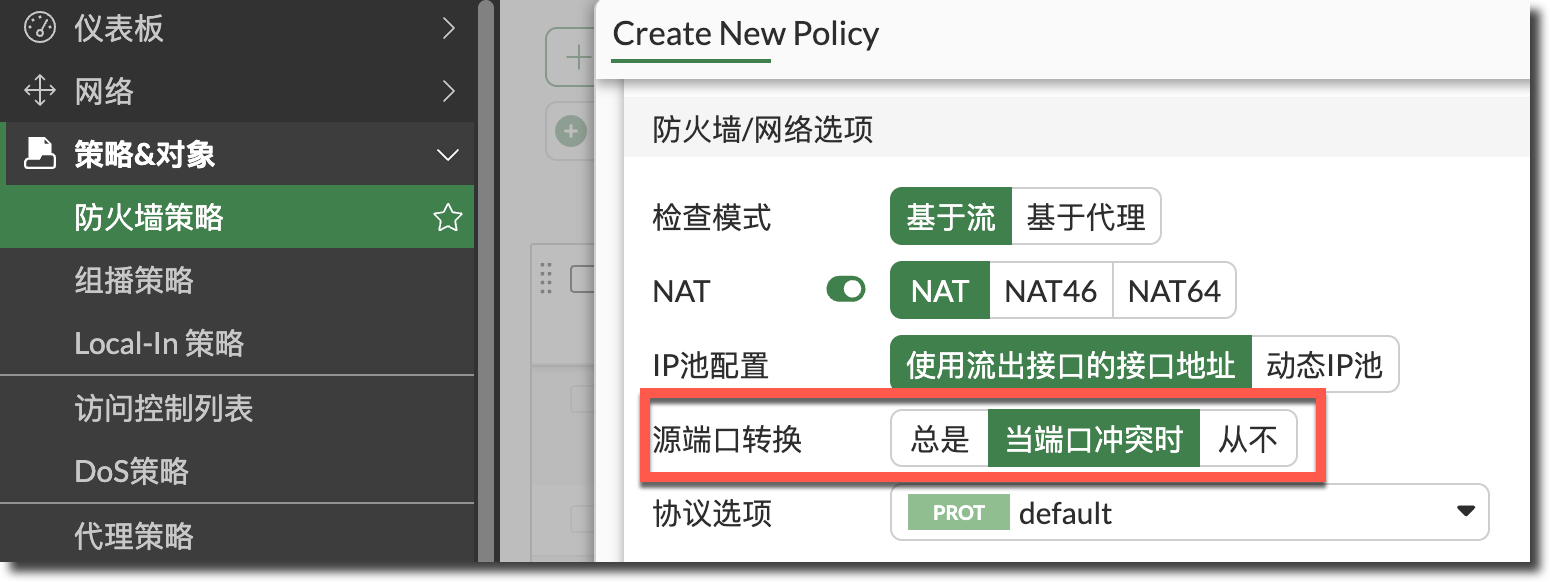
- 总是:对应
set port-preserve disable。 - 当端口冲突时:对应
set port-preserve enable。 - 从不:对应
set fixedport enable。
- 总是:对应
如果使用 Central SNAT,在
central-snat-map中配置对应参数。config firewall central-snat-map edit <snat_id> set port-preserve {enable | disable} next end
配置示例
以下示例中,内网主机 192.0.2.10 访问外部 DNS 服务器 198.51.100.53,FortiGate 使用出接口地址或 IP Pool 地址 203.0.113.5 做 SNAT,并优先保留客户端原始源端口。
config firewall policy
    edit 1
        set name "lan-to-dns"
        set srcintf "lan"
        set dstintf "wan"
        set action accept
        set srcaddr "all"
        set dstaddr "all"
        set schedule "always"
        set service "DNS"
        set nat enable
        set port-preserve enable
    next
end
源端口被保留时,NAT 前后的报文示例如下。
# diagnose sys session list
......
hook=post dir=org act=snat 192.0.2.10:12345->198.51.100.53:53(203.0.113.5:12345)
hook=pre dir=reply act=dnat 198.51.100.53:53->203.0.113.5:12345(192.0.2.10:12345)
......
如果使用
set port-preserve disable,或启用port-preserve但原始源端口已经被占用,FortiGate 会改用其他可用高端口。# diagnose sys session list ...... hook=post dir=org act=snat 192.0.2.10:12345->198.51.100.53:53(203.0.113.5:12346) hook=pre dir=reply act=dnat 198.51.100.53:53->203.0.113.5:12346(192.0.2.10:12345) ......如果使用一对一 IP Pool 并启用
fixed-port,查看 IP Pool 状态,并确认输出中包含fixed-port=yes。# diagnose firewall ippool list list ippool info:(vf=root) ippool 7.0: id=1, block-sz=60416, num-block=1, fixed-port=yes, use=2
注意事项
fixedport强制保留源端口,适合连接数量可控、业务确实依赖固定源端口的场景;不建议在大量并发客户端共用单个 SNAT 地址时盲目启用。- 多个会话需要同时保留相同源端口时,应使用 IP Pool 提供更多 NAT 后地址,避免多个会话争用同一个 NAT 后地址和端口组合。
- FortiOS 7.4.4 及之后版本中,优先使用
port-preserve调整默认行为;只有确实需要无条件固定源端口时,再启用fixedport。