部署案例 - IPsec IKEv2 with Entra ID(Azure AD)
部署案例 - IPsec IKEv2 with Entra ID(Azure AD)
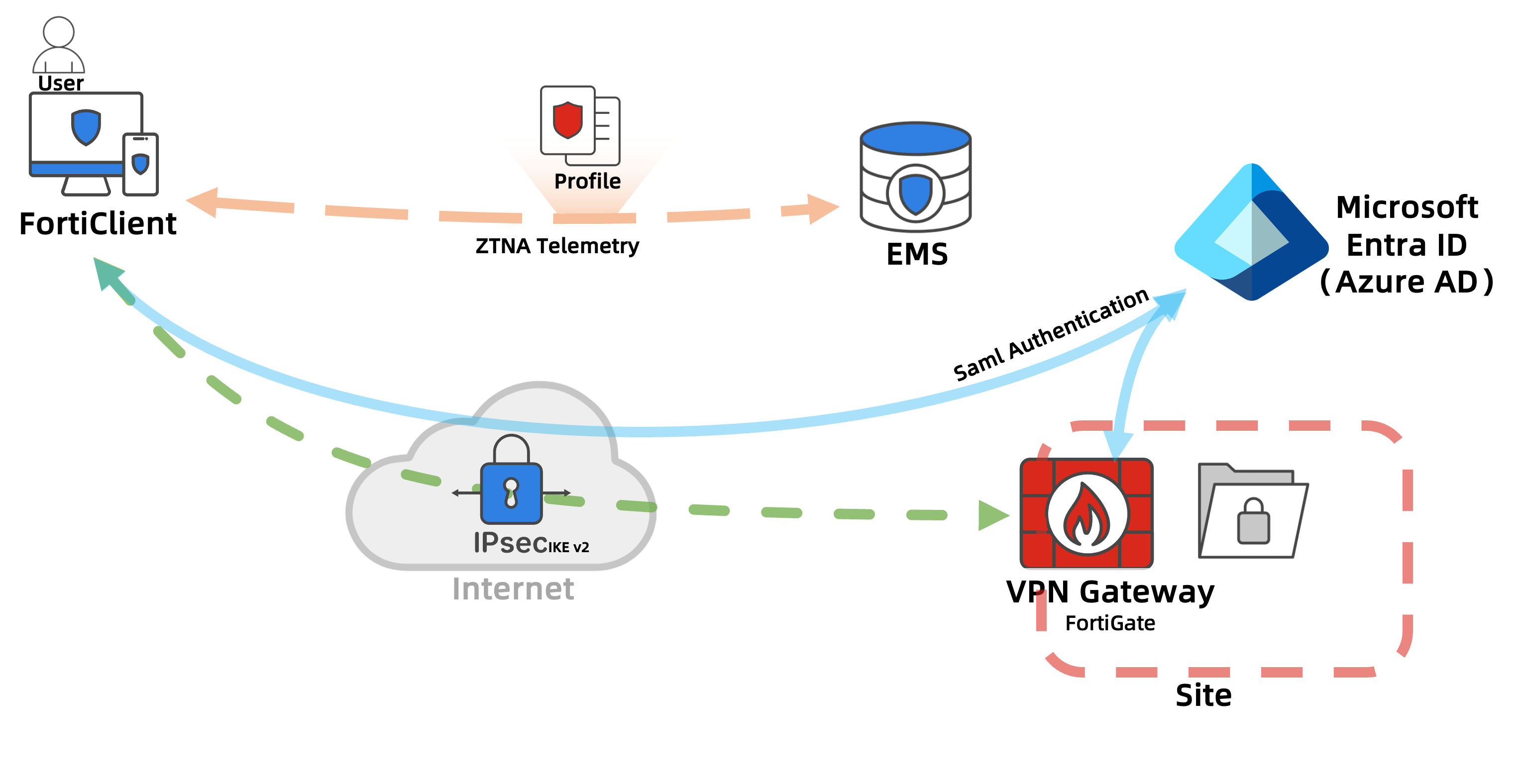
本案例介绍如何通过 Microsoft Entra ID(原 Azure AD)SAML 单点登录和条件访问 MFA,为 FortiClient 用户提供 IPsec IKEv2 远程接入。部署内容包括 Entra 企业应用、用户组与 MFA 策略、FortiGate VPN 网关,以及 EMS 隧道配置下发。完成配置后,授权用户可使用 Entra 账号连接 VPN,访问指定的内网资源。
在该方案中,Entra ID 作为身份提供者(IdP),负责用户登录和多因素认证;FortiGate 作为服务提供者(SP),校验 SAML 响应并根据组声明授予访问权限。EMS 统一管理终端的 VPN 配置,业务流量通过 FortiGate 转发至内网。
注
- 以下配置用于说明部署方法,尚未完成对应设备与租户的实测。部署时请将租户 ID、组 Object ID、证书、域名和 PSK 替换为实际值,并按验证步骤检查连接与授权结果。
部署环境与前提条件
| 组件 | 版本与要求 |
|---|---|
| FortiGate | FortiOS 7.4.12,配置前核对该补丁的发布说明和兼容性 |
| FortiClient | EMS 管理的 Windows FortiClient 7.4.8,安装 VPN 组件 |
| FortiClient EMS | 7.4.8,终端已注册并匹配正确的 Endpoint Policy |
| Microsoft Entra ID | 可管理企业应用、用户组和 SAML 单点登录的租户 |
| 条件访问 | 本文采用 Entra ID P1 或 P2 所包含的条件访问能力,为涉及用户配置相应许可 |
| 用户 | 有效 Entra ID 账号、直接加入试点安全组,并完成允许的 MFA 方法注册 |
| 证书和时间 | VPN 域名对应的可信服务器证书,FortiGate 与客户端时间同步 |
FortiClient 的 IPsec SAML 支持从 7.2.4 开始,使用 IKEv2。本案例使用客户端内嵌登录窗口。若需使用外部浏览器,应确认 FortiOS 与 FortiClient 的版本组合支持该功能。相关功能范围见 Fortinet IPsec SAML 说明及外部浏览器支持说明。
认证流程
下面展示了FortiClient/FortiGate/EntraID之间隧道建立的过程
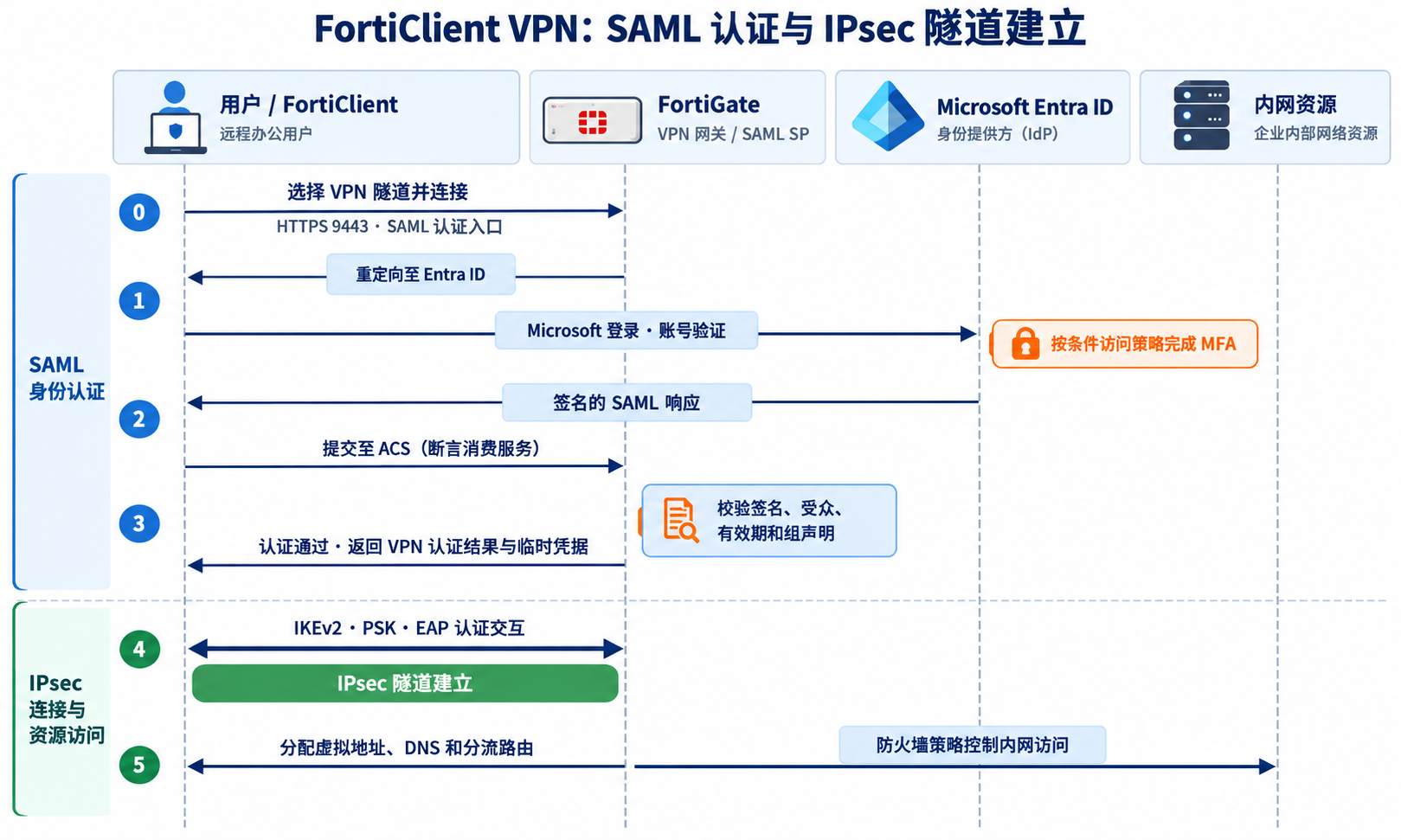
- 用户在 FortiClient 中选择 VPN 隧道并连接,客户端通过 HTTPS 9443 访问 FortiGate 的 SAML 认证入口。
- FortiGate 将登录请求重定向到 Entra ID,用户在 Microsoft 登录页面输入账号,并按条件访问策略完成 MFA。
- Entra ID 生成签名的 SAML 响应,由客户端提交至 FortiGate 的断言消费服务(ACS)。
- FortiGate 校验签名、受众、有效期和组声明,认证通过后向客户端返回 VPN 认证结果及临时凭据。
- FortiClient 与 FortiGate 完成 IKEv2、PSK 和 EAP 认证交互,建立 IPsec 隧道。
- FortiGate 为客户端分配虚拟地址、DNS 和分流路由,并通过防火墙策略控制内网资源访问。
在本案例中,EMS 负责配置分发,不参与 SAML 签名校验或业务转发。PSK 用于 IKE 层认证,不是 Entra 用户的第二因素。如果要支持MFA,需要在Entra中进行设定。
示例环境拓扑和相关参数
示例拓扑
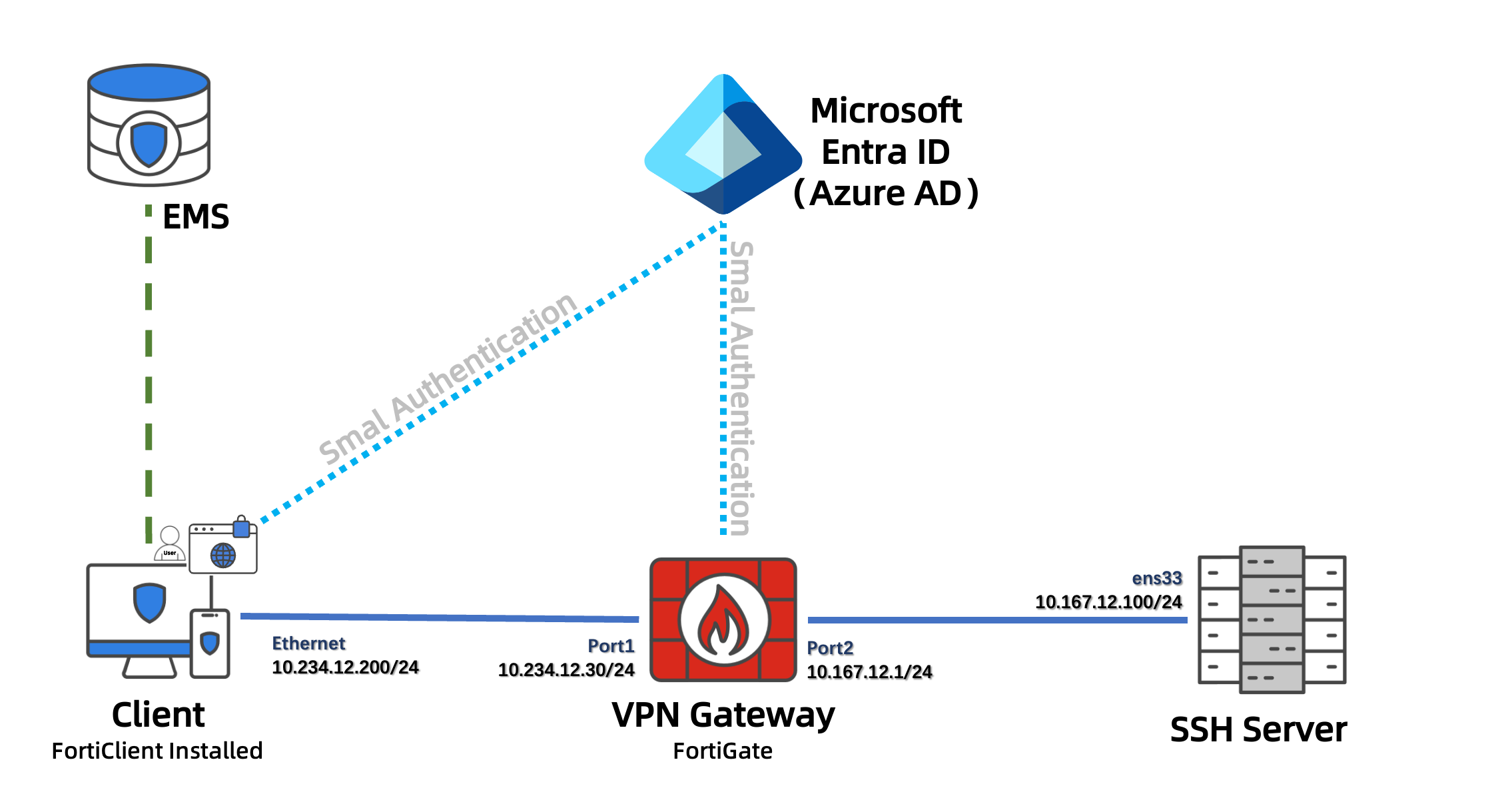
实验网络由 Windows 客户端、FortiGate、EMS和 SSH 服务器组成。客户端地址为 10.234.12.200/24,通过 FortiGate 的 port1(10.234.12.30/24)接入 VPN;port2(10.167.12.1/24)连接内网,DNS 和 SSH 服务器分别位于 10.167.12.254 和 10.167.12.100。
客户端通过 HTTPS 443 访问 Entra ID,通过 HTTPS 9443 访问 FortiGate 的 SAML 认证入口。IPsec 使用 UDP 500/4500。EMS 的连接域名为 emsdemo.fortiems.com.cn,负责向终端下发 Remote Access Profile。
示例参数
| 名称 | 设备 | 项目 | 值 | 其他 |
|---|---|---|---|---|
| Client | PC | FortiClient版本 | 7.4.8 | Windows客户端,由EMS管理 |
| 网卡地址 | 10.234.12.200/24 | |||
| EMS | EMS | EAP Authentication Method | EAP-MSCHAPv2 | 与EMS Phase 1配置截图一致 |
| SAML Login / SAML Port | Enable / TCP 9443 | 通过Microsoft登录页面完成用户认证 | ||
| EMS版本 | 7.4.8 | 部署方式本文不涉及 | ||
| EMS连接域名 | emsdemo.fortiems.com.cn | 连接方式本文不涉及 | ||
| Remote Access Profile | VPN-Profile | 下发IPsec VPN隧道配置 | ||
| VPN Gateway | FortiGate | FortiOS版本 | 7.4.12 | 部署方式本文不涉及 |
| 面向公网接口/地址 | port1 / 10.234.12.30/24 | 模拟公网接入接口 | ||
| 面向内网接口/地址 | port2 / 10.167.12.1/24 | |||
| Remote Gateway | 10.234.12.30 | FortiClient连接的网关地址 | ||
| SAML服务对象 / 监听接口 | Entra-ID / port1 | 通过ike-saml-server绑定接口 | ||
| SAML监听端口 | TCP 9443 | 对应auth-ike-saml-port,与EMS SAML Port一致 | ||
| IPsec VPN隧道名 | RA-IKEv2-Azure | IKEv2拨号式隧道 | ||
| IPsec VPN Phase 1 SA | AES128-SHA256、AES256-SHA256 / DH 20 | Lifetime:86400秒 | ||
| IPsec VPN Phase 2 SA | AES128-SHA256、AES256-SHA256 / PFS DH 20 | Lifetime:43200秒 | ||
| 预共享密钥 | Pass@123 | 实验使用,与EMS配置一致 | ||
| Peer ID / Local ID | Azure | FortiGate Peer ID与EMS Local ID一致,注意大小写 | ||
| 地址分配方式 | Mode Config / IPv4 | 由FortiGate分配客户端地址 | ||
| VPN地址池 | 10.254.10.11-10.254.10.20 | 地址对象:RA-Azure-POOL | ||
| 用户组 | VPN-AZURE-AD | 通过Entra-ID匹配指定Entra安全组的Object ID | ||
| 分流网段 | 10.167.12.0/24 | 地址对象:RA-Azure-LAN | ||
| 分流地址组 | RA-Azure-SPLIT | 成员:RA-Azure-LAN | ||
| 内部DNS | 10.167.12.254 | 通过Mode Config下发 | ||
| 传输协议 / IKE端口 | UDP / 500 | EMS Encapsulation选择IKE UDP Port,NAT-T使用UDP 4500 | ||
| 访问策略 | RA-Azure-IPsec-to-LAN | 从RA-IKEv2-Azure到port2,Service为ALL | ||
| SAML IdP | Microsoft Entra ID | 企业应用 | FortiGate-IPsec-IKEv2 | 使用FortiGate SSL VPN模板创建,单点登录方式为SAML |
| Assignment required | Yes | 将允许接入的用户组分配给应用 | ||
| 安全组 | VPN-IPsec-Users | Group type:Security;Membership type:Assigned | ||
| 安全组Object ID | 2dc61f49-099d-4a5d-8442-3e3f09831bda | 用于FortiGate远程组匹配 | ||
| 租户ID | 90d90449-1035-4645-9f50-25f008e49eaf | 对应下列IdP地址中的租户标识 | ||
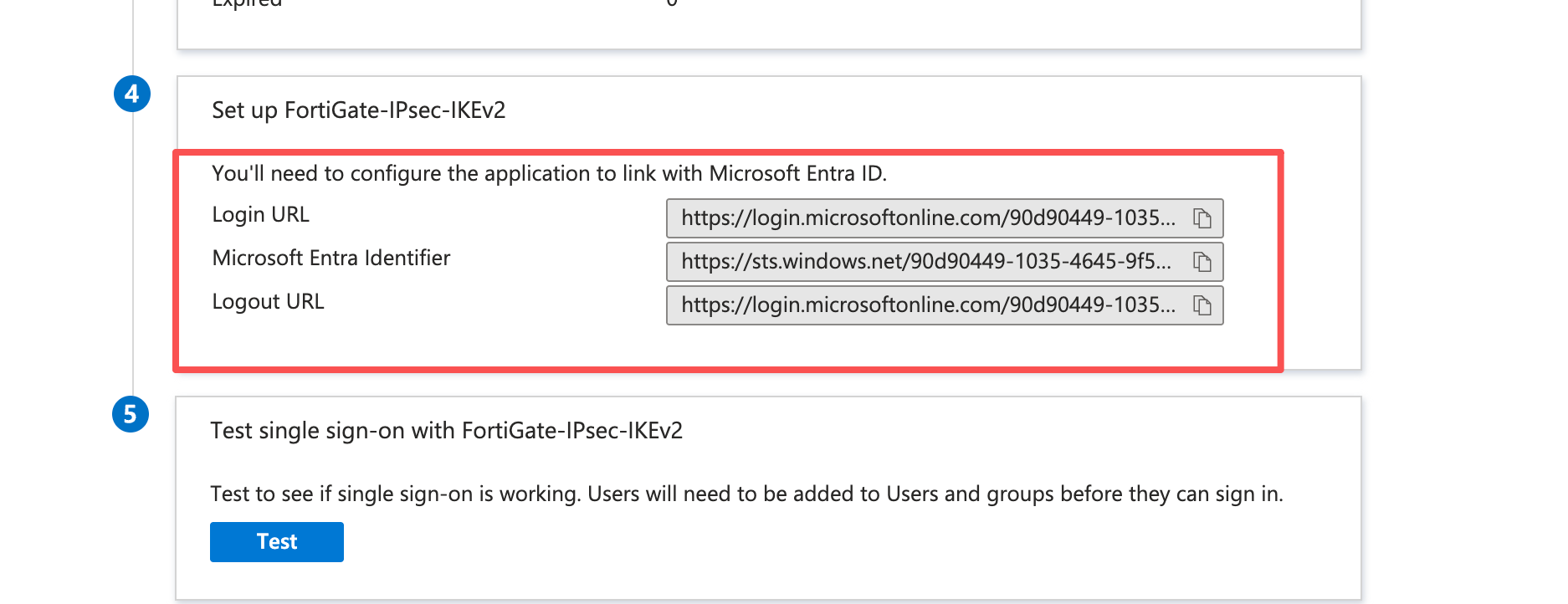
| Microsoft Entra Identifier | https://sts.windows.net/90d90449-1035-4645-9f50-25f008e49eaf/ | FortiGate的idp-entity-id | ||
| Login URL / Logout URL | https://login.microsoftonline.com/90d90449-1035-4645-9f50-25f008e49eaf/saml2 | 分别对应IdP单点登录和注销地址 | ||
| 用户名声明 | username | Source attribute:user.userprincipalname; | ||
| 组声明 | group | Groups assigned to the application;Source attribute:Group ID; | ||
| SAML签名设置 | SHA-256;签署SAML Response与Assertion | 签名证书以Certificate (Base64)格式下载 | ||
| SSH Server | Linux Server | 网卡地址 / 服务端口 | 10.167.12.100/24 / TCP 22 | 默认网关为10.167.12.1 |
注意
- 实际部署时请注意:
- 客户端需要在VPN 建连前就必须能解析并访问 Microsoft 登录服务。
配置过程
配置 Microsoft Entra ID
1. 获取SP参数
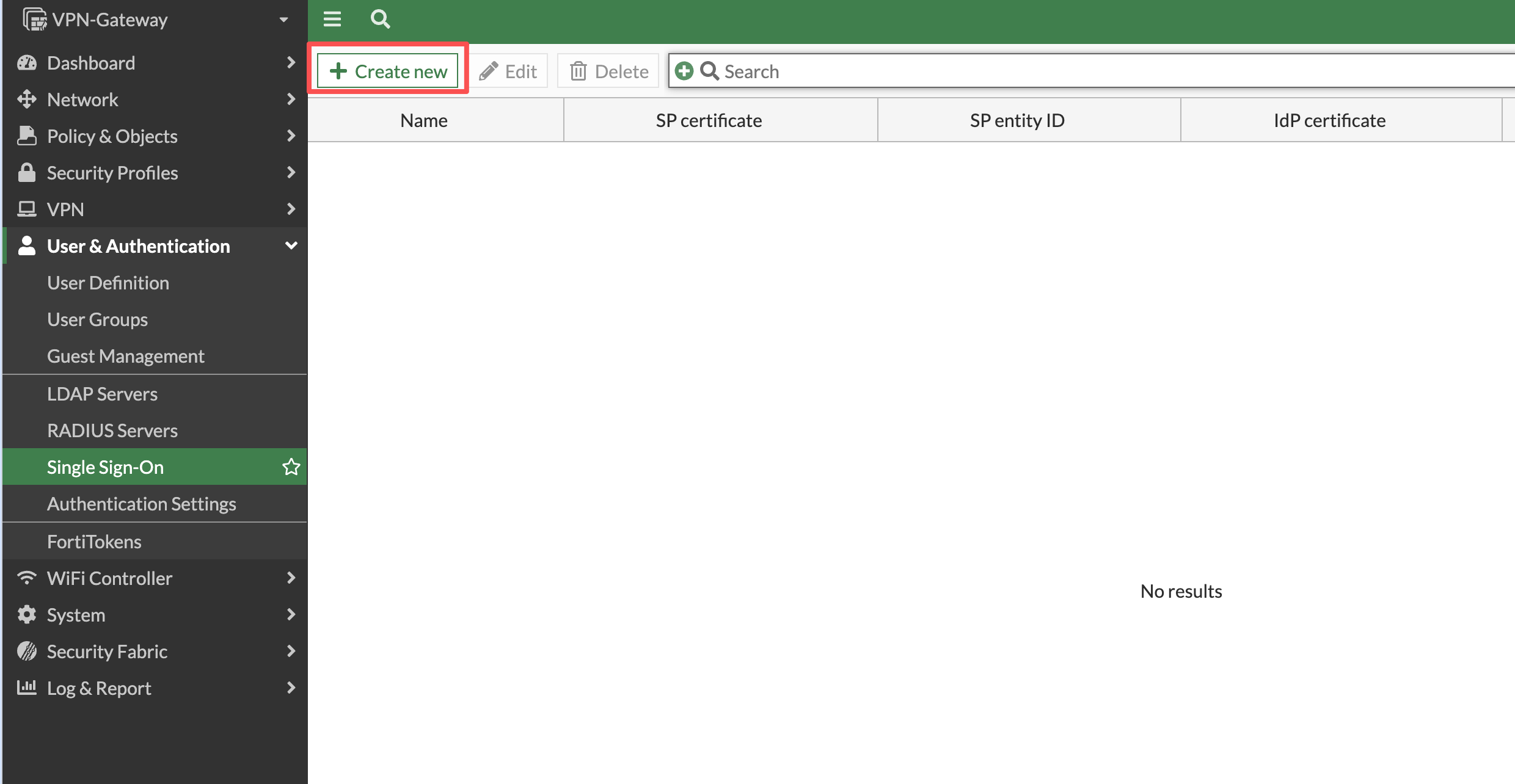
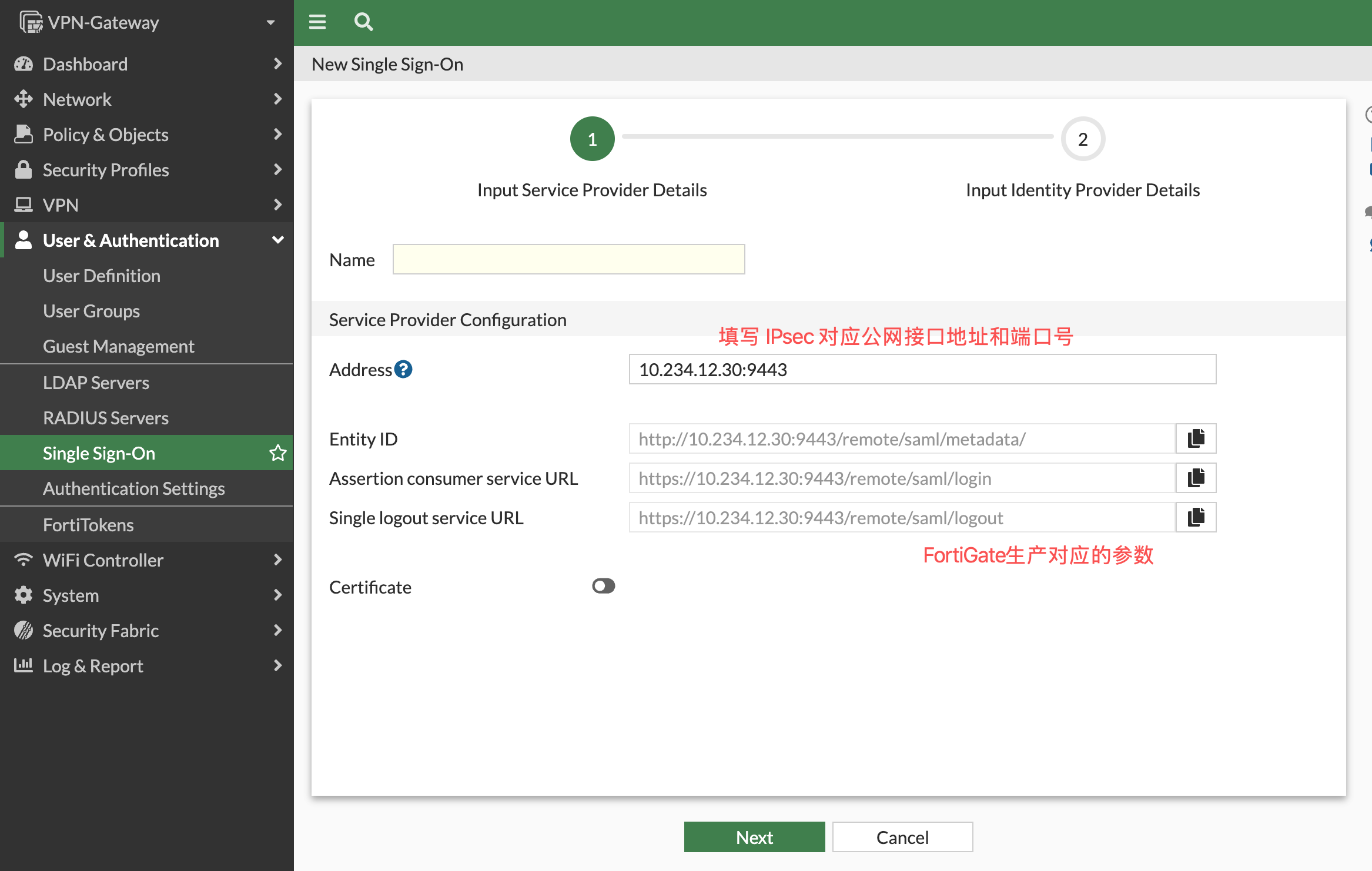
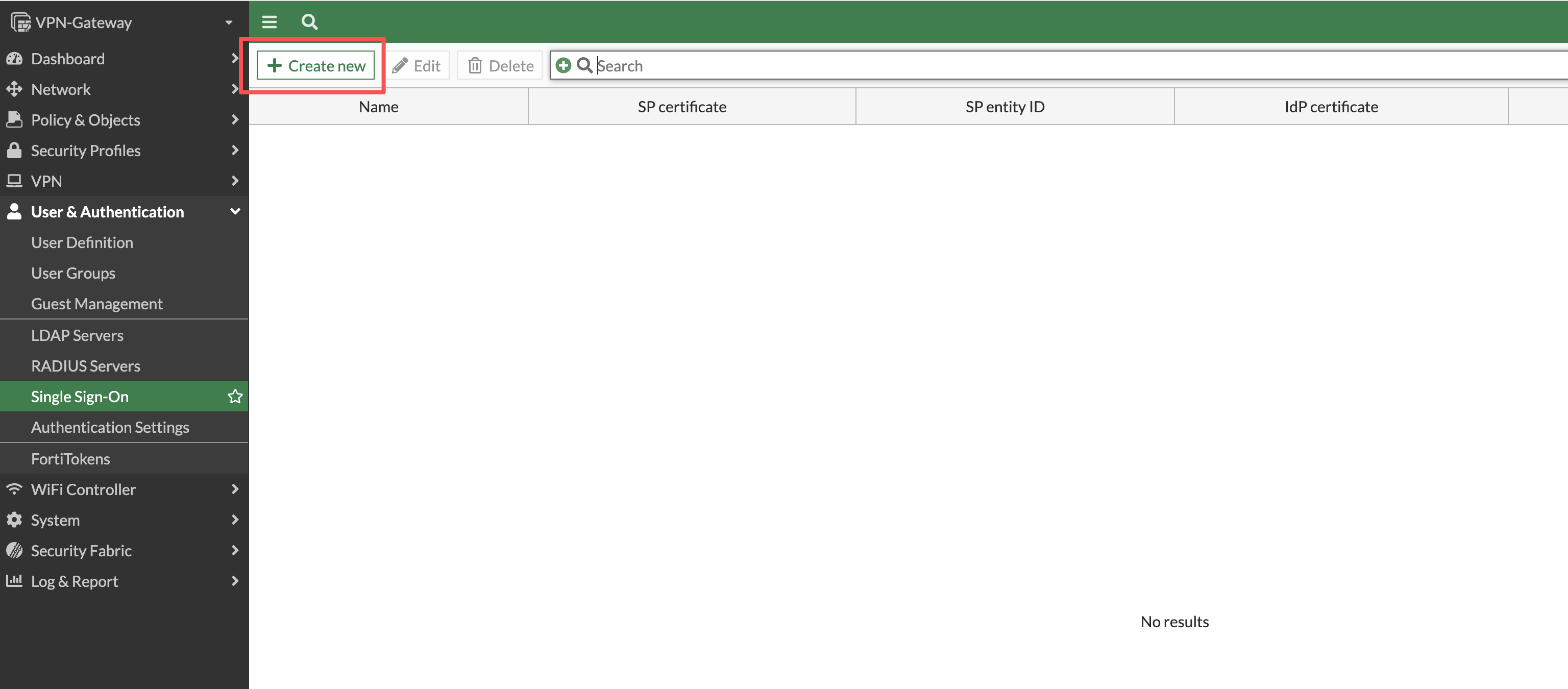
- 登录FortiGate,进入 User & Authentication > Single Sign-On。点击Create new按钮,进入
New Single Sign-On配置界面。
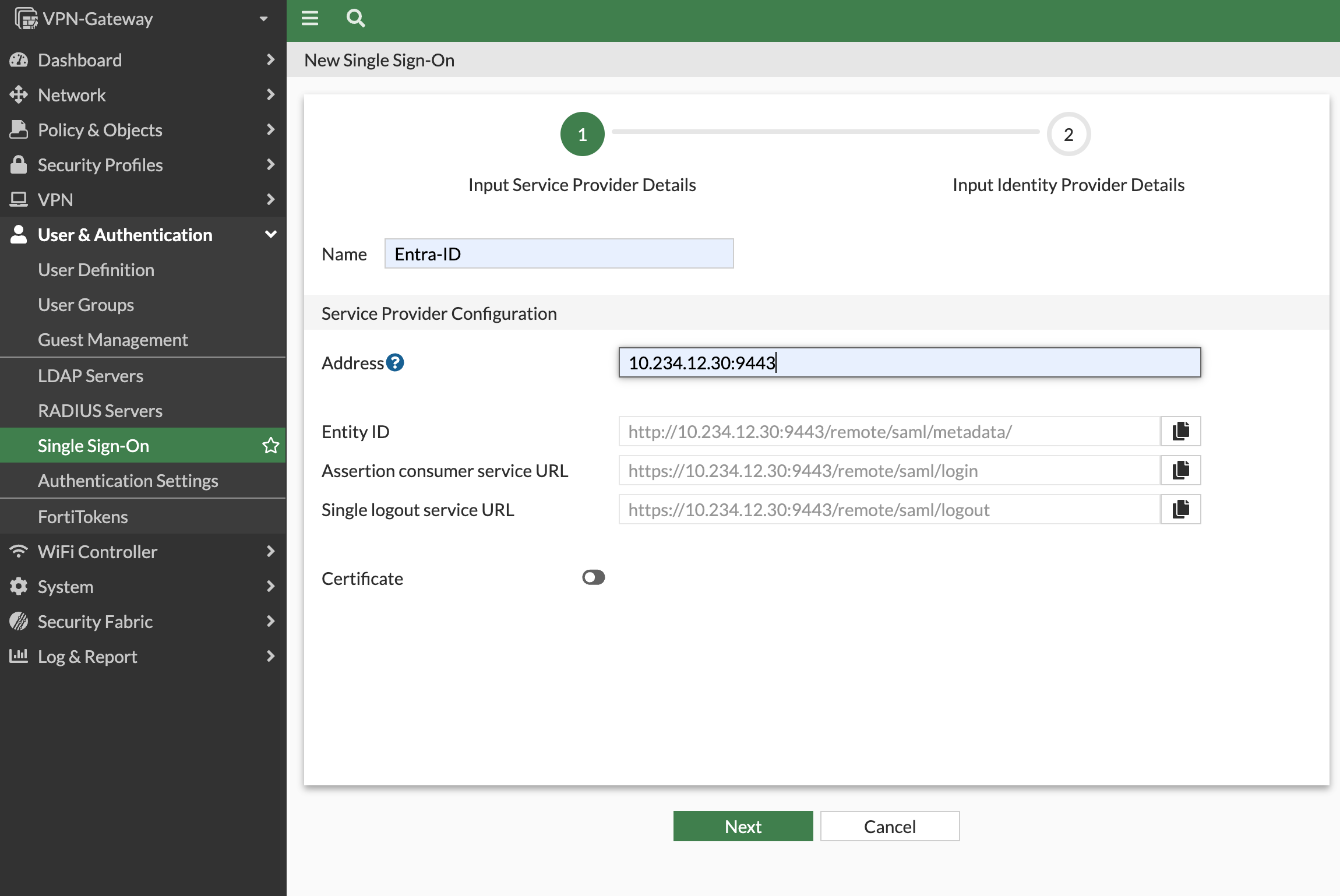
- 进入配置界面后,填写需要配置IPsecVPN所在公网口接口的地址或者域名,FortiGate会自动帮助生成
Entity ID(实体ID)、Assertion consumer service URL(断言使用者服务URL)和Single logout service URL(单点注销服务URL)。将这些参数记录下来,以备用。
注
- 本例10.234.12.30为模拟公网地址,具体地址以实际环境为主。本例参数为:
- Entity ID(实体ID):
http://10.234.12.30:9443/remote/saml/metadata/ - Assertion consumer service URL(断言使用者服务URL):
https://10.234.12.30:9443/remote/saml/login - Single logout service URL(单点注销服务URL):
https://10.234.12.30:9443/remote/saml/logout
- Entity ID(实体ID):
注意
- 请一定注意,该地址要携带Saml 端口号(本例为9443),否则Saml认证成功后不能将信息返回SP(FortiGate)。
2. 创建试点组和企业应用
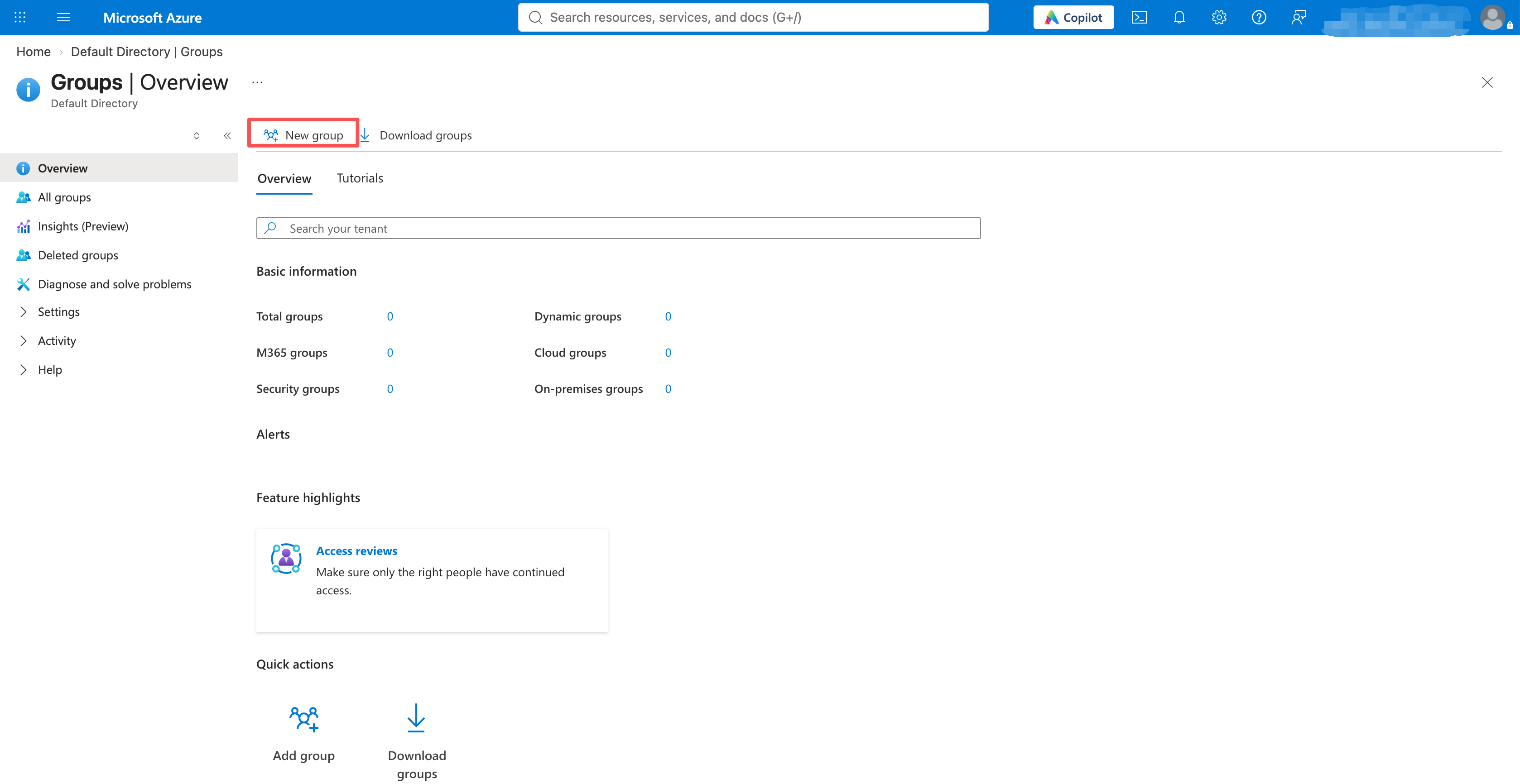
- 登录 Microsoft Entra 管理中心,进入 Entra ID > Groups > New group。
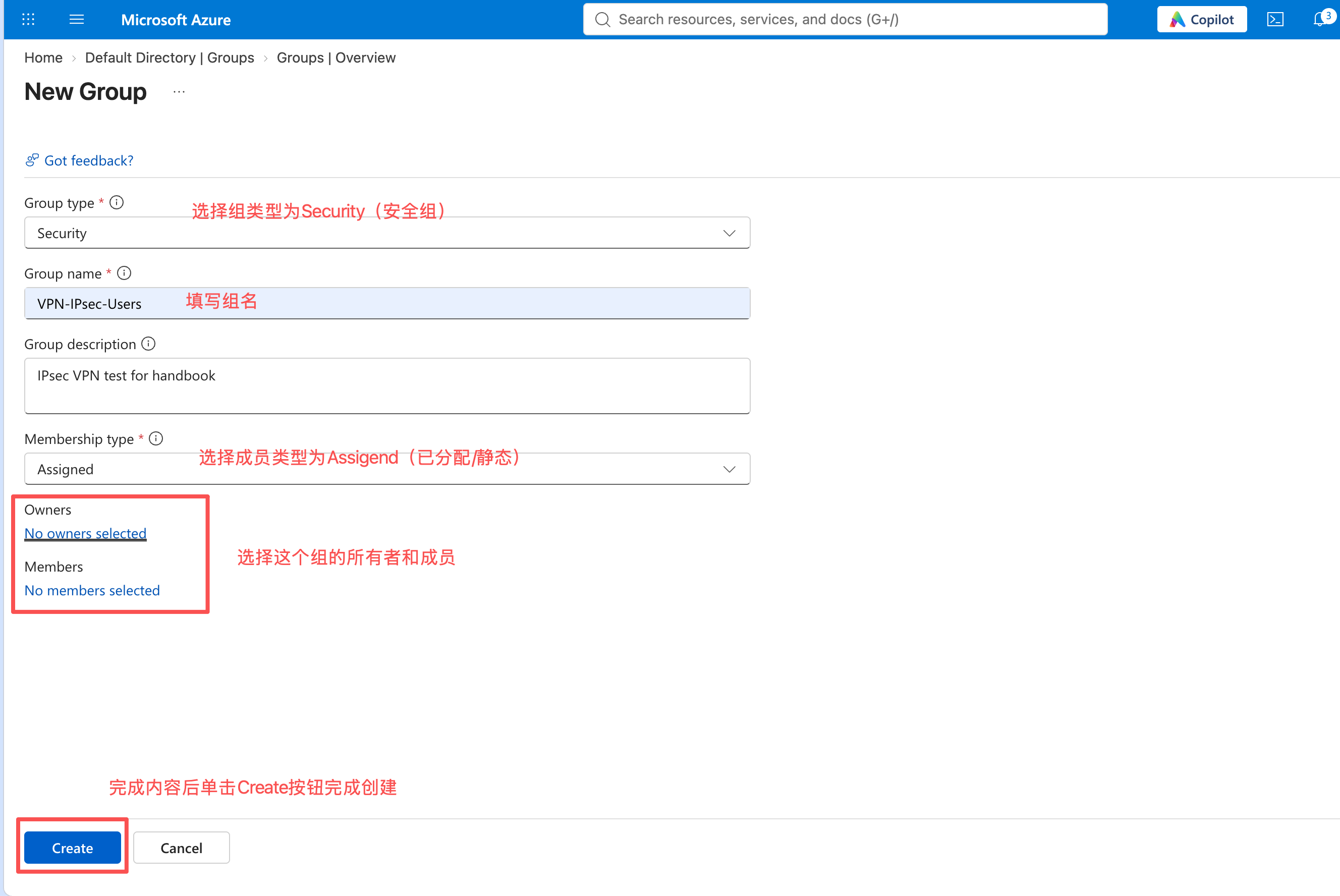
- 创建 Security 类型、Assigned 成员方式的
VPN-IPsec-Users,添加owner和member。完成后单击Create按钮完成创建。
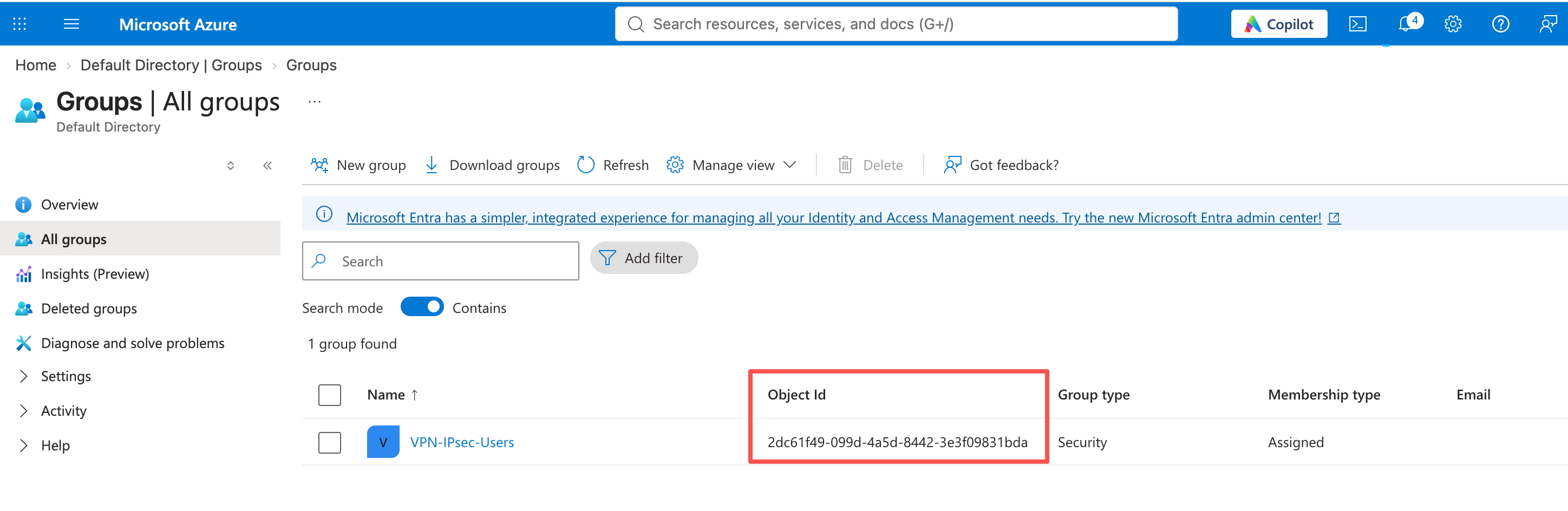
- 完成创建后,进入All groups菜单中,记录组的 Object ID。
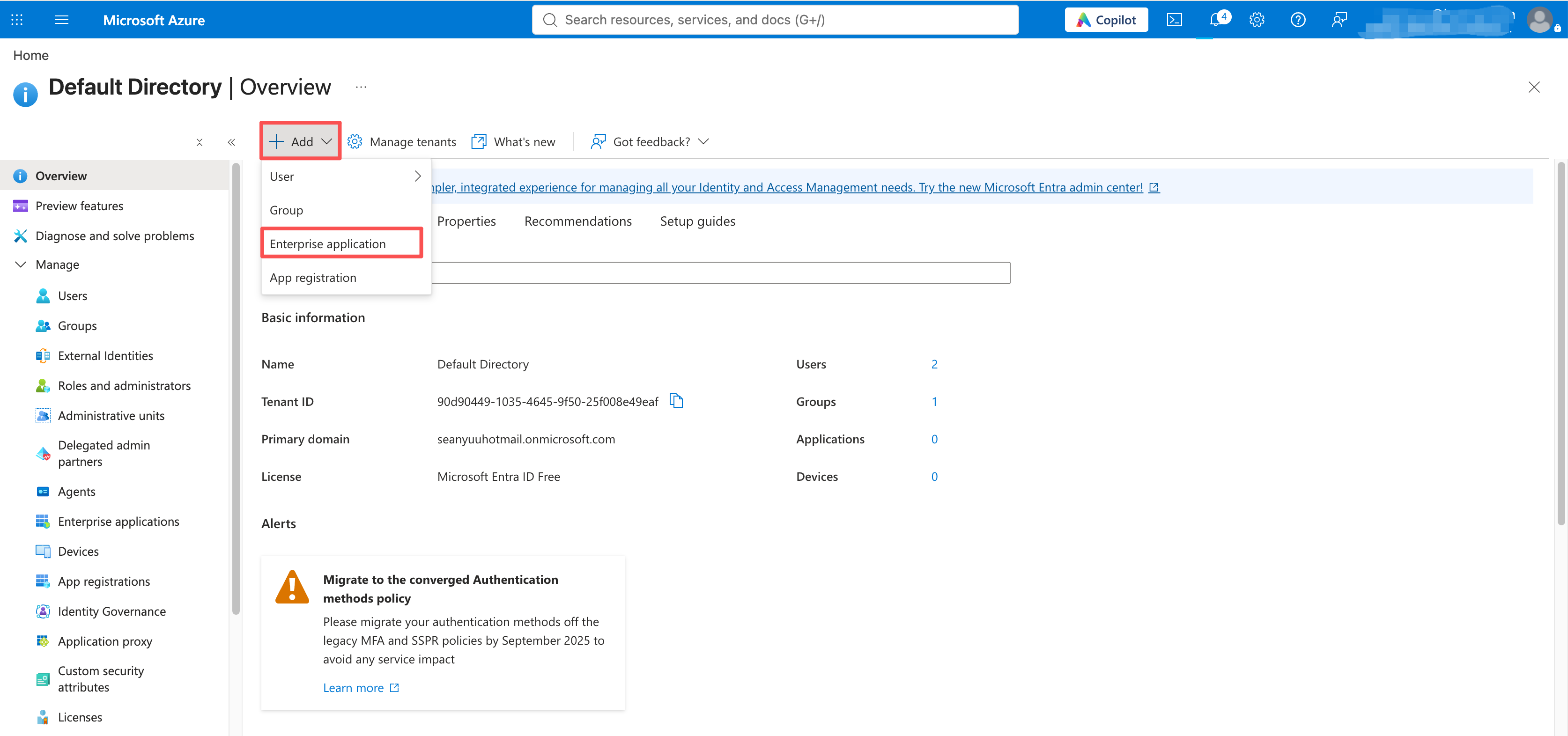
- 回到首页后,单击Add添加Enterprise application 企业应用,进入企业应用添加向导。
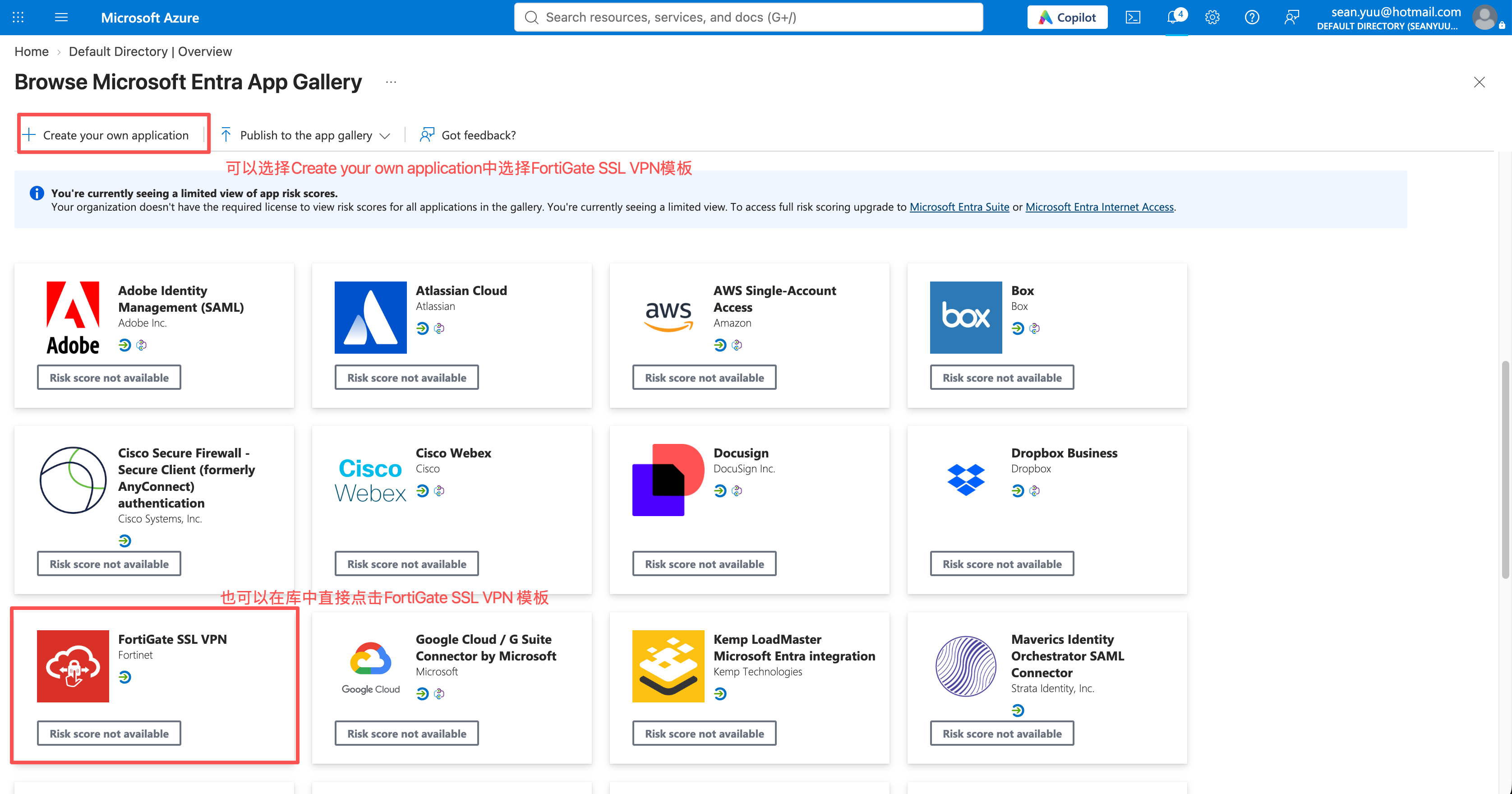
- 在浏览应用库中选择Create your own application(创建你自己的应用) 中选择
FortiGate SSL VPN模板,或者直接选择库中的FortiGate SSL VPN模板。
注
- 虽然这个模板名字叫SSL VPN,但是实际上只是个SAML模板,和最后在FortiGate上部署的是SSL VPN还是IPsec VPN没有关系。后续 URL 必须填写 IPsec SAML 端口,无需创建 SSL VPN Portal。
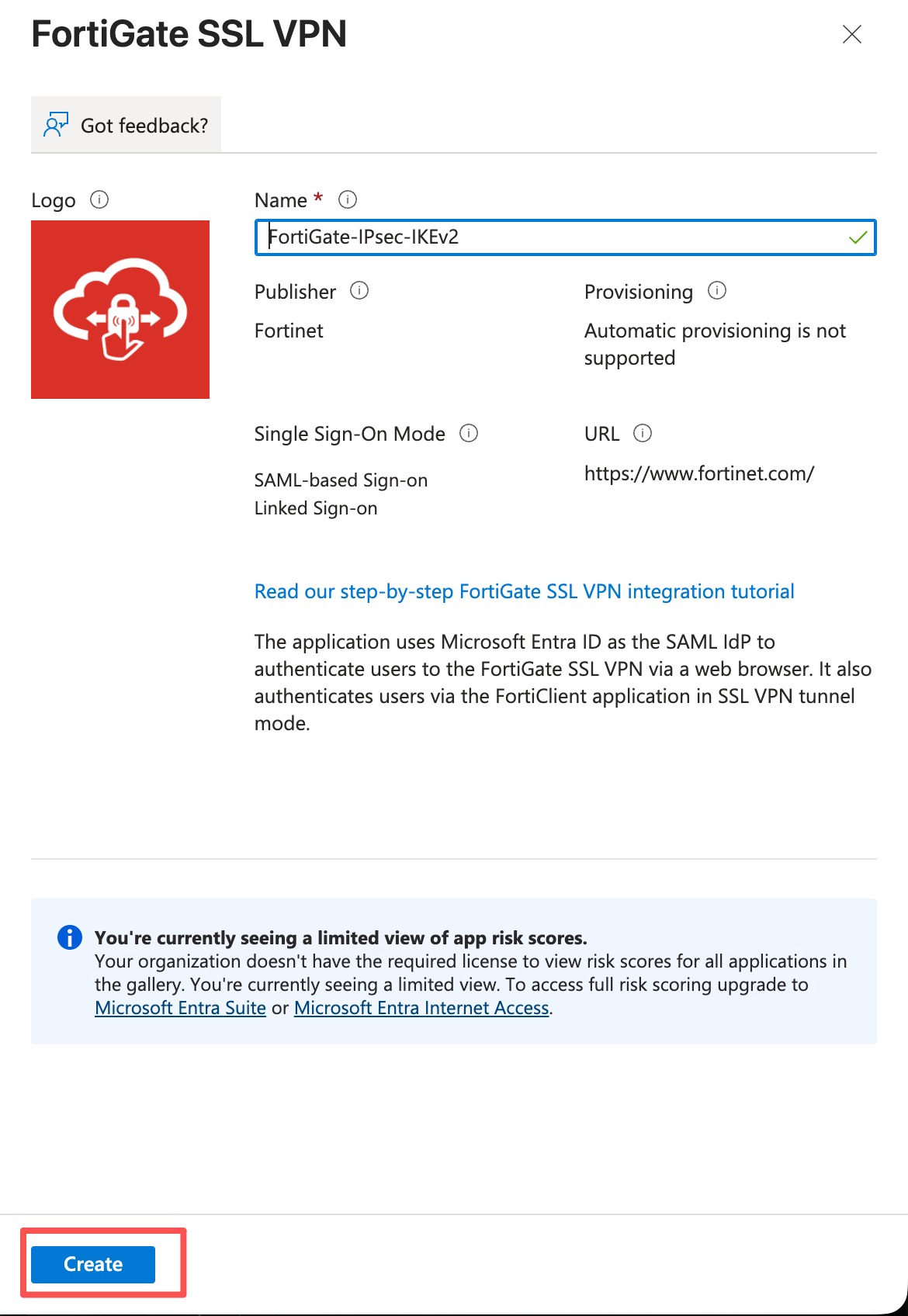
- 进入向导后,为该模板命名为
FortiGate-IPsec-IKEv2。完成后单击Create按钮继续。
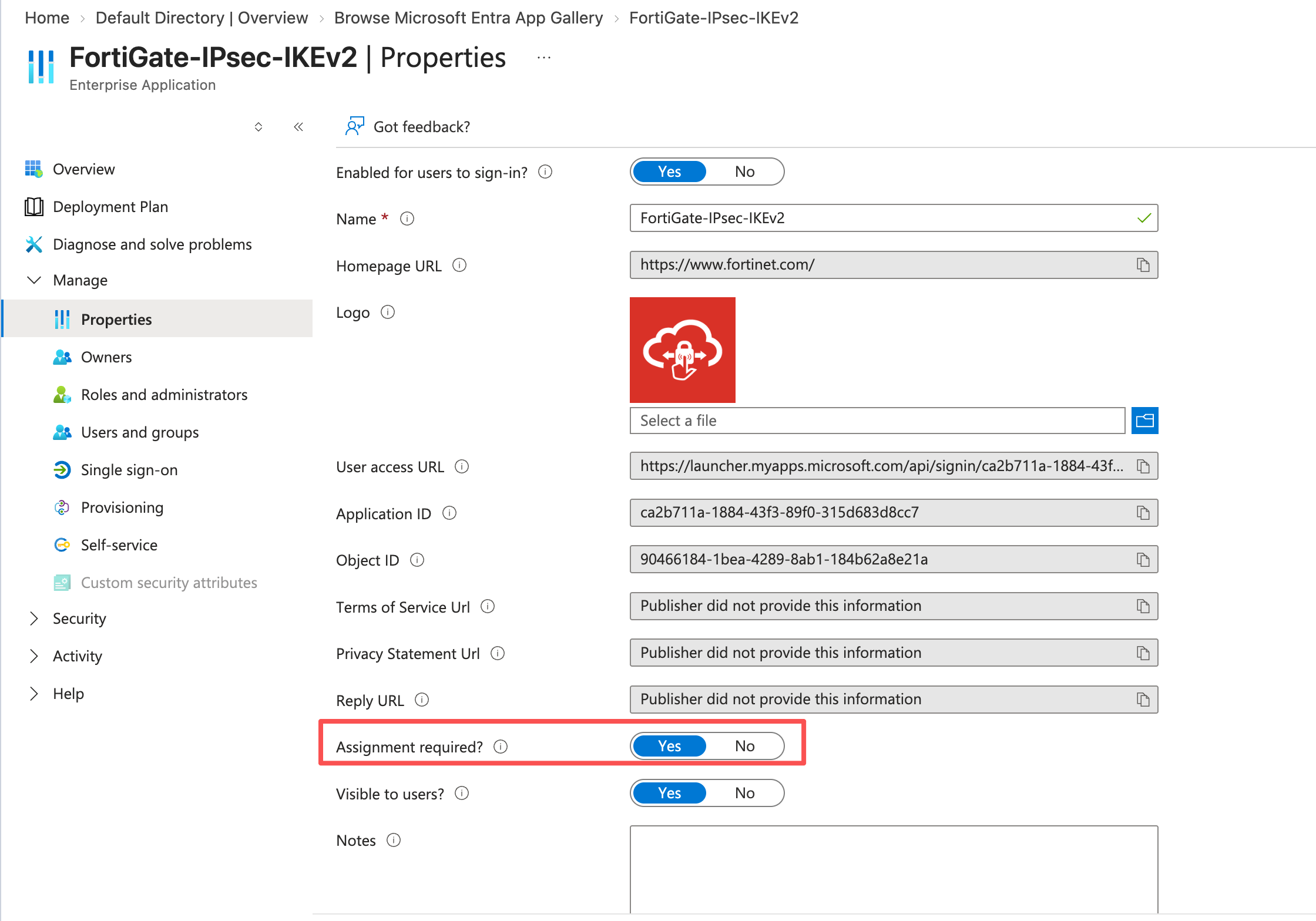
- 等待模板创建完成,在模板创建完成后,会自动进入应用页面,此时单击Manage>Properties进入应用的属性配置。
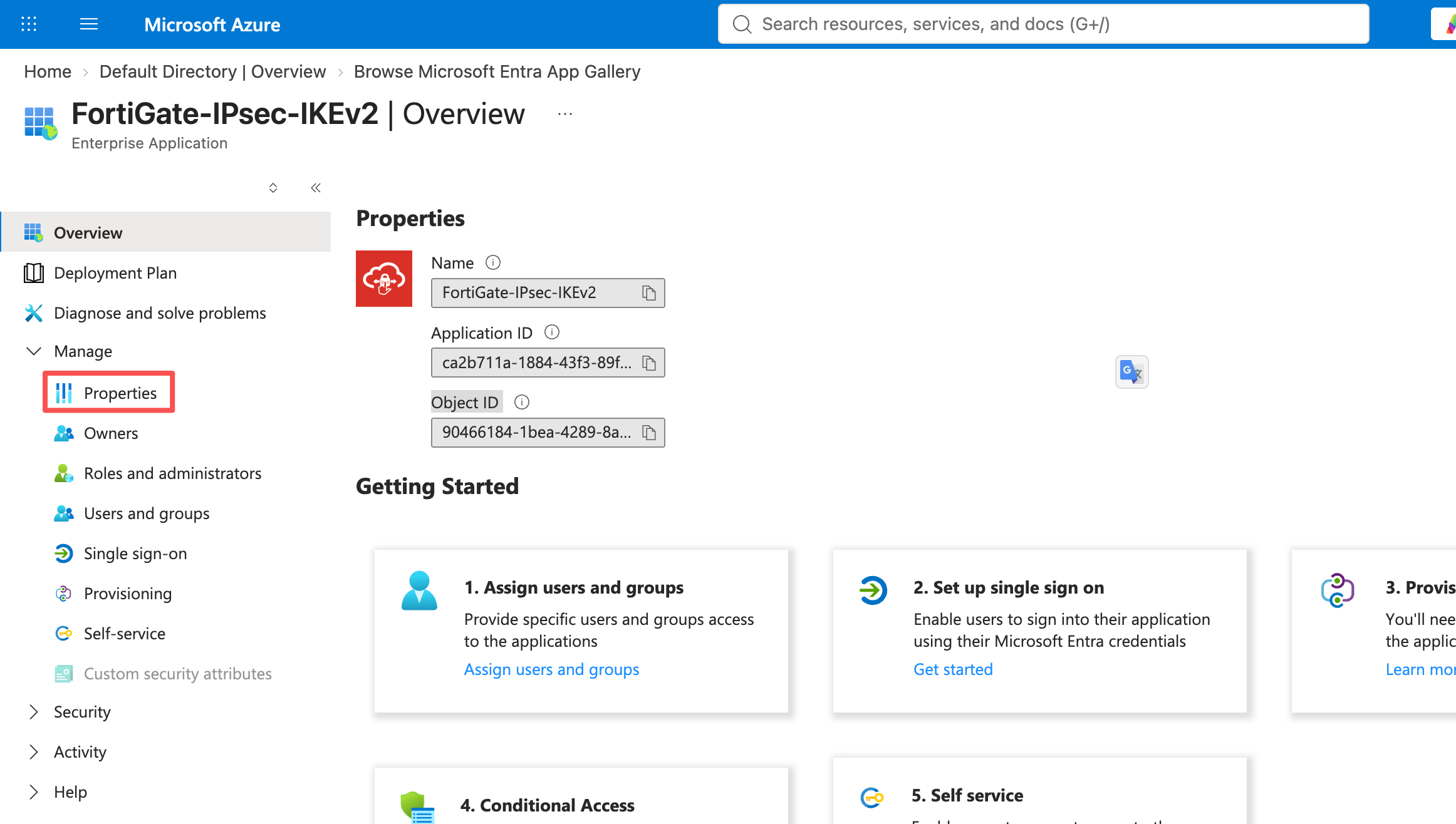
- 检查Properties 中确认 Assignment required? = Yes。如果显示为No时,需要修改,并单击Save按钮保存。
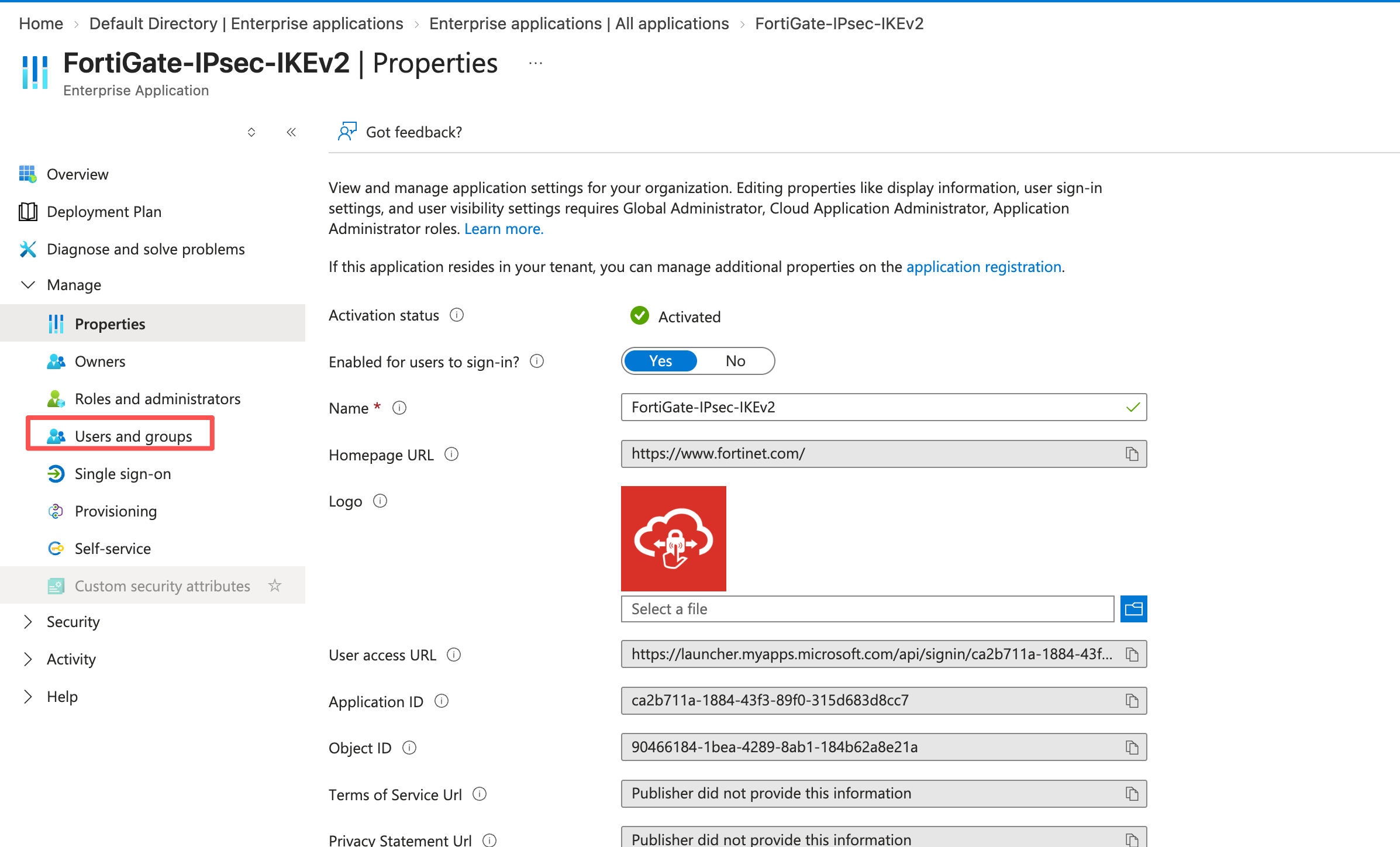
- 单击Manage>Users and groups按钮,进入用户和组界面。
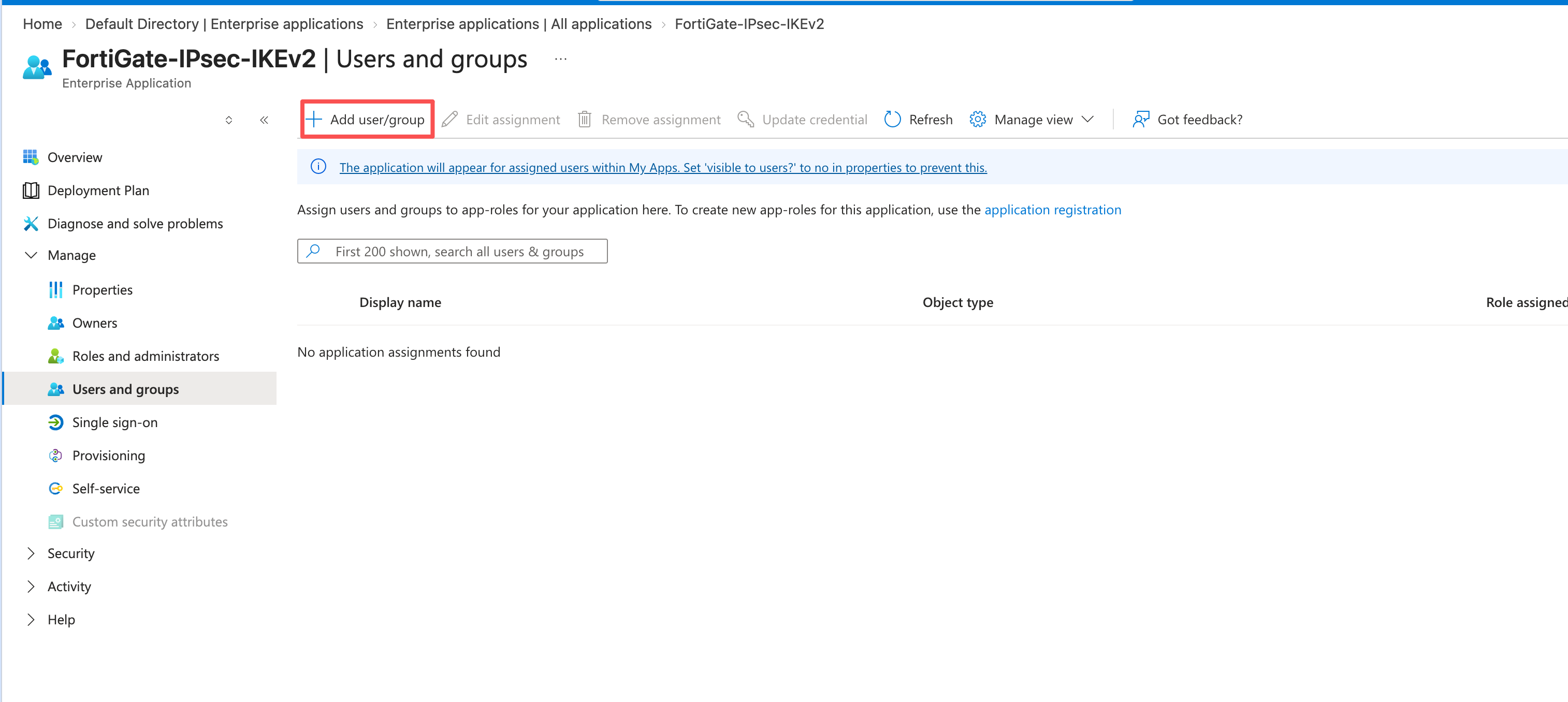
- 在 Users and groups 中单击Add user/group 按钮将试点组分配给应用。
注
Microsoft 的FortiGate 企业应用配置说明可用于核对应用、声明与证书的配置位置。
3. 配置 SAML URL
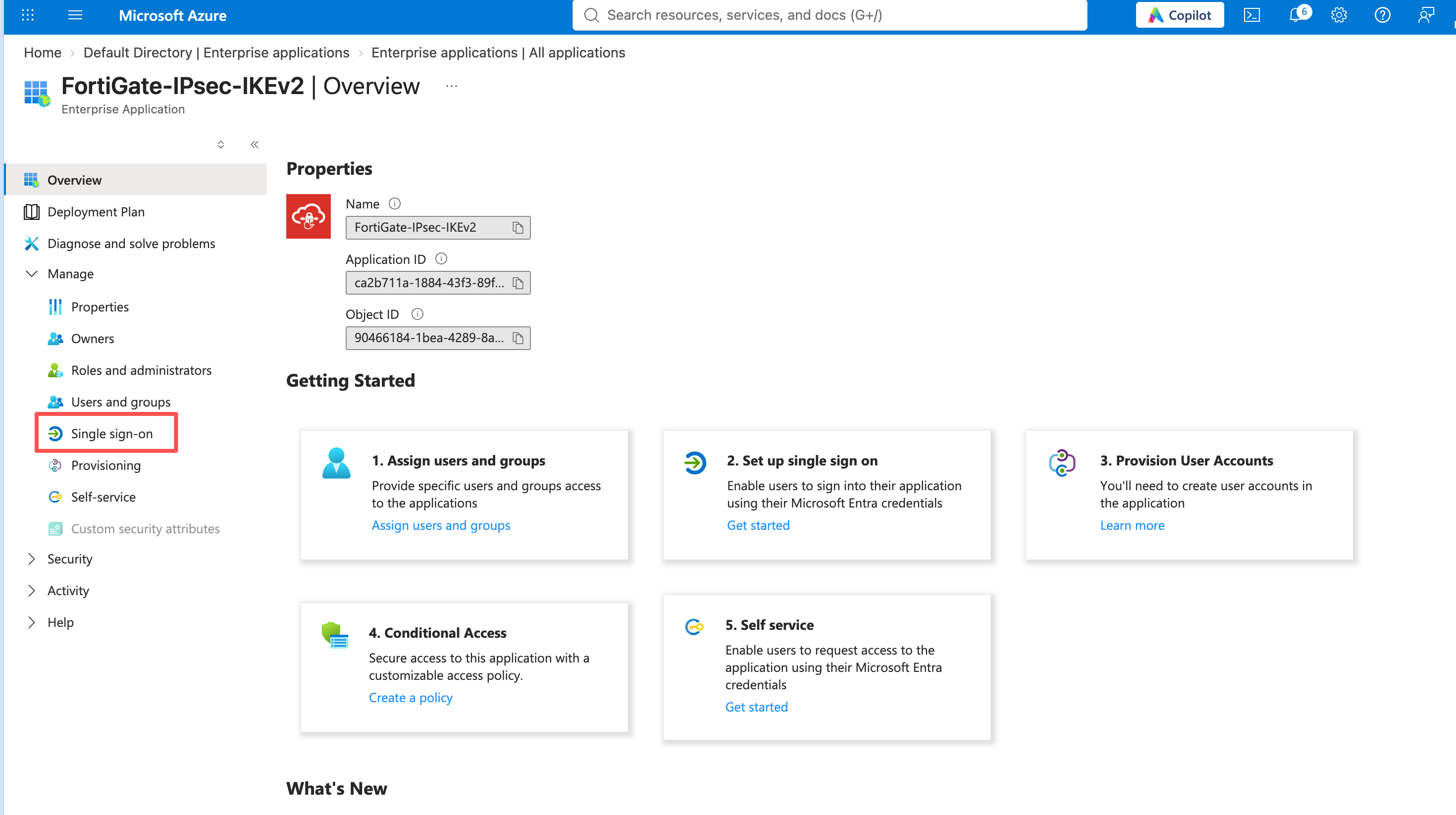
- 选择Manage>Single sign-on,进入单点登录配置向导。
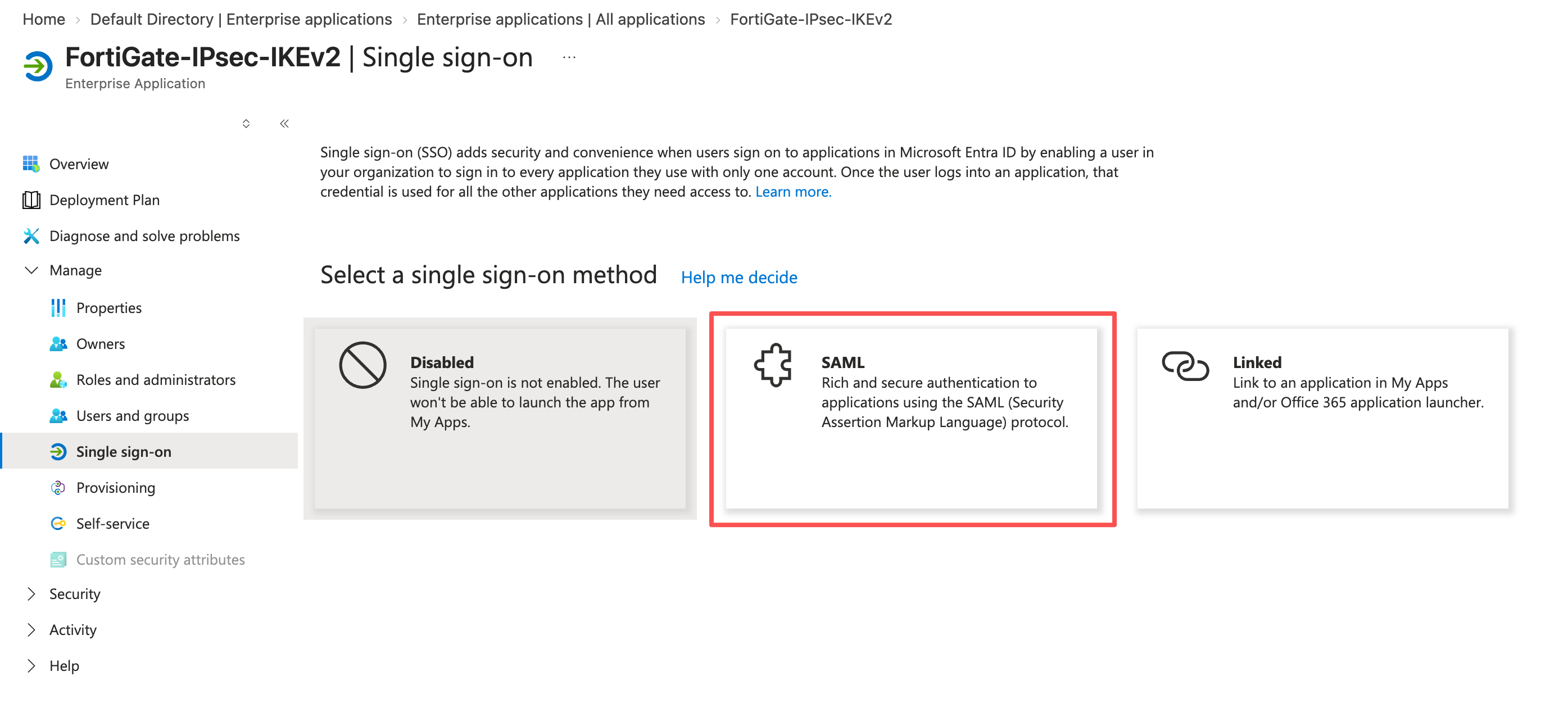
- 进入向导后,选择SAML作为single sign-on method(单点登录方式),进入SAML-based Sign-on的配置页面。
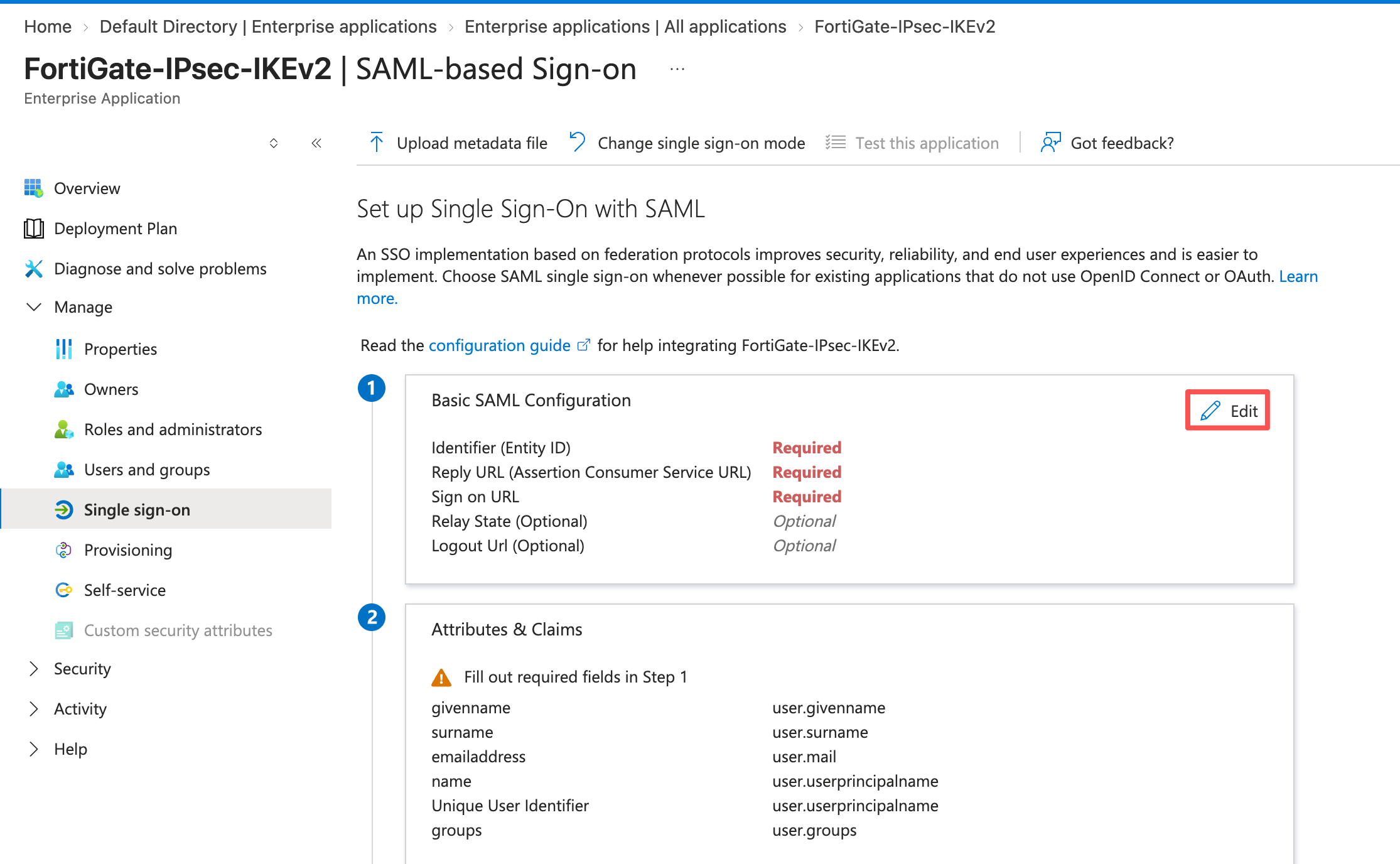
- 进入SAML-based Sign-on的配置页面后,单击Edit按钮编辑Basic SAML Configuration配置。
进入应用 Single sign-on > SAML > Basic SAML Configuration,使用前面步骤记录参数完善配置。
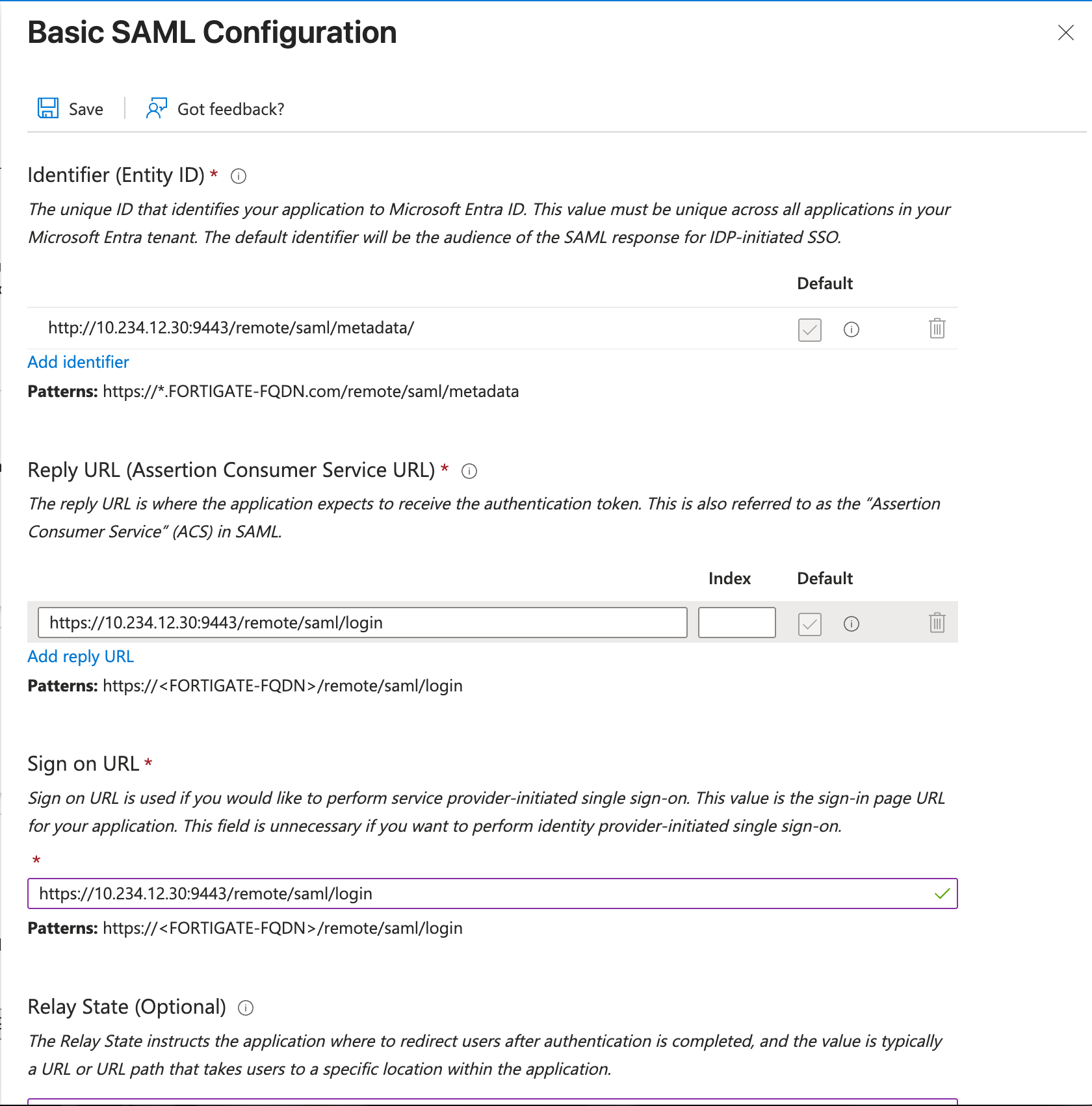
| Entra 配置项 | 本案例示例 | FortiGate对应信息 |
|---|---|---|
| Identifier (Entity ID) | http://10.234.12.30:9443/remote/saml/metadata/ | Entity ID(实体ID) |
| Reply URL (Assertion Consumer Service URL) | https://10.234.12.30:9443/remote/saml/login | Assertion consumer service URL(断言使用者服务URL) |
| Sign on URL | https://10.234.12.30:9443/remote/saml/login | Assertion consumer service URL(断言使用者服务URL) |
| Logout URL | https://10.234.12.30:9443/remote/saml/logout | Single logout service URL(单点注销服务URL) |
| 在完成后点击左上角Save按钮保存。 |
4. 配置用户名和组声明
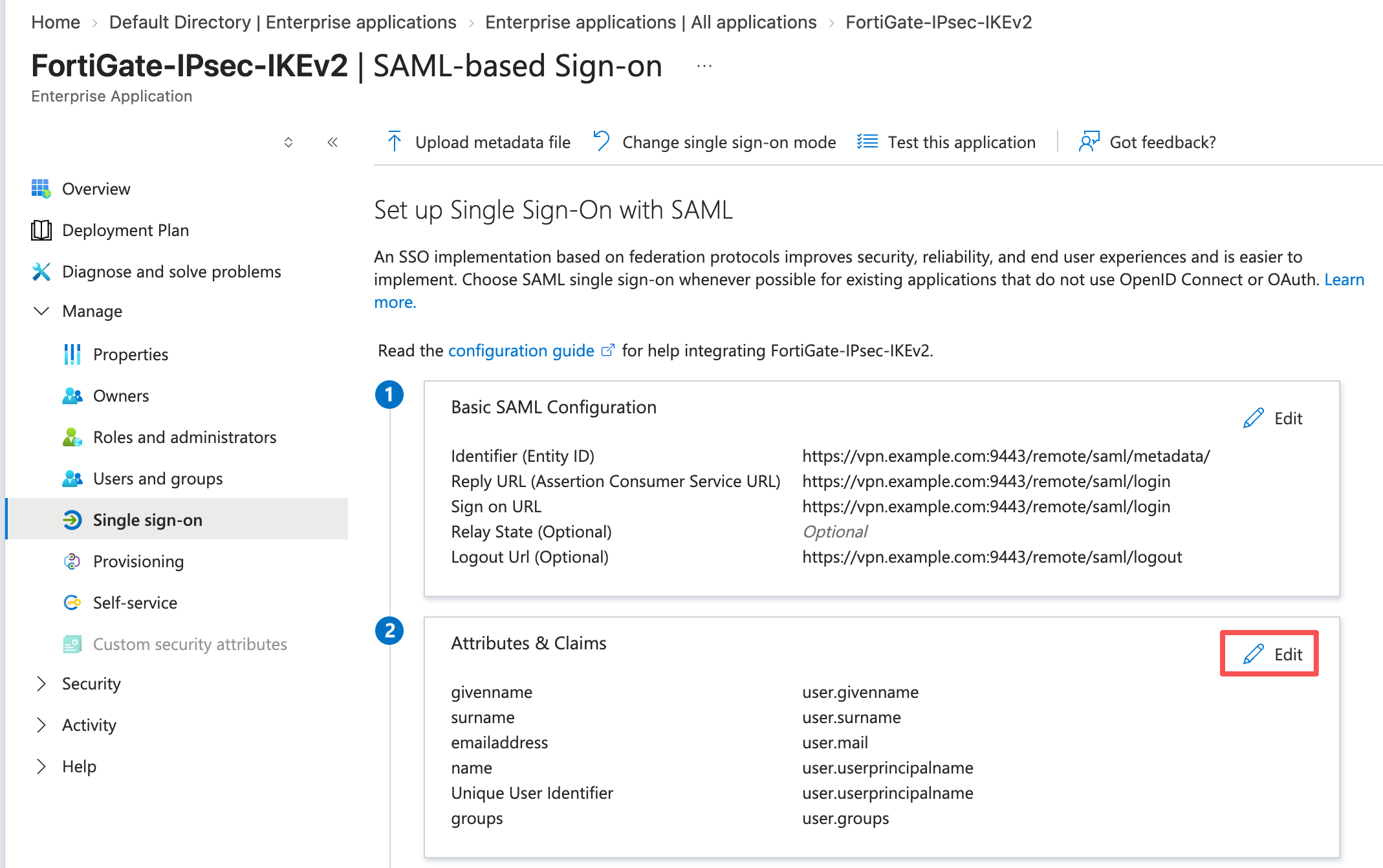
- 单击Edit按钮编辑 Attributes & Claims配置:
- 单击Add new cliam按钮新建声明
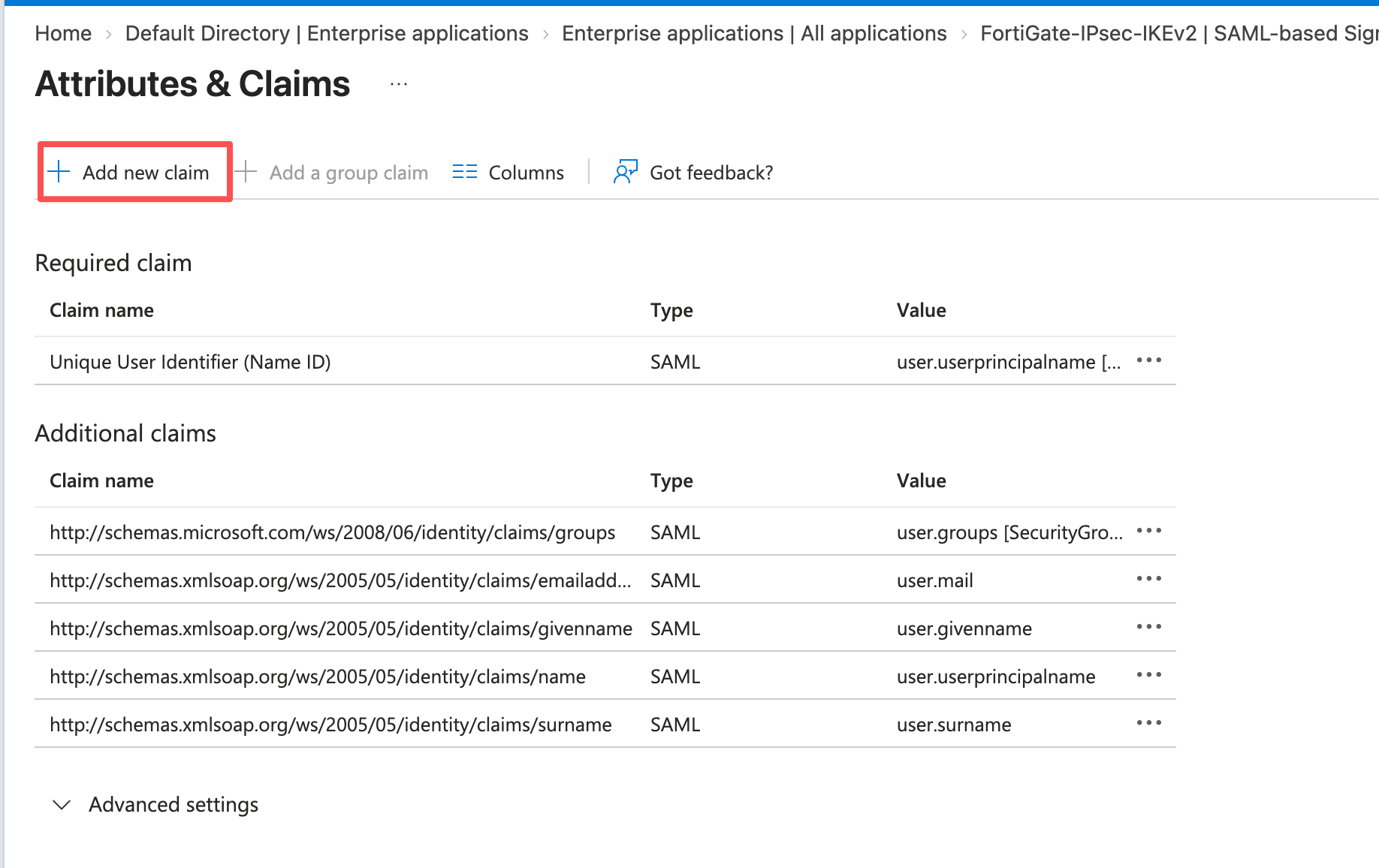
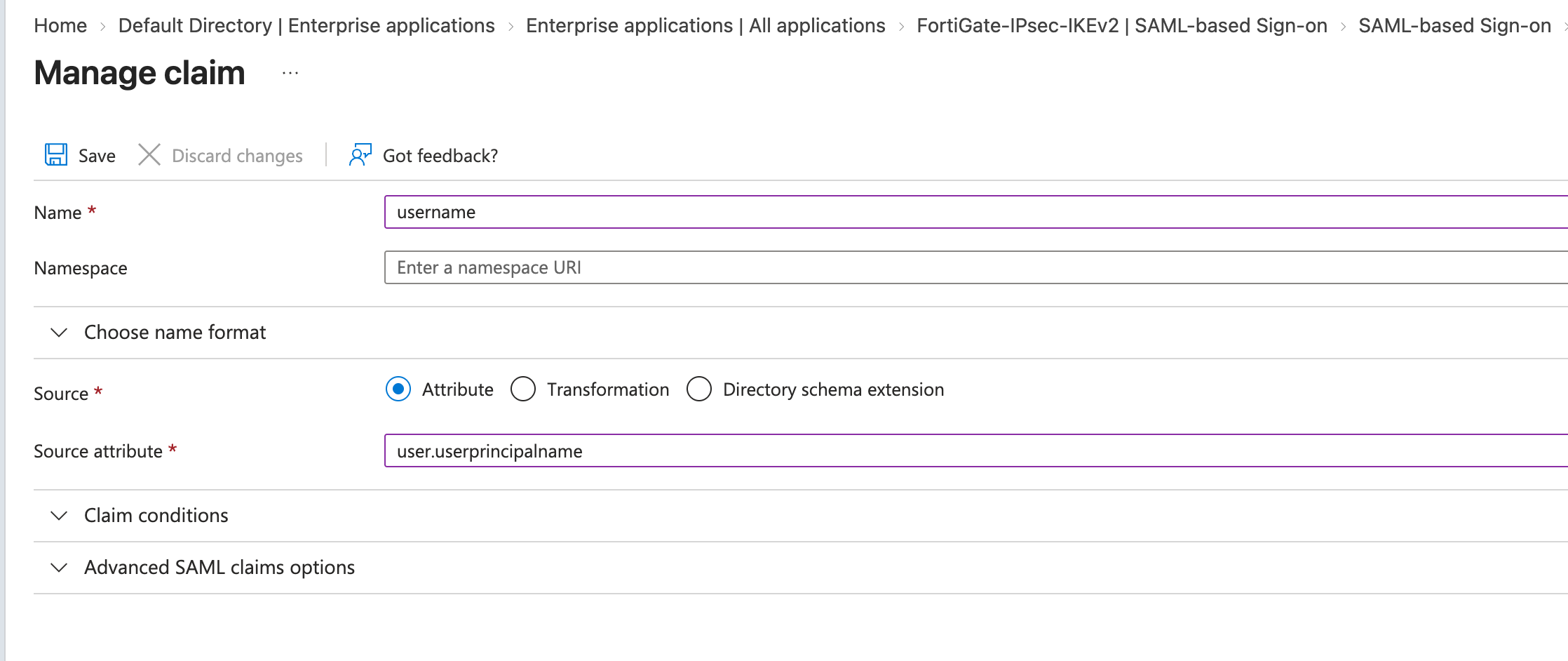
- 分别根据以下信息创建声明以及配置,完成后点击Save按钮保存 username声明
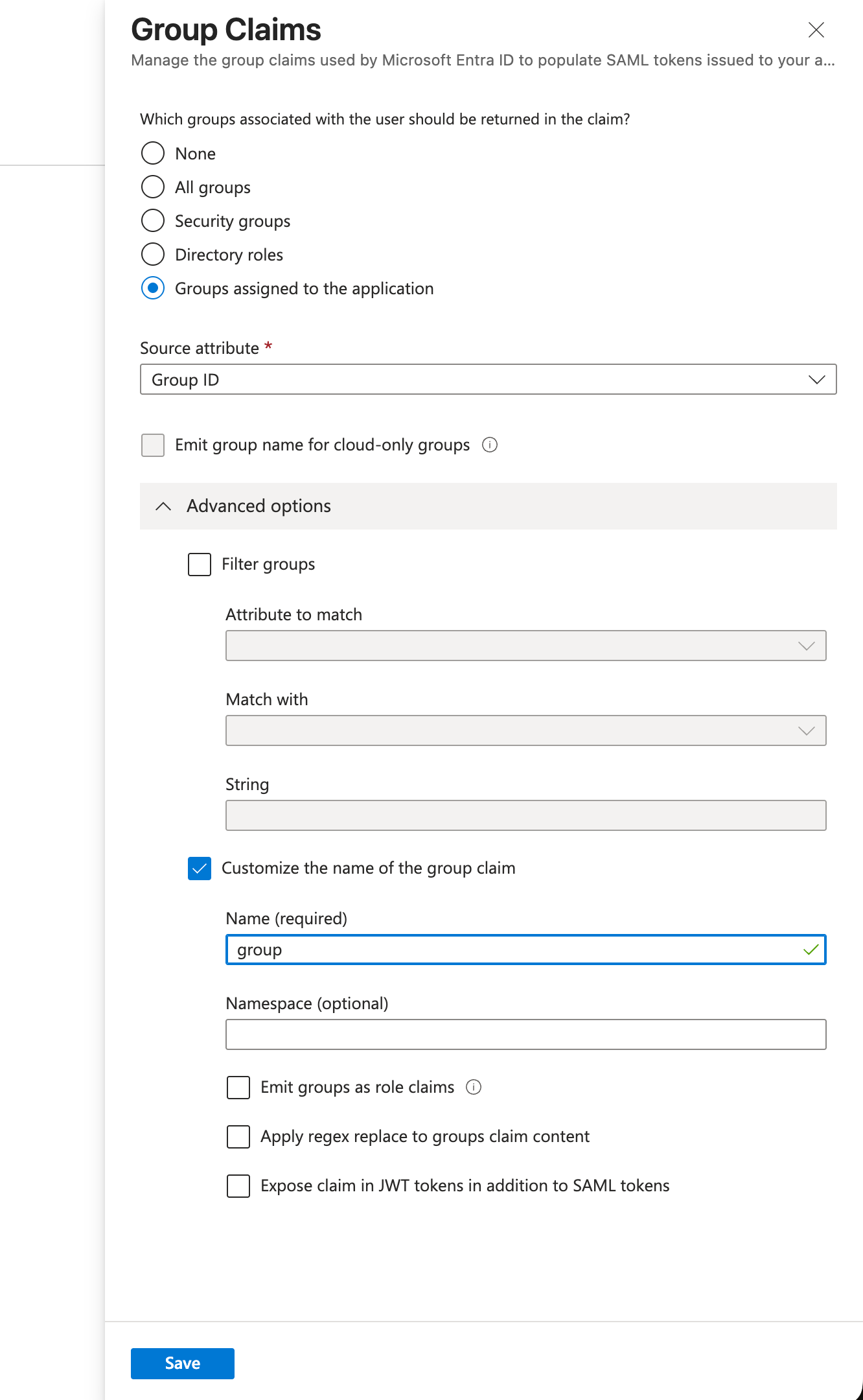
group声明
| 声明 | 配置 |
|---|---|
username | 新建声明,Source attribute 为 user.userprincipalname,Namespace 留空 |
group | 添加组声明,选择 Groups assigned to the application,Source attribute 为 Group ID;高级选项自定义名称为 group,Namespace 留空 |
重要
- 确认实际发出的属性名为
username和group,注意大小写。FortiGate 匹配的是VPN-IPsec-Users的 Object ID,不是显示名,也不是企业应用 Object ID 或租户 ID。
注
- 仅发送应用所需的组可减少声明体积。SAML 组声明有 150 个组的限制,超限时不能假设 FortiGate 会自行查询 Microsoft Graph 补齐组信息;本例使用直接成员和应用分配组,并在试点中核对实际声明。参见 Microsoft 组声明说明。
5. 获取 IdP 参数和签名证书
- 回到SAML-based Sign-on页面,在 SAML Signing Certificate 中下载 Certificate (Base64)。
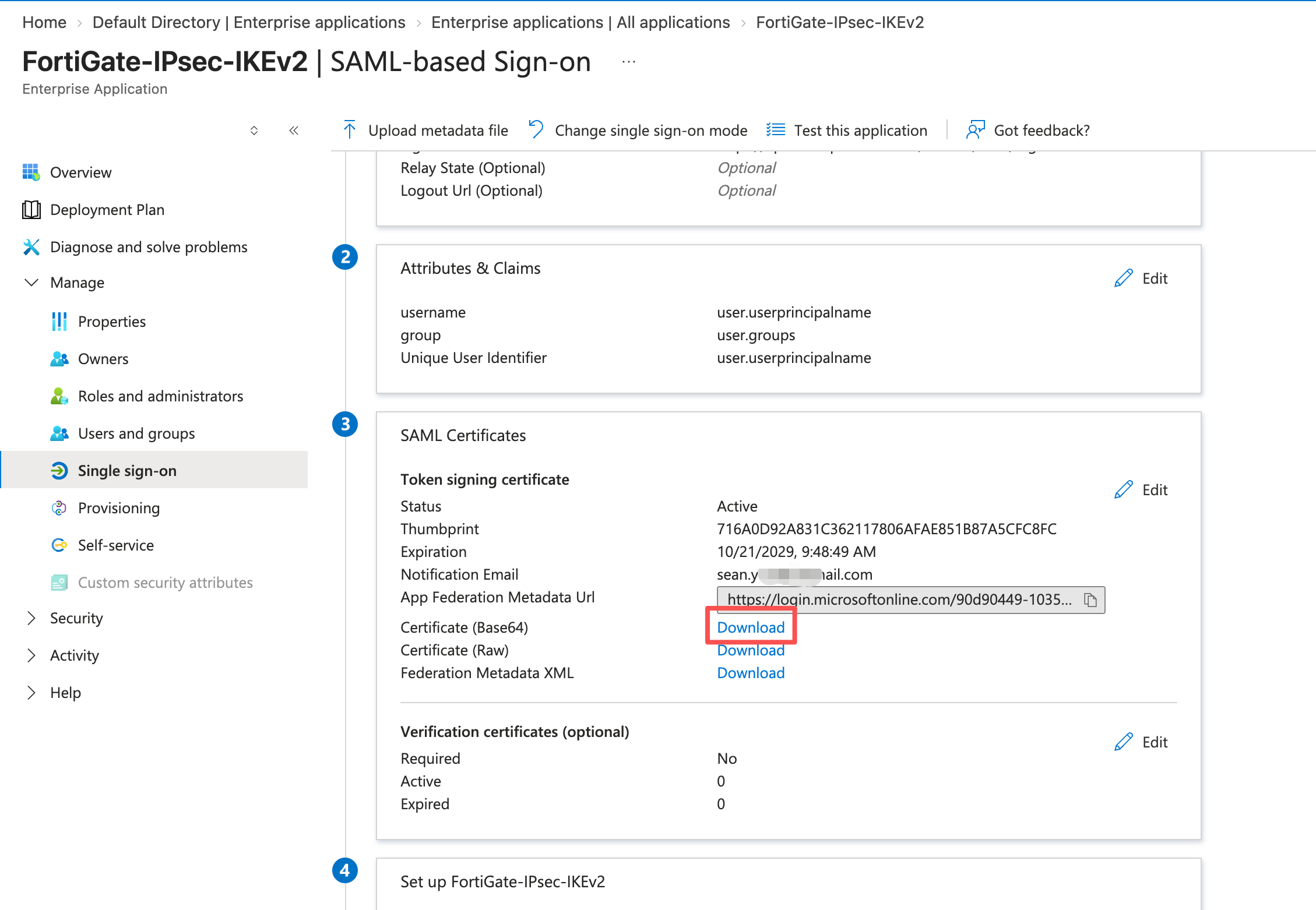
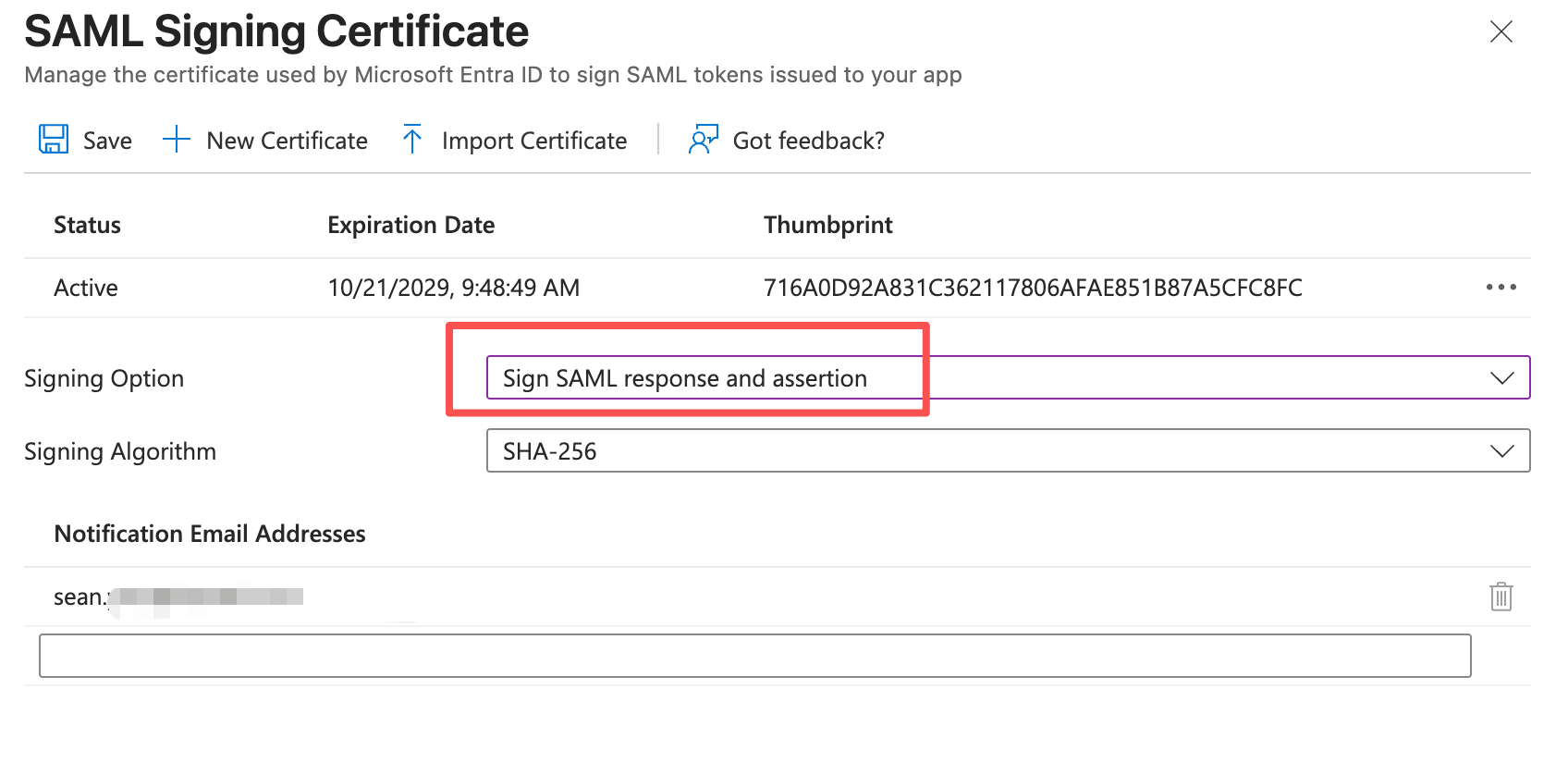
- 单击Edit按钮编辑 Saml Certificate配置,进入签名证书配置页面
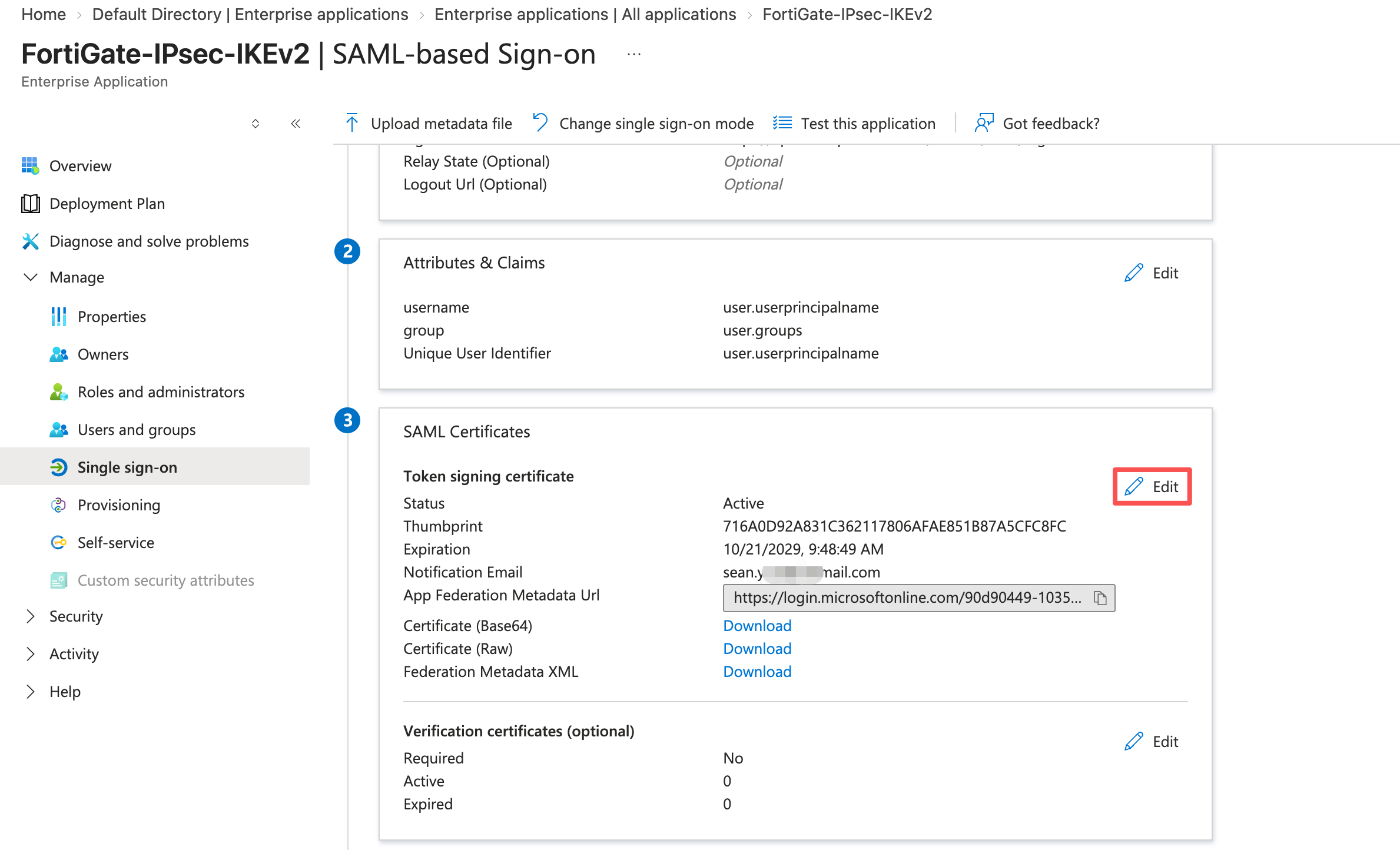
- 编辑签名设置,使用 SHA-256,并将签名选项(Signing Option)选择同时签署 SAML Response 与 Assertion,然后单击Save按钮保存配置。
- 在应用的设置区域记录 Login URL、Microsoft Entra Identifier、Logout URL,后续分别填入 FortiGate 的 IdP 参数。
配置 FortiGate
1. 配置SAML服务
1. 导入证书
- 进入 System > Certificates,单击Create/Import>Remote Certificate,进入远程证书导入页面
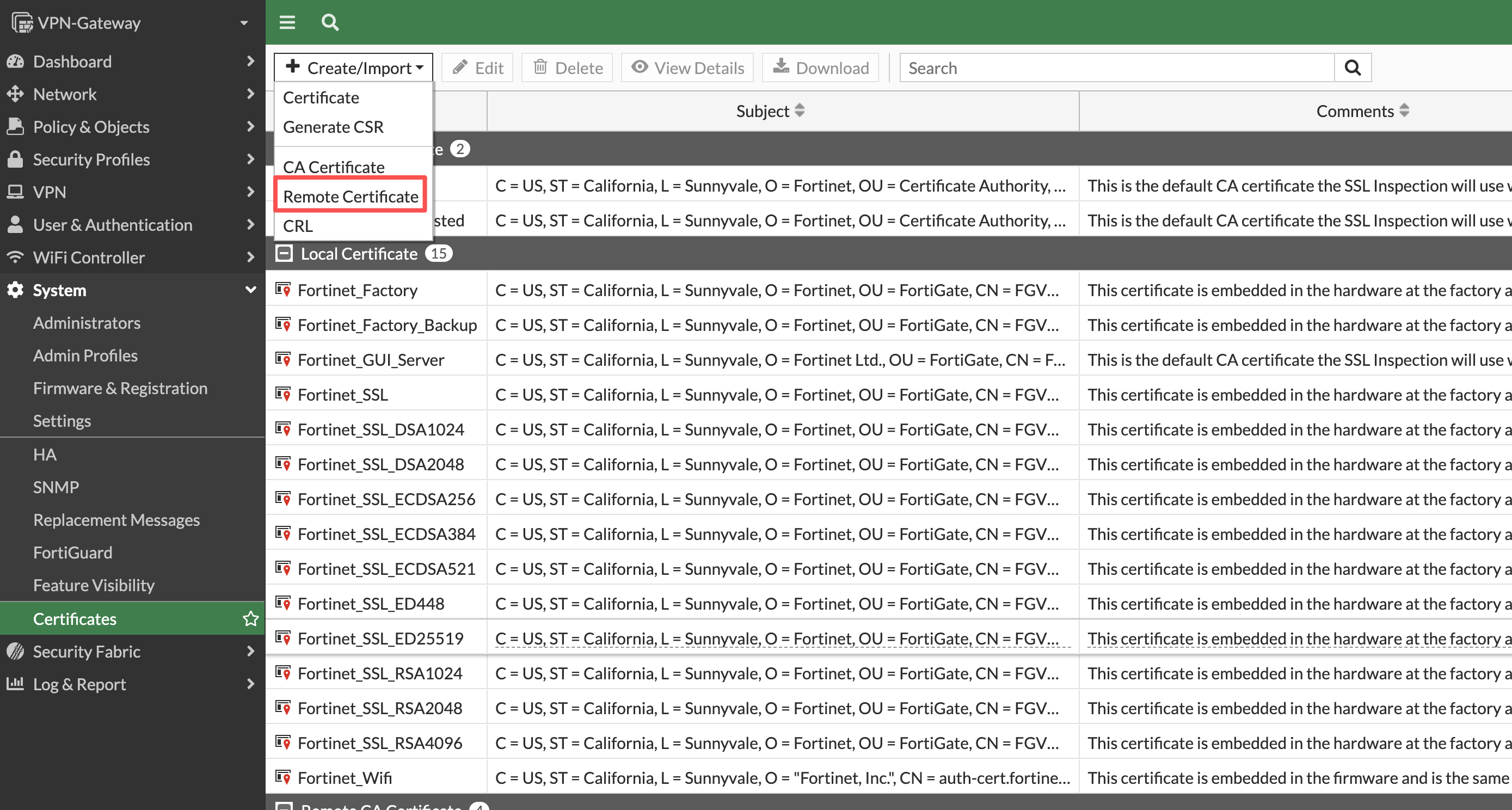
- 单击Upload按钮选择之前下载的证书,导入完成后单击OK按钮继续。

- 完成后可以看到微软的证书信息。
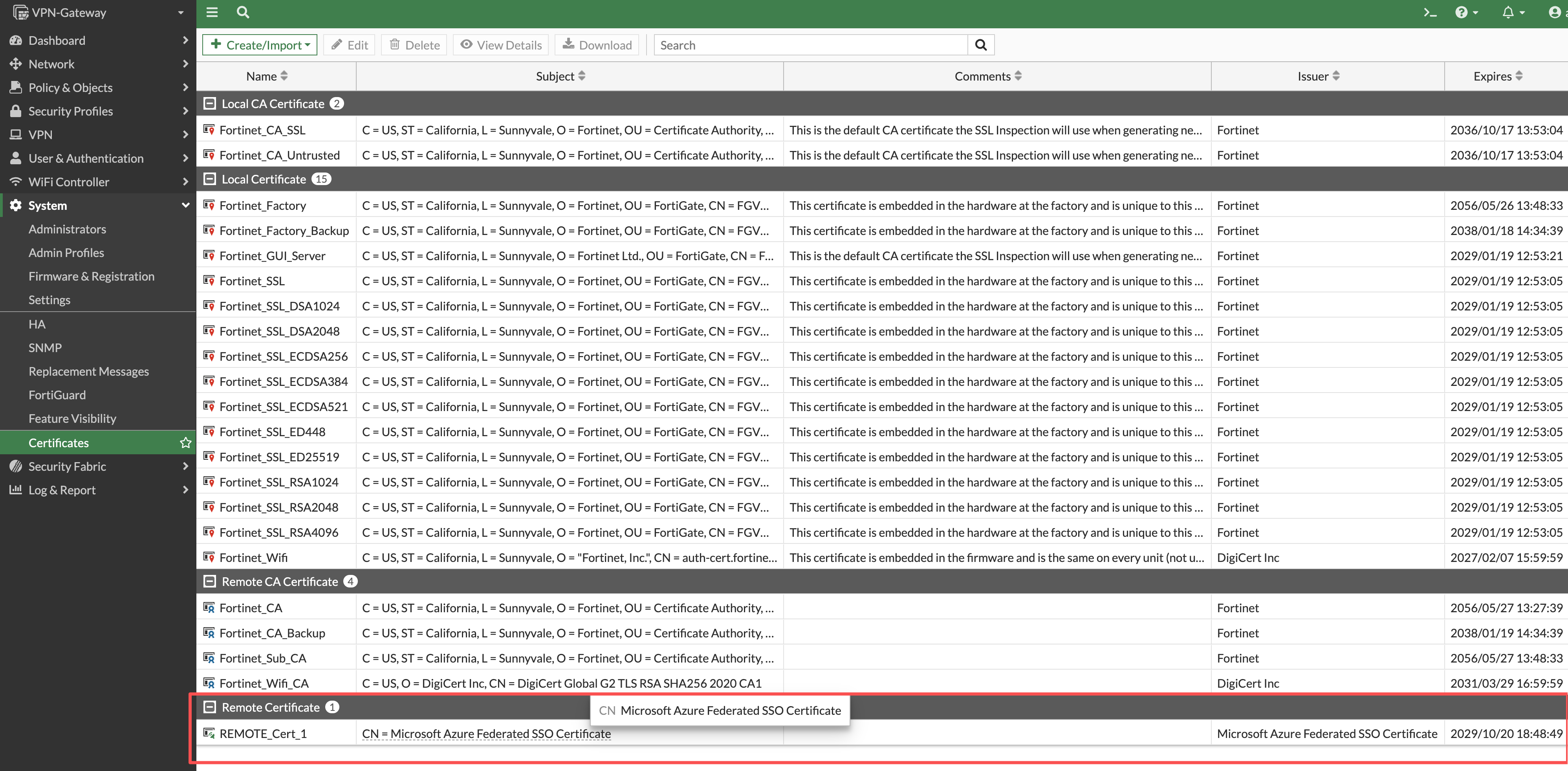
重要
如需替换 SAML HTTPS 认证服务使用的服务器证书,那也需要在这里导入服务器证书及完整证书链和私钥。并配置以下信息:
config user setting
  set auth-cert <导入的证书>
end
2. 创建Saml服务
- 通过CLI命令配置saml监听端口。
config system global
    set auth-ike-saml-port 9443
end- 进入 User & Authentication > Single Sign-On, 单击Create new创建新的SSO实例。
- 进入配置界面后,填写实例名称以及需要配置IPsecVPN所在公网口接口的地址或者域名。完成后点击Next按钮继续。
- 进入IdP配置界面后,根据之前记录的信息完成IdP的配置,并选择之前上传的证书。完成后单击Submit提交

| FortiGate配置项 | 本案例示例 | Entra 对应信息 |
|---|---|---|
| Entity ID(实体ID) | https://sts.windows.net/90d90449-1035-4645-9f50-25f008e49eaf/ | Microsoft Entra Identifier |
| Assertion consumer service URL(断言使用者服务URL) | https://login.microsoftonline.com/90d90449-1035-4645-9f50-25f008e49eaf/saml2 | Login URL |
| Single logout service URL(单点注销服务URL) | https://login.microsoftonline.com/90d90449-1035-4645-9f50-25f008e49eaf/saml2 | Logout URL |
| Attribute used to identify users | username | username声明 |
| Attribute used to identify groups | group | group声明 |
| 对应CLI: |
config user saml
    edit "Entra-ID"
        set entity-id "http://10.234.12.30:9443/remote/saml/metadata/"
        set single-sign-on-url "https://10.234.12.30:9443/remote/saml/login"
        set single-logout-url "https://10.234.12.30:9443/remote/saml/logout"
        set idp-entity-id "<Microsoft Entra Identifier>"
        set idp-single-sign-on-url "<Login URL>"
        set idp-single-logout-url "<Logout URL>"
        set idp-cert "<下载的微软entra-id证书>"
        set user-name "username"
        set group-name "group"
    next
end- 修改签名算法,匹配 Entra-ID IdP 配置。将 FortiGate 的 SAML 签名摘要算法设置为 SHA-256,使用CLI命令:
config user saml
    edit "Entra-ID"
        set digest-method sha256
    next
end
注
- 设备默认使用sha1算法,但算法安全性比较脆弱。Entra-ID默认使用sha-256。
3. 将 SAML 对象绑定到接入接口
需要使用以下CLI命令,将SAML对象绑定到对应公网接口,使得监听端口和接口绑定共同构成 SAML 入口。
config system interface
    edit "port1"
        set ike-saml-server "Entra-ID"
    next
end
重要
- 绑定的是客户端访问 SAML 端口时实际进入的接口。
- FortiGate 的 IPsec IKEv2 SAML 认证,目前不支持在同一个接口上直接绑定两套 SAML Server。
4. 配置用户组
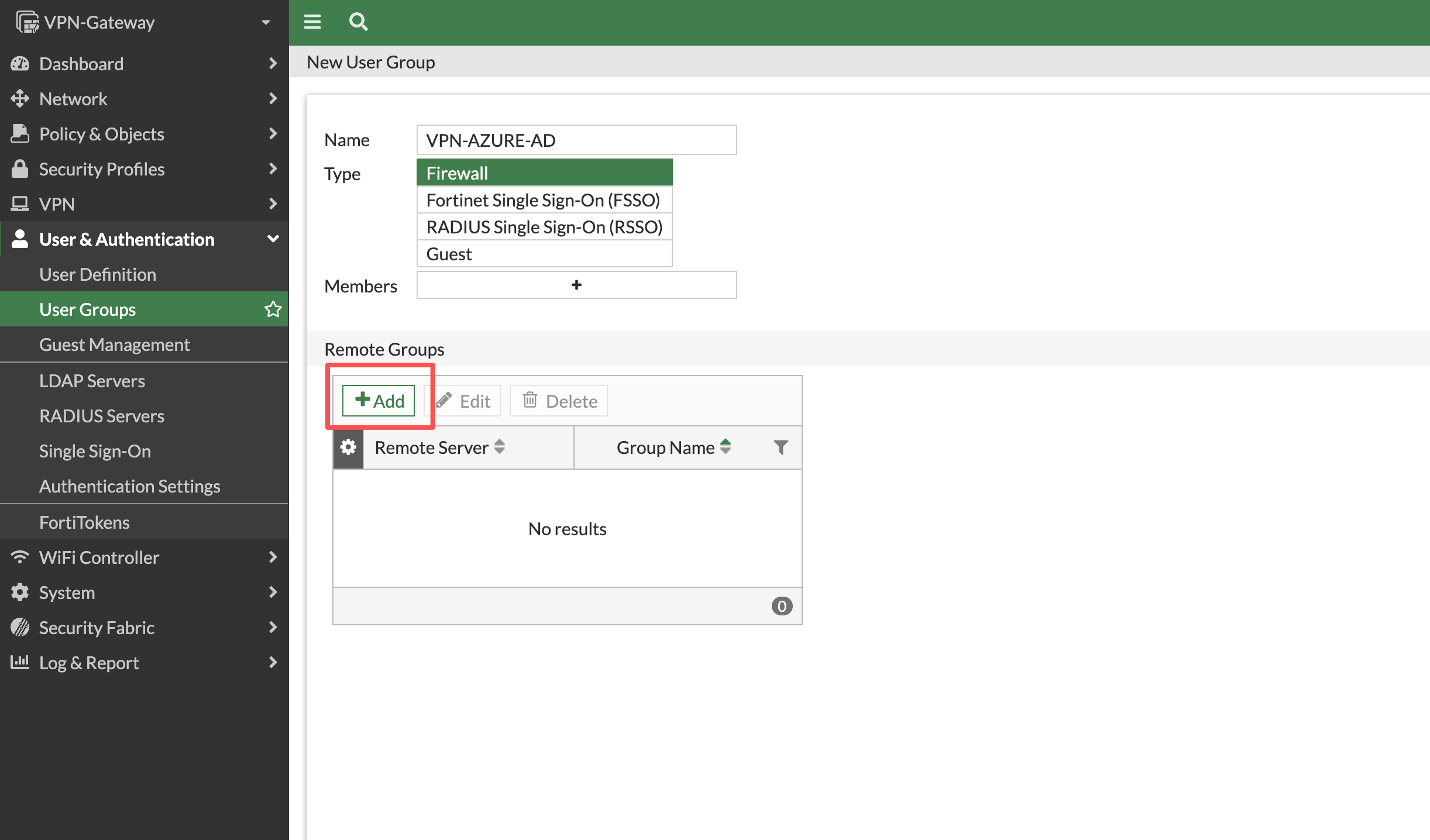
- 进入 User & Authentication > User Groups,单击 Create New,进入新建组向导
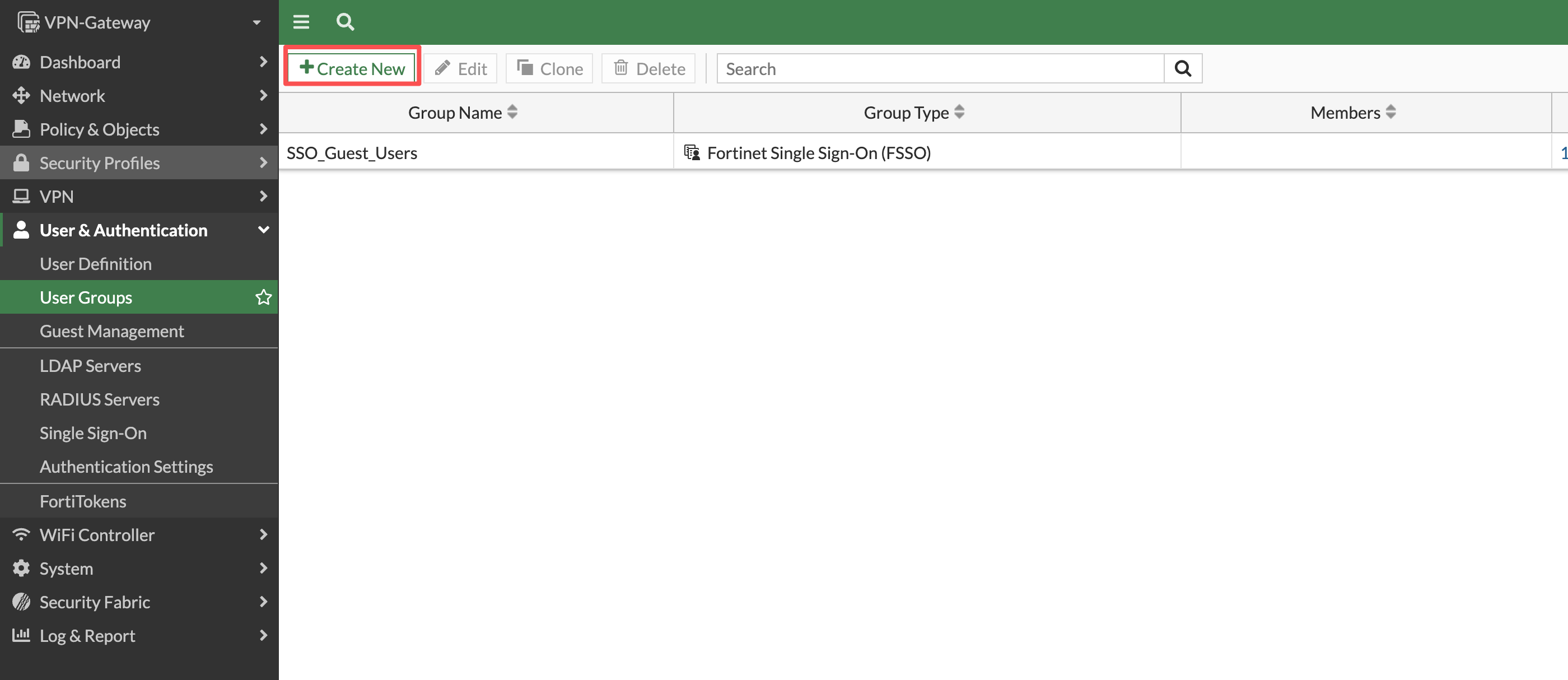
- 在新建页面中完成Name为
VPN-AZURE-AD、Type为Firewall,然后点击Remote Groups 的Add按钮,进入添加远程用户组界面。
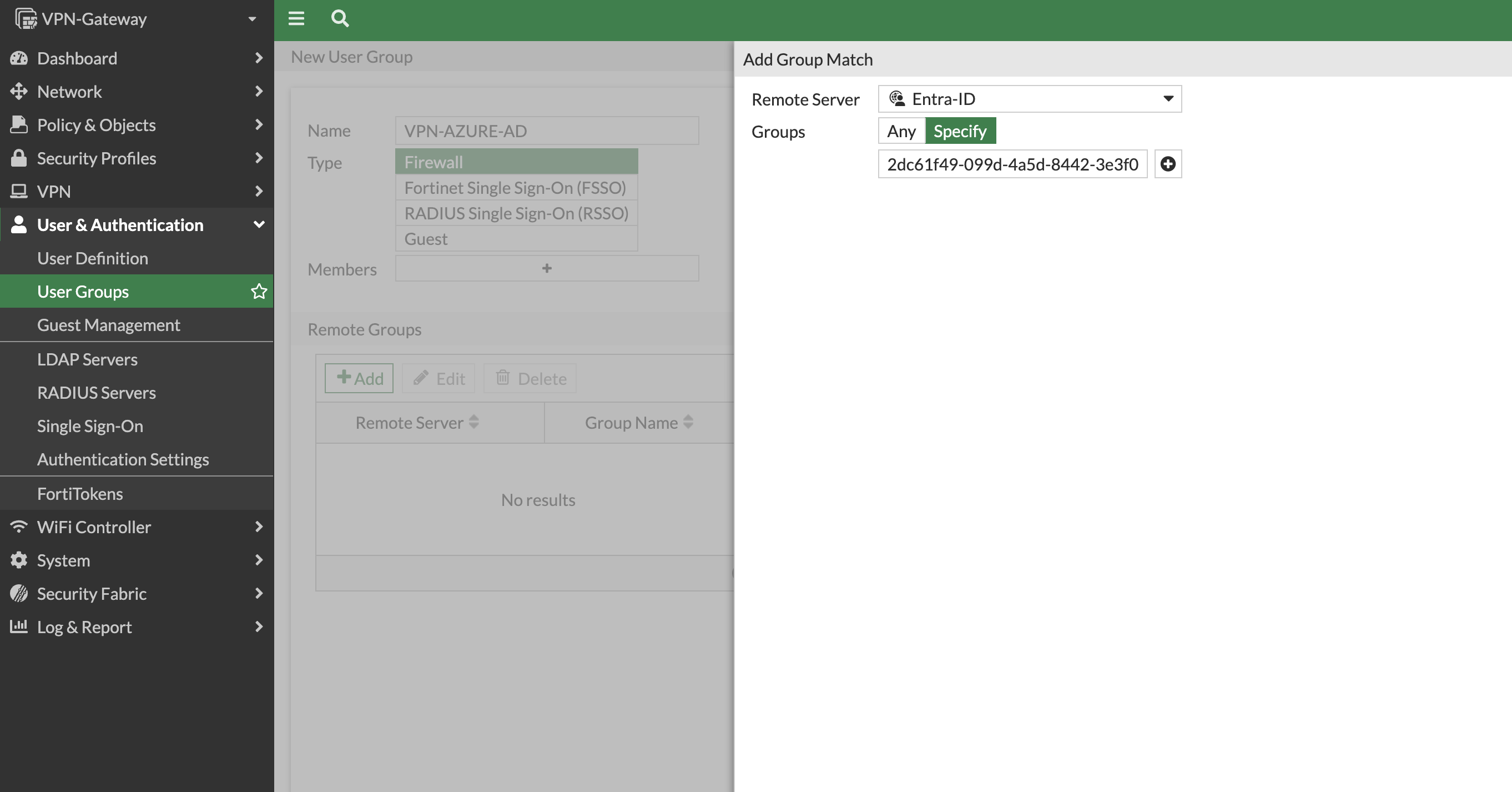
- 在远程组匹配中,Remote Server选择
Entra-ID,匹配指定组(Specify),填写之前记录的组ID。在完成之后点击OK按钮保存用户组配置。
相关CLI
config user group
    edit "VPN-AZURE-AD"
        set group-type firewall
        set member "Entra-ID"
        config match
            edit 1
                set server-name "Entra-ID"
                set group-name "<VPN-IPsec-Users的Object-ID>"
            next
        end
    next
end
2. 配置 IPsec IKEv2 隧道
1. 配置相关地址对象
分别创建地址对象,需要创建用于客户端地址分配地址对象RA-Azure-POOL,以及用于作为隧道分离对象的地址组 RA-Azure-SPLIT,包括地址对象RA-Azure-LAN
注
- 使用地址对象更加方便后期运维,隧道分离配置只允许选择一个地址对象或者地址组
进入 Policy & Objects > Addresses,单击Create new按钮,创建以下地址对象:

| 名称 | 类型 | 地址 | 用途 | 配置意义和说明 |
|---|---|---|---|---|
RA-Azure-POOL | IP Range | 10.254.10.11-10.254.10.20 | 客户端地址分配、策略源地址 | 与 Mode Config 配置的地址池范围保持一致,用于防火墙策略的源地址匹配。 |
RA-Azure-LAN | Subnet | 10.167.12.0/24 | 下发到客户端的分流路由 | 加入 RA-Azure-SPLIT 后供网关下发目标路由;本对象不直接授予访问权限。 |
相关 CLI 参考:
config firewall address
    edit "RA-Azure-POOL"
        set type iprange
        set start-ip 10.254.10.11
        set end-ip 10.254.10.20
    next
    edit "RA-Azure-LAN"
        set subnet 10.167.12.0 255.255.255.0
    next
end
2. 配置相关地址组
- 在 Addresses 中点击AddressGroup选项卡,单击Create new进入地址组配置。
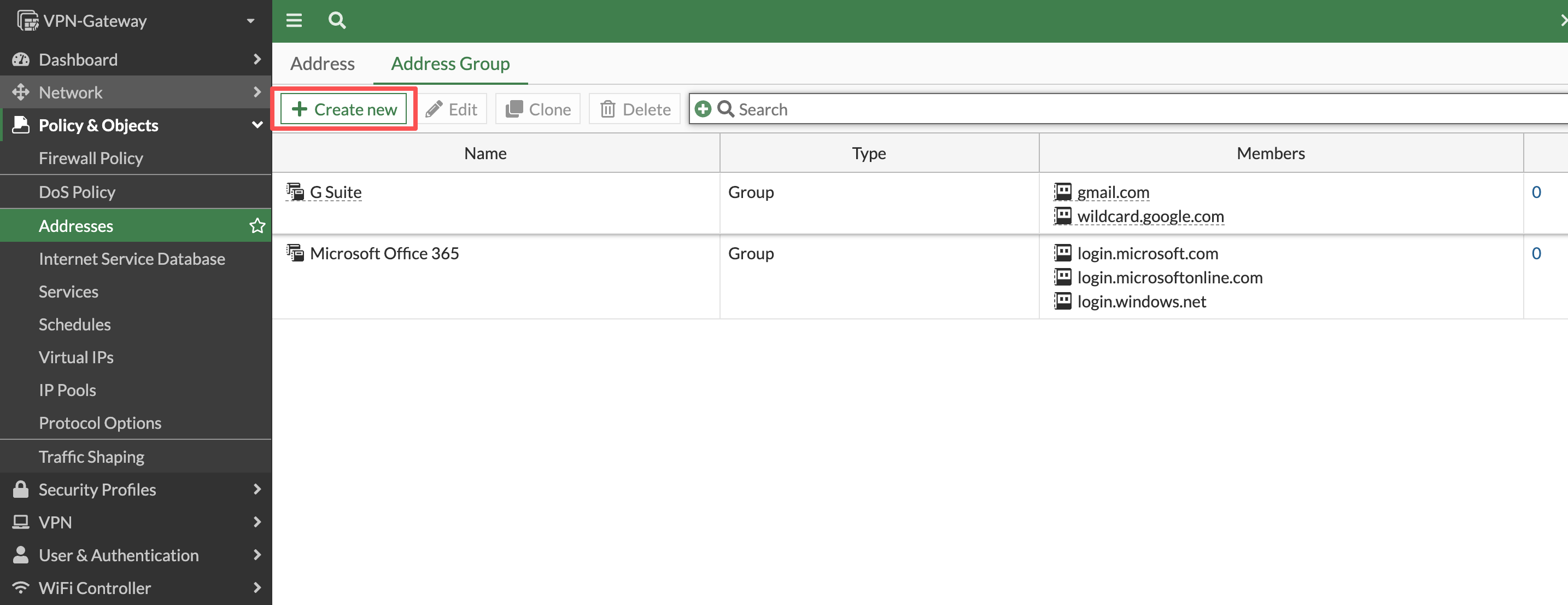
- 创建地址组
RA-Azure-SPLIT,加入RA-Azure-LAN,用于指定分流网段。
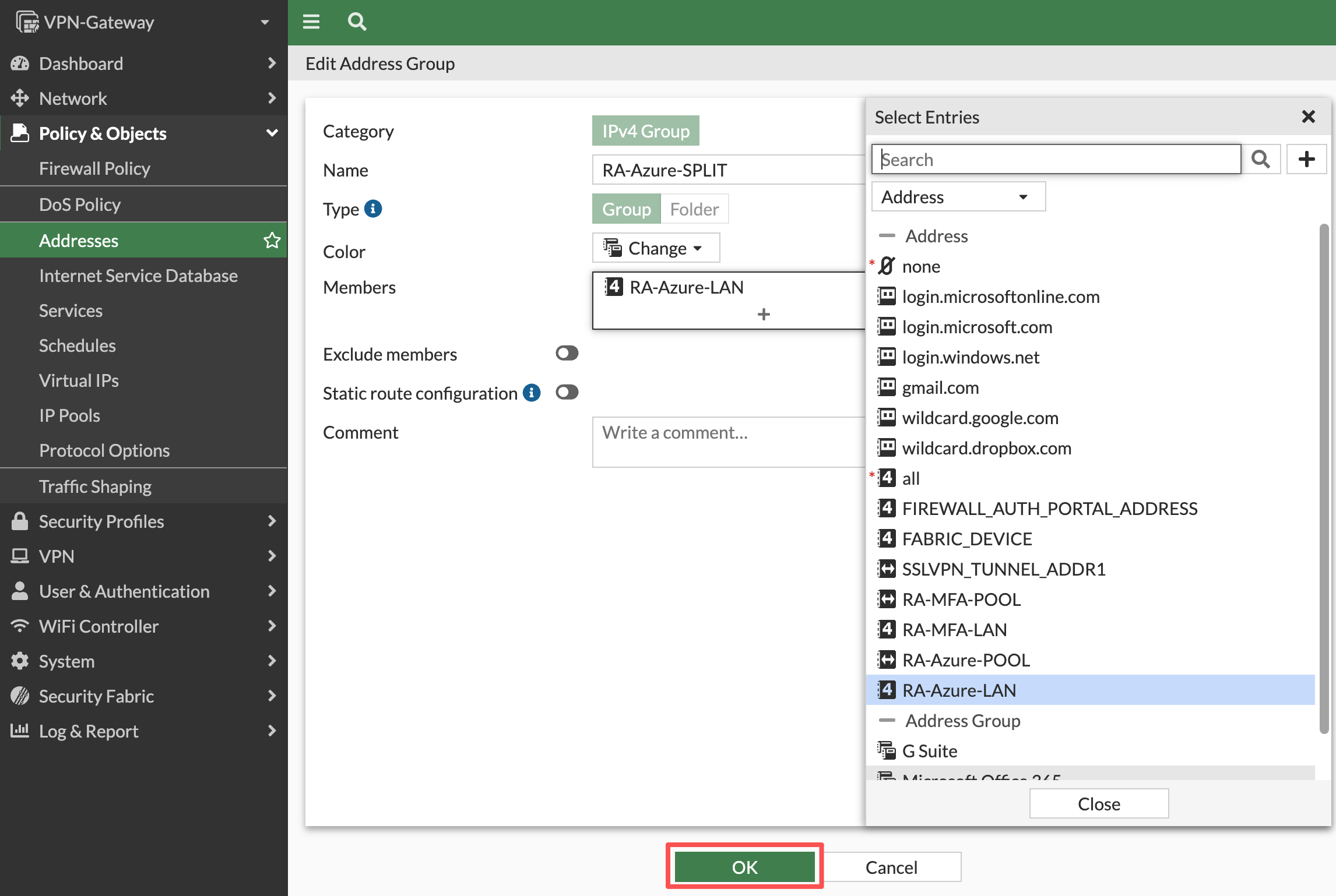
完成后单击OK按钮以完成创建,相关CLI命令参考
config firewall addrgrp
    edit "RA-Azure-SPLIT"
        set member "RA-Azure-LAN"
    next
end
重要
分流地址组决定哪些目标流量进入 VPN,这是路由层面的配置。实际可访问的资源和端口仍由防火墙策略控制。
3. 配置 IKEv2 隧道,阶段 1 和阶段 2
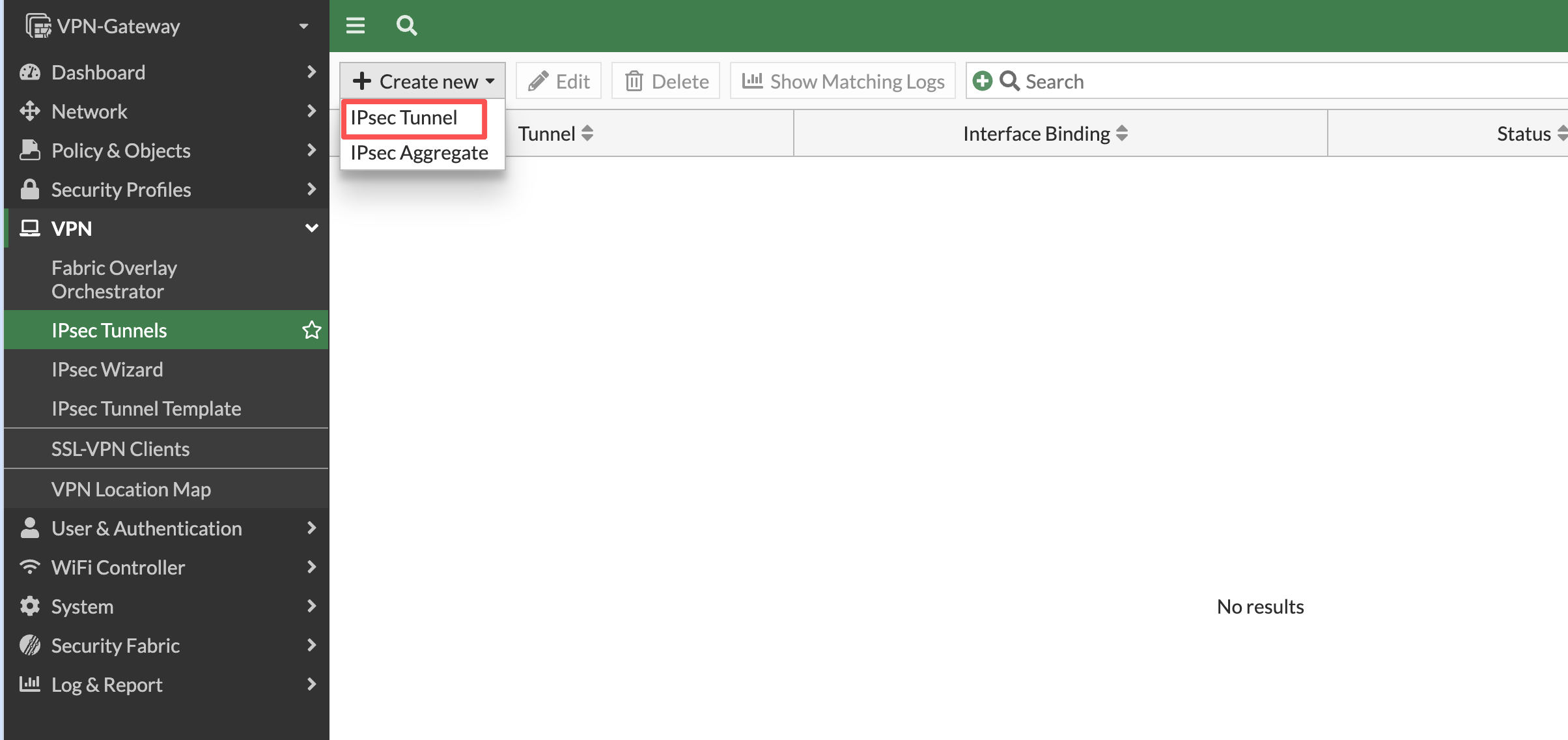
- 进入 VPN > IPsec Tunnels 单击Create new按钮,创建IPsec Tunnel进入新建隧道配置向导。
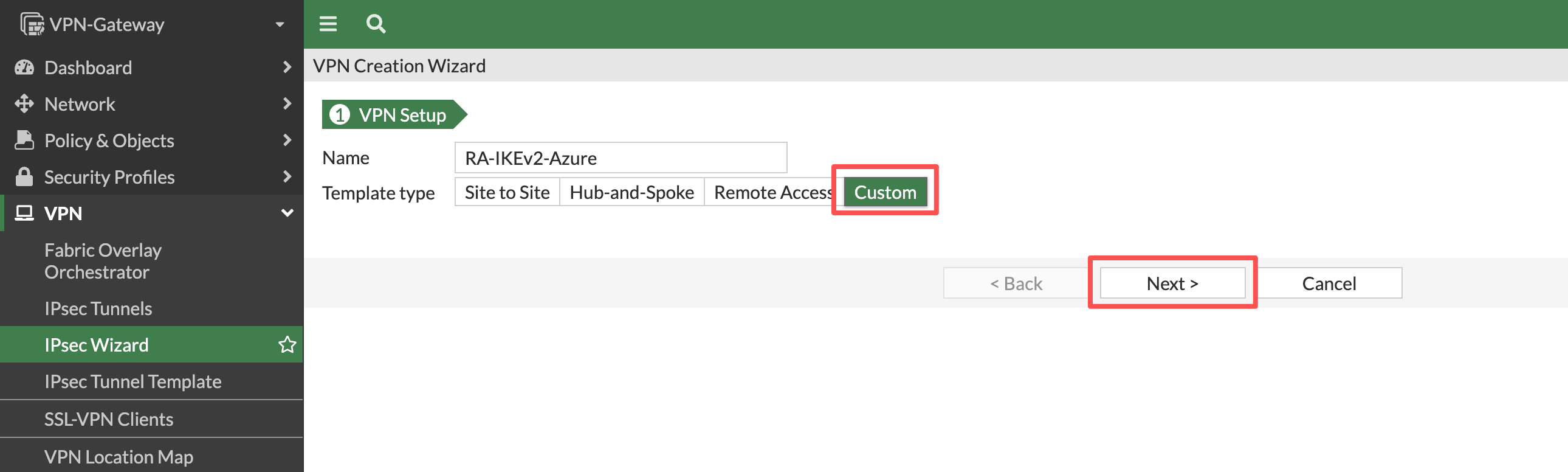
- 进入VPN配置向导后,输入名称为
RA-IKEv2-Azure,Template type为Custom。单击Next按钮进入配置模板。
- 使用以下参数配置自定义IPsec 隧道模板。
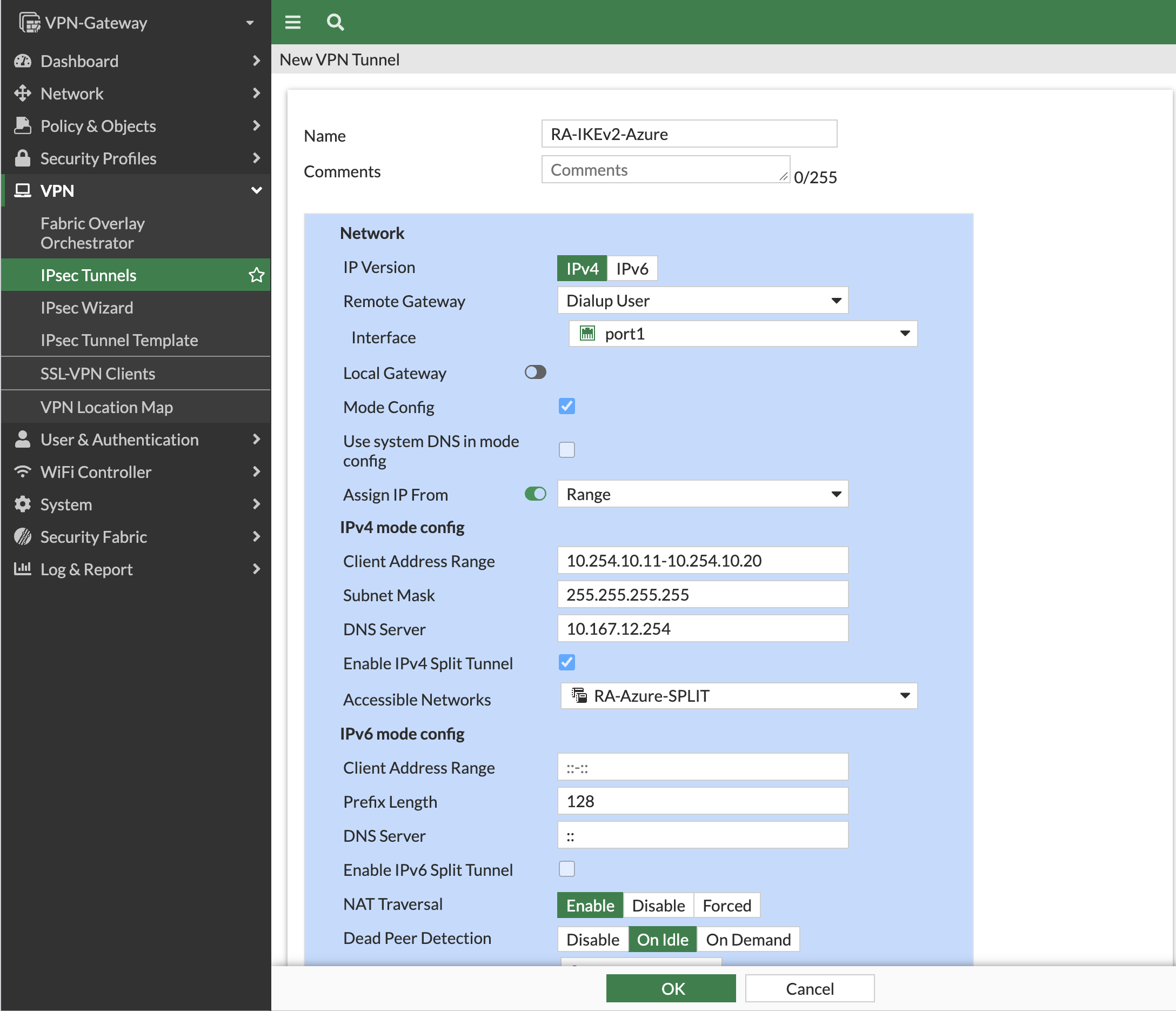
配置信息:
| 项目 | 值 | 注意 | 配置意义和说明 |
|---|---|---|---|
| Remote Gateway 类型 | Dialup User | 接受地址可能变化的远程客户端主动拨入 | |
| Interface | port1 | 指定接收 IKE 协商的网关接口,须与客户端 Remote Gateway 所在入口对应。 | |
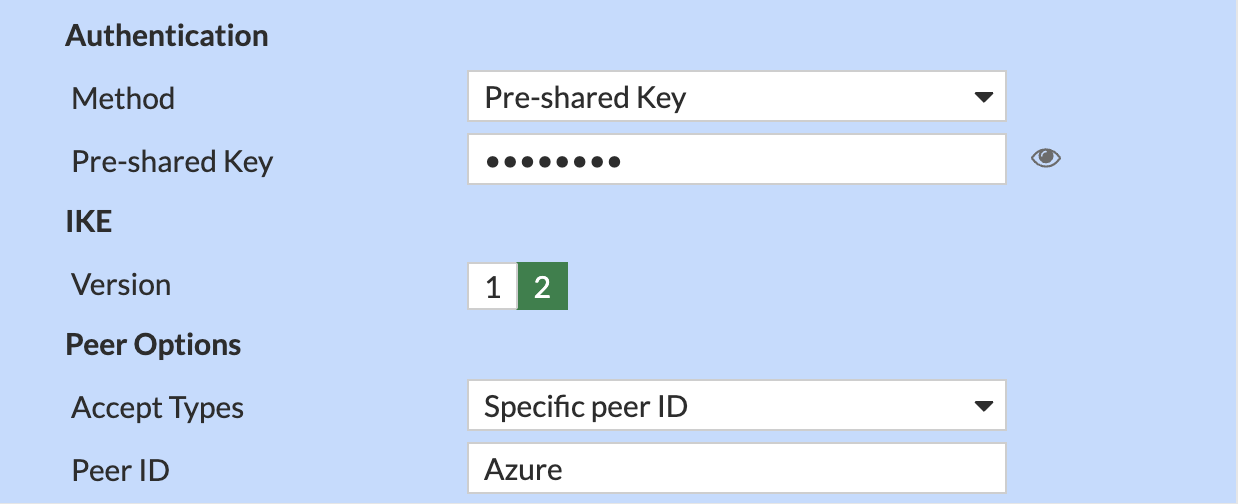
| IKE Version | 2 | 选择 IKEv2 协议,两端版本必须一致;本文用户认证通过 EAP 完成。 | |
| Authentication Method | Pre-shared Key | 选择 IKE 对等体认证方式 | |
| Pre-shared Key | 与示例参数和 EMS 配置一致Pass@123 | 供两端证明持有相同共享密钥;不一致时无法完成该层认证。 | |
| Mode Config | Enable | 由网关向客户端提供 VPN 地址、DNS 和分流信息,避免逐终端手工设置。 | |
| Client Address Range | 10.254.10.11-10.254.10.20 | 指定客户端获得的隧道内源地址,应和RA-Azure-POOL配置的值相同 | |
| DNS Server | 10.167.12.254 | 指定连接后可用的内部解析服务器;下发地址本身不保证 DNS 流量可达。 | |
| Split Tunnel | RA-Azure-SPLIT | 仅将组内目标网段的流量引入 VPN;具体访问权限仍取决于策略。 | |
| EAP | Enable | 必须CLI配置 | 启用用户身份验证为EAP。 |
| eap-identity | send-request | 必须CLI配置 | FortiGate 在 IKEv2 认证过程中主动发送 EAP-Request/Identity,要求客户端返回 EAP 用户身份,而非直接使用 IKE IDi。适用于需要单独获取 EAP 用户名并进行后续用户认证的场景。 |
| Access Types | Specific peer ID | 限制允许建立 IKEv2 连接的客户端 Peer ID,只有客户端提交的 IKE 身份标识与指定 Peer ID 匹配时,才允许继续协商。 | |
| Peer ID | Azure | 指定允许接入的客户端 IKE 身份标识为 Azure,须与 FortiClient/EMS 配置的 Local ID 一致。 | |
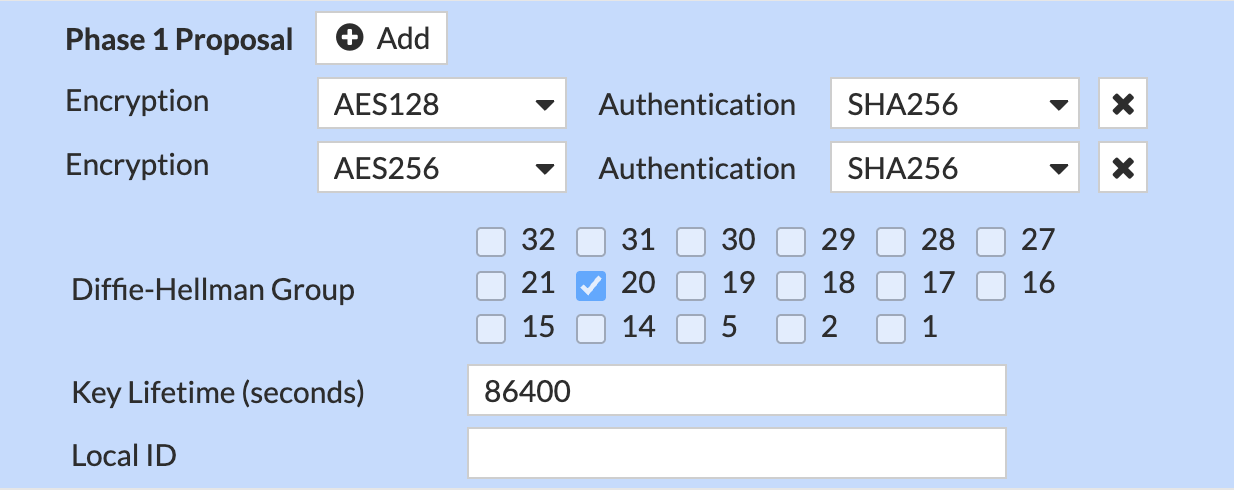
| Phase 1 Proposal / DH / Lifetime | AES128-SHA256、AES256-SHA256/DH20/ 86400 | 设定 IKE SA 的算法、密钥交换组和使用时长;86400 秒为 24 小时。 | |
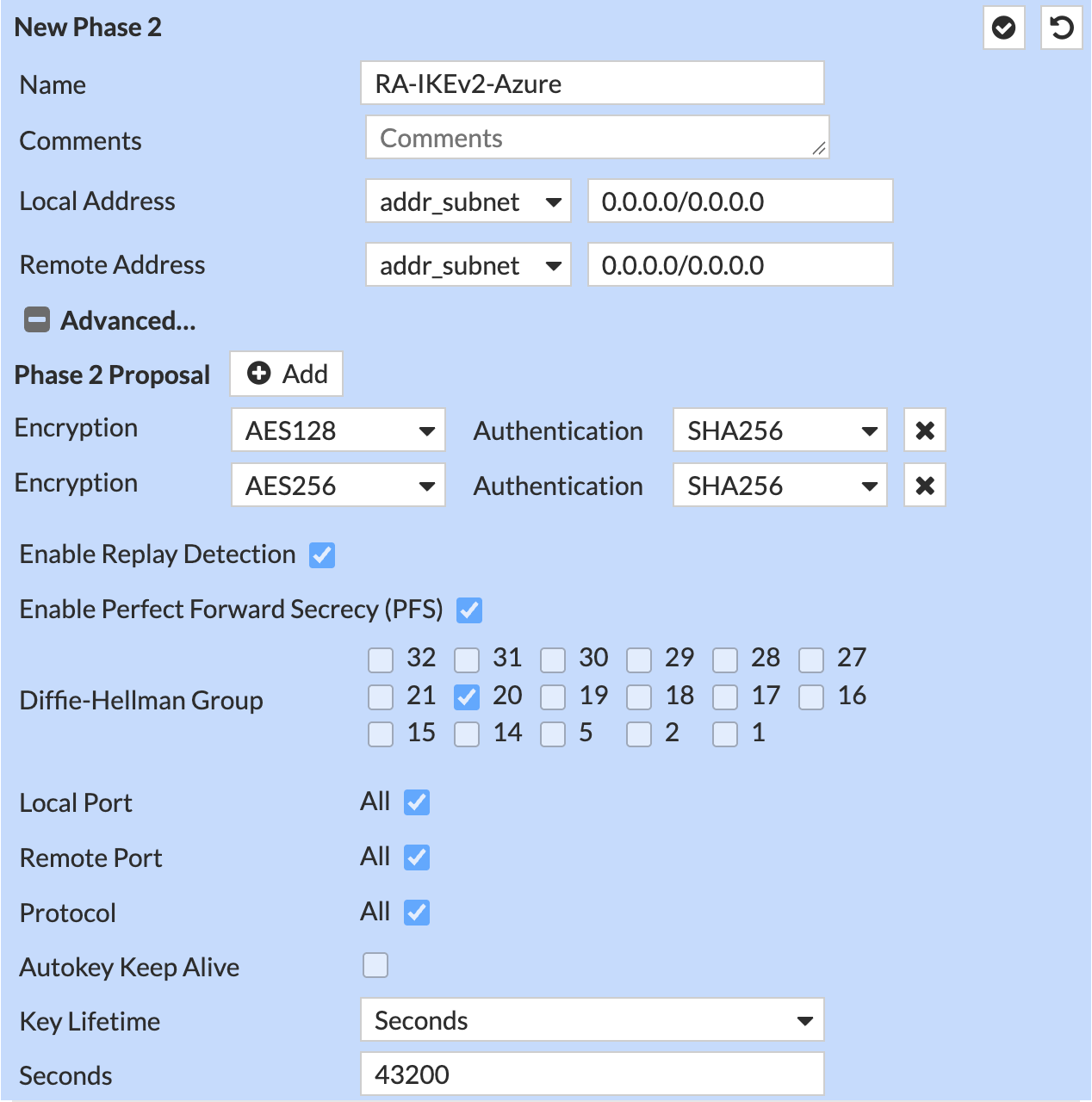
| Phase 2 Proposal / PFS / Lifetime | AES128-SHA256、AES256-SHA256/DH20/ 43200 | 设定业务 IPsec SA 的算法、PFS 密钥交换和使用时长;43200 秒为 12 小时,到期触发重协商。 |
GUI配置
配置网络基本信息:
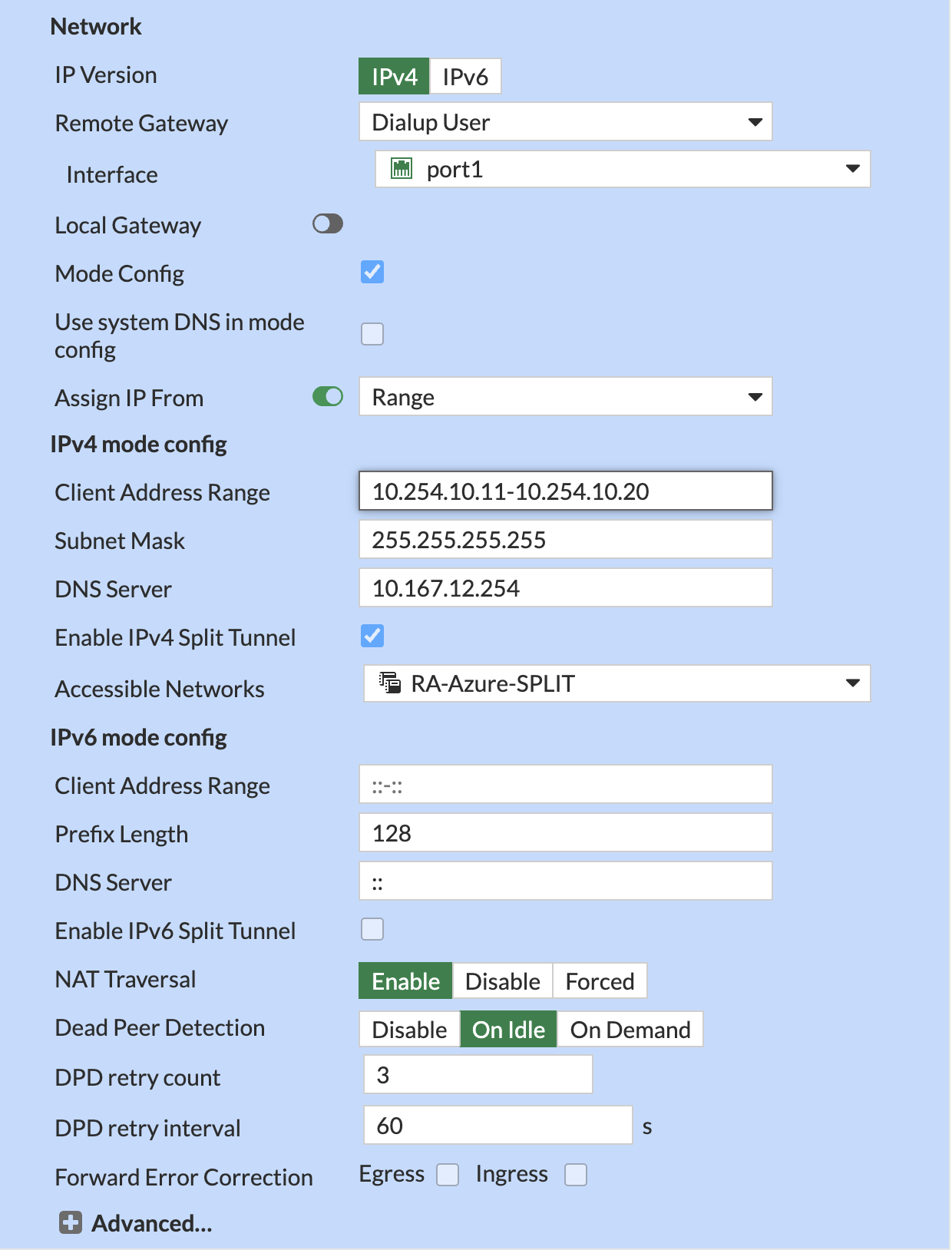
配置认证信息:
配置阶段1提案(Phase 1 Propsoal)
配置阶段2提案(Phase 2 Selectors)
CLI配置eap/eap-identity
config vpn ipsec phase1-interface
    edit "RA-IKEv2-Azure"
        set eap enable
        set eap-identity send-request
    next
end
完整相关 CLI 参考:
config vpn ipsec phase1-interface
    edit "RA-IKEv2-Azure"
        set type dynamic
        set interface "port1"
        set ike-version 2
        set peertype one
        set net-device disable
        set mode-cfg enable
        set ipv4-dns-server1 10.167.12.254
        set proposal aes128-sha256 aes256-sha256
        set dpd on-idle
        set dhgrp 20
        set eap enable
        set eap-identity send-request
        set peerid "Azure"
        set ipv4-start-ip 10.254.10.11
        set ipv4-end-ip 10.254.10.20
        set ipv4-split-include "RA-Azure-SPLIT"
        set psksecret Pass@123
        set dpd-retryinterval 60
    next
end

config vpn ipsec phase2-interface
    edit "RA-IKEv2-Azure"
        set phase1name "RA-IKEv2-Azure"
        set proposal aes128-sha256 aes256-sha256
        set dhgrp 20
    next
end
注意
- 如果
port1已有其他拨号式 IKEv2 隧道,应为本隧道指定Network-ID使用peerid对不同的隧道进行区分,并在 EMS 中设置相同值,避免连到旧的认证入口。本文使用了指定peerid作为隧道指定唯一标识。
4. 配置关联策略
进入 Policy & Objects > Firewall Policy,单击Create new按钮创建新策略。
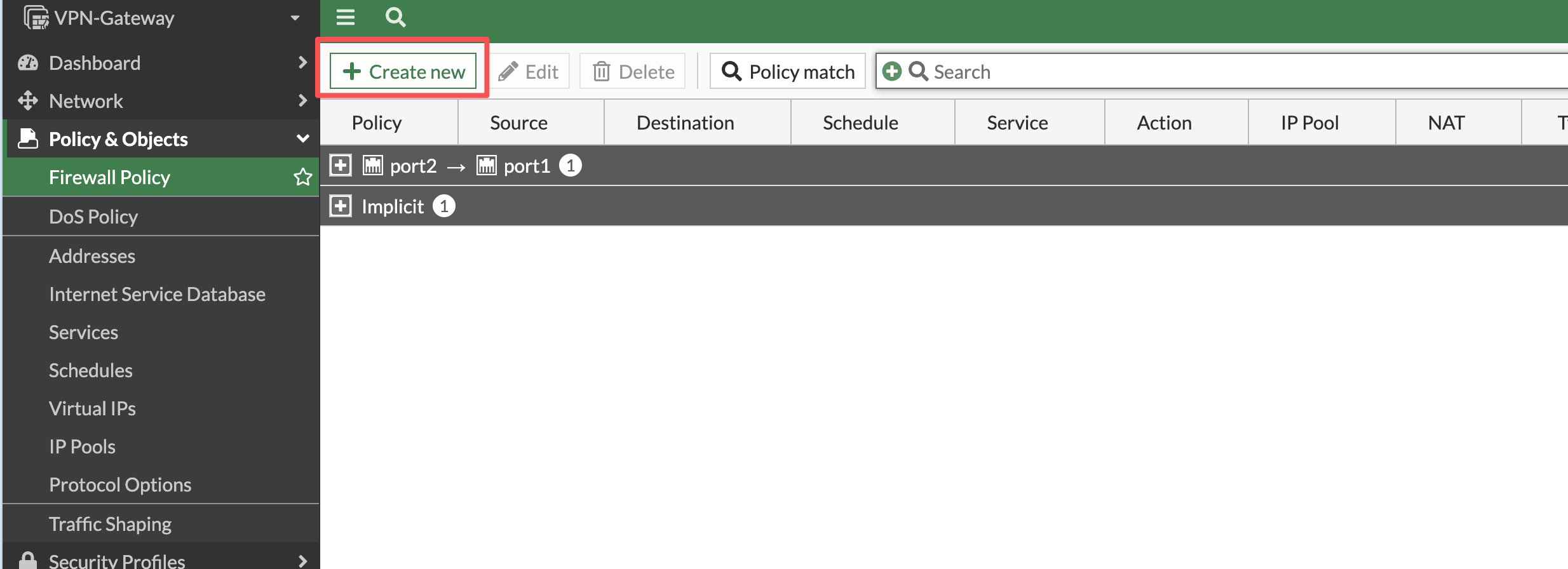
进入新策略配置界面后,使用以下参数配置允许IPsec 隧道地址RA-Azure-POOL和测试用户组VPN-AZURE-AD访问内网资源RA-Azure-LAN
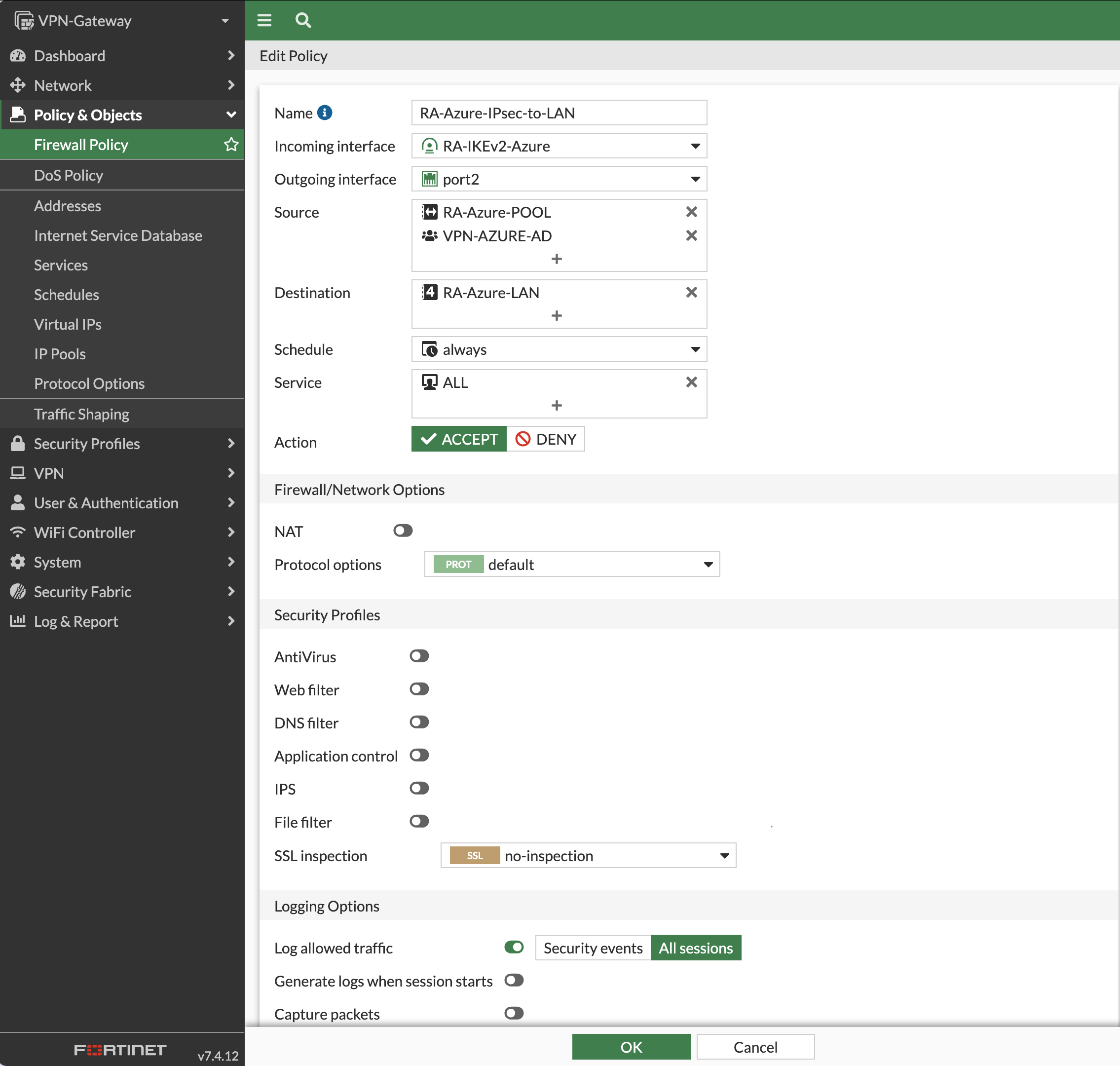
以下是相关配置信息:
| 项目 | 值 | 配置意义和说明 |
|---|---|---|
| Name | RA-Azure-IPsec-to-LAN | 为这条防火墙策略设置一个名称,方便后续查找、管理和排查问题。 |
| Incoming Interface | RA-IKEv2-Azure | 选择 IPsec VPN 隧道接口,用于接收 VPN 客户端访问内网的流量。 |
| Outgoing Interface | port2 | 选择连接内网的接口,让 VPN 客户端的流量能够转发到内部网络。 |
| Source | RA-Azure-POOL、VPN-AZURE-AD | 设置允许访问的 VPN 客户端地址范围和用户组,确保只有符合地址条件且属于指定用户组的客户端才能通过这条策略。 |
| Destination | RA-Azure-LAN | 选择 VPN 客户端可以访问的内网地址范围,避免客户端访问不需要开放的其他网络资源。 |
| Schedule | always | 设置策略始终生效,让 VPN 客户端在通过认证后可以随时访问允许的内网资源。 |
| Service | ALL | 允许 VPN 客户端使用所有服务和端口访问指定的内网资源,方便进行连通性测试和业务访问。 |
| Action | ACCEPT | 允许符合这条策略匹配条件的流量通过 FortiGate。 |
| NAT | Disable | 关闭源地址转换,让内网服务器能够看到 VPN 客户端实际分配到的虚拟 IP 地址,方便识别和排查问题。 |
| Log Allowed Traffic | All Sessions | 记录通过这条策略的会话日志,方便后续查看访问情况和排查连接问题。 |
| 完成后单击OK按钮完成配置 |
相关 CLI 参考:
config firewall policy
    edit 0
        set name "RA-Azure-IPsec-to-LAN"
        set srcintf "RA-IKEv2-Azure"
        set dstintf "port2"
        set action accept
        set srcaddr "RA-Azure-POOL"
        set dstaddr "RA-Azure-LAN"
        set schedule "always"
        set service "ALL"
        set logtraffic all
        set groups "VPN-AZURE-AD"
    next
end
3. 配置 EMS
1. 在对应的Endpoint Profile 中添加IKEv2隧道
- 登录 EMS,进入 Endpoint Profiles > Remote Access,编辑想要添加隧道的Profile。本例为
VPN-Profile
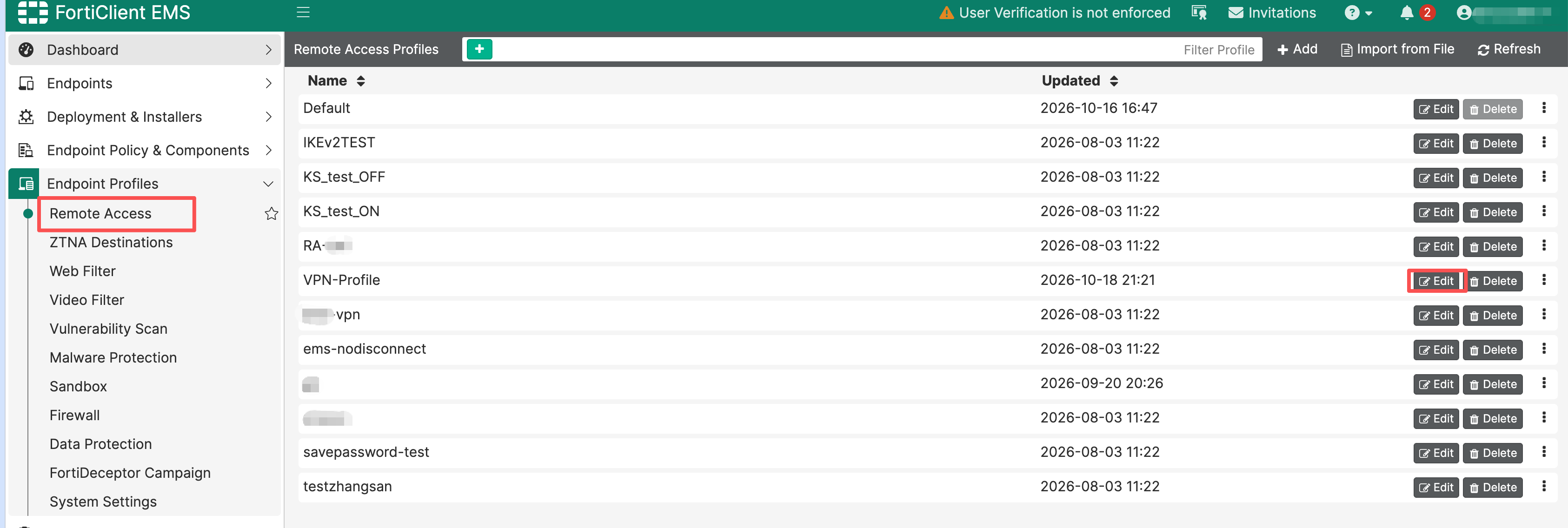
- 在VPN Tunnels 单击Add Tunnel按钮以添加隧道
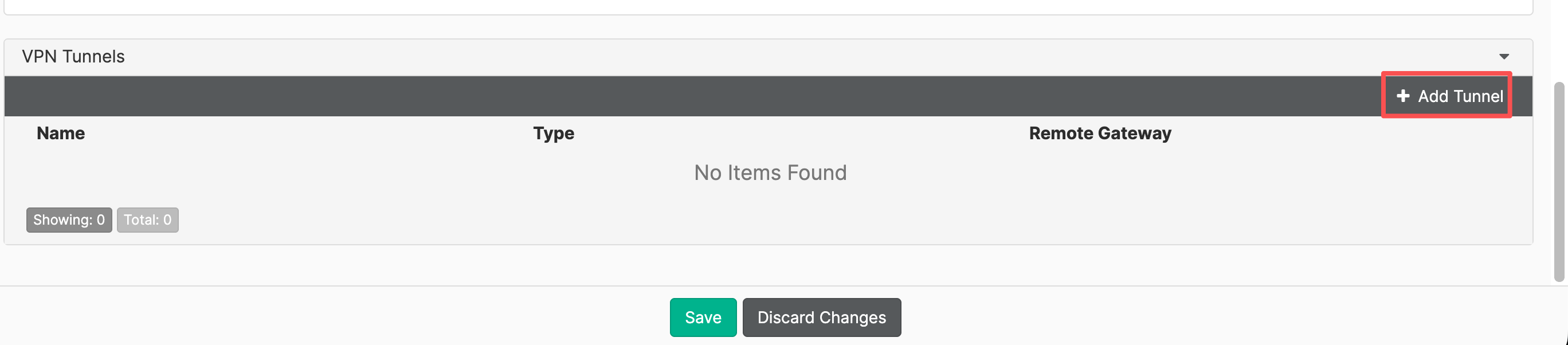
- 在进入 VPN Tunnels,后选择 Manual,并单击Next以继续配置IPsec隧道。
- 按以下参数配置IPsec 隧道
| 配置位置 | 参数 | 值 | 注意 |
|---|---|---|---|
| Basic Settings | Name | RA-IKEv2-Azure | |
| Basic Settings | Type | IPsec VPN | |
| Basic Settings | Remote Gateway | 10.234.12.30 | |
| Basic Settings | Authentication Method | Pre-Shared Key | |
| Basic Settings | Pre-Shared Key | 与 FortiGate 一致,实验为 Pass@123 | |
| Basic Settings | Prompt for Username | Enable | |
| VPN Settings | IKE | Version 2 | |
| VPN Settings | Address Assignment | Mode Config | |
| VPN Settings | Mode Config Types | IPv4 | |
| VPN Settings | Encapsulation | IKE UDP Port | |
| VPN Settings | IKE UDP Port | 500 | |
| Phase 1 | Proposal | AES128 / SHA256 | |
| Phase 1 | Proposal | AES256 / SHA256 | |
| Phase 1 | DH Group / Key Life | 20 / 86400 秒 | |
| Phase 1 | Local ID | Azure | 该参数作为隧道指定唯一标识 |
| Phase 1 | EAP Authentication Method | EAP-MSCHAPv2 | |
| Phase 1 | Dead Peer Detection / NAT Traversal | Enable | |
| Phase 1 | Enable Block network access during IKE negotiation | enable | |
| Phase 1 | Block network access during IKE negotiation Timeout | 120 | |
| Phase 2 | Proposal | AES128 / SHA256 | |
| Phase 2 | Proposal | AES256 / SHA256 | |
| Phase 2 | DH Group / Key Life | 20 / 43200 秒 | |
| Phase 2 | Perfect Forward Secrecy / Replay Detection | Enable | |
| Advanced Settings | Enable SAML Login | Enable | |
| Advanced Settings | SAML Port | 9443 |
Basic Settings配置
| 配置位置 | 参数 | 值 |
|---|---|---|
| Basic Settings | Name | RA-IKEv2-Azure |
| Basic Settings | Type | IPsec VPN |
| Basic Settings | Remote Gateway | 10.234.12.30 |
| Basic Settings | Authentication Method | Pre-Shared Key |
| Basic Settings | Pre-Shared Key | 与 FortiGate 一致,实验为 Pass@123 |
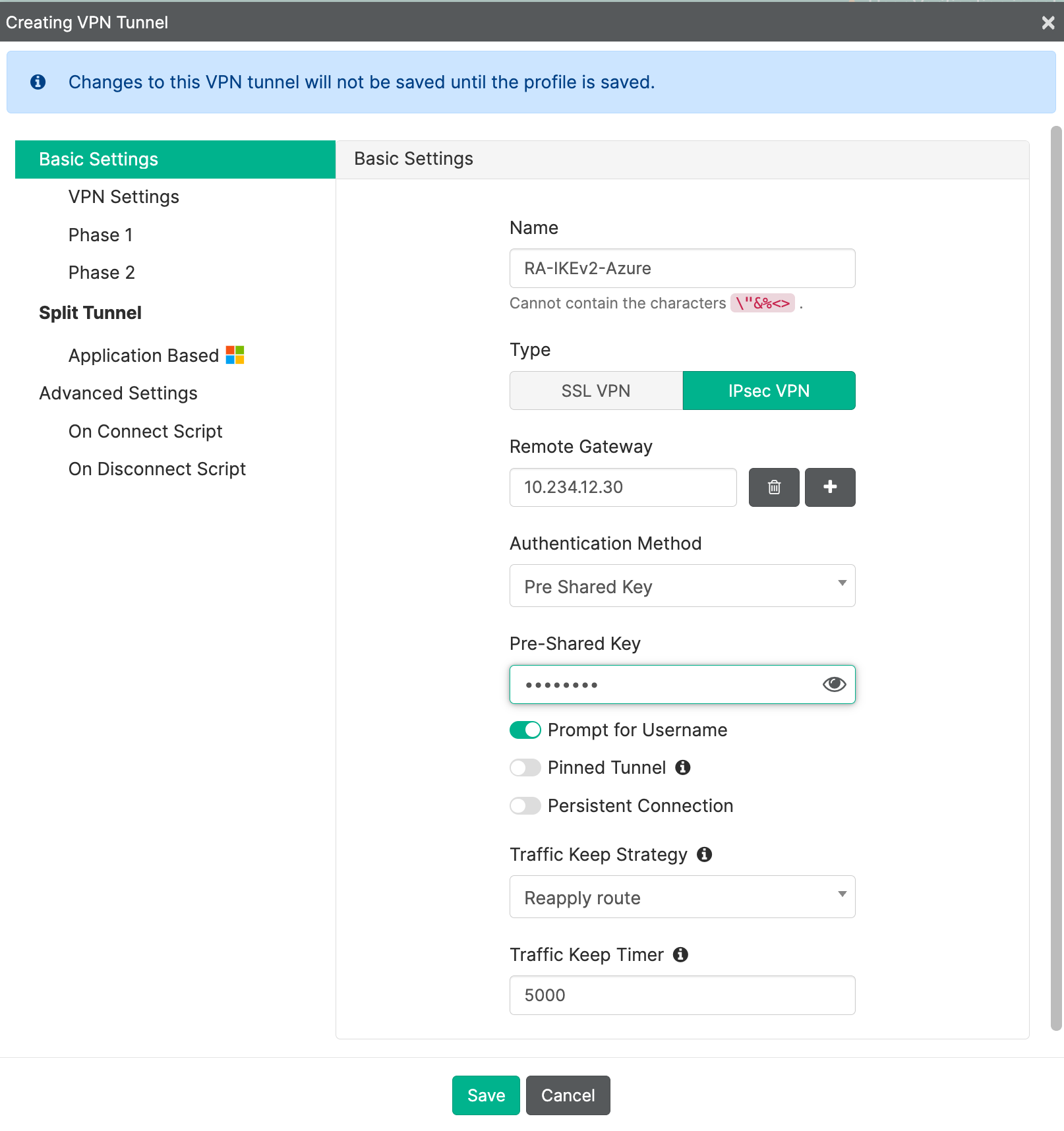
VPN Settings配置
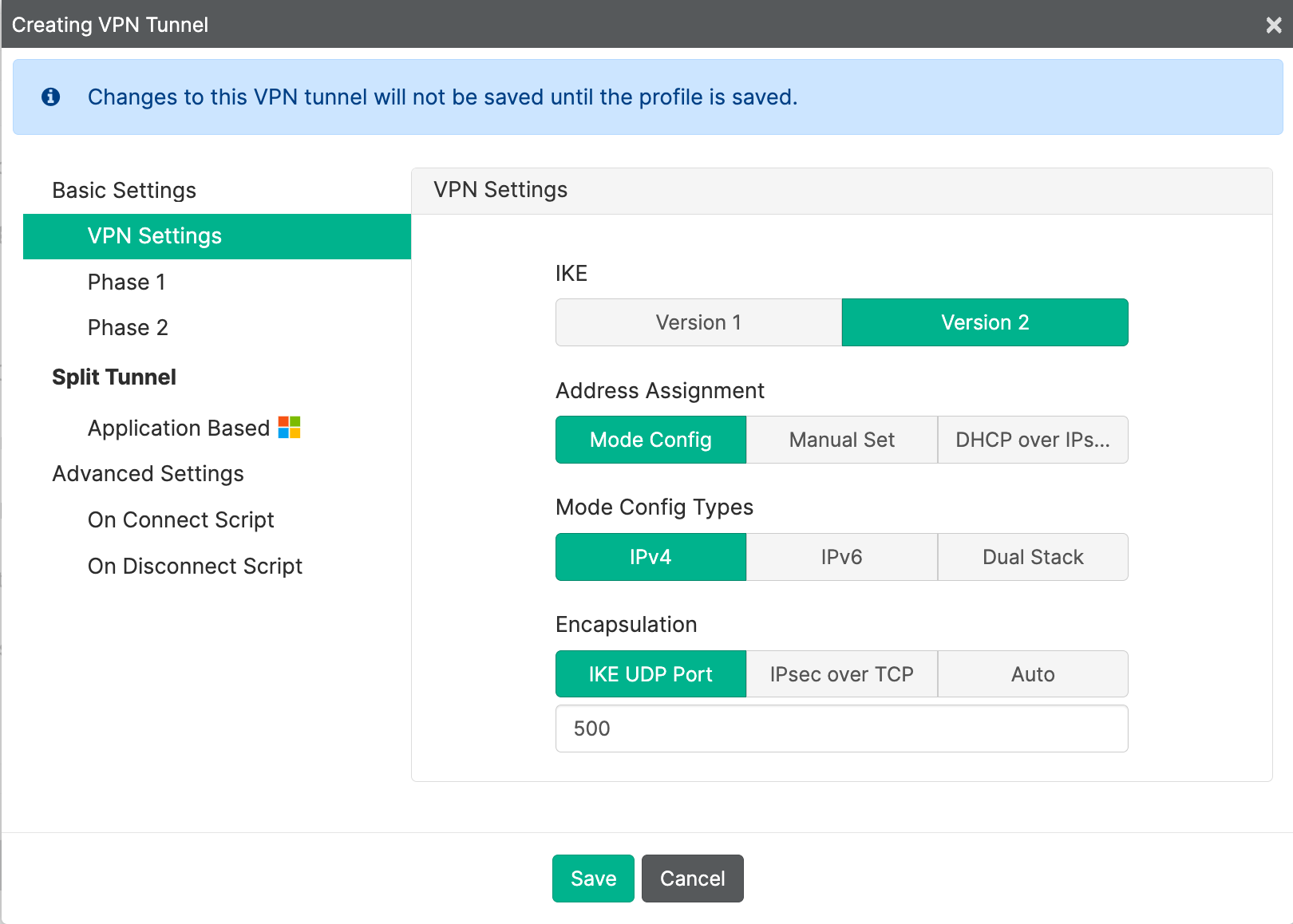
| 配置位置 | 参数 | 值 |
|---|---|---|
| VPN Settings | IKE | Version 2 |
| VPN Settings | Address Assignment | Mode Config |
| VPN Settings | Mode Config Types | IPv4 |
| VPN Settings | Encapsulation | IKE UDP Port |
| VPN Settings | IKE UDP Port | 500 |
Phase 1
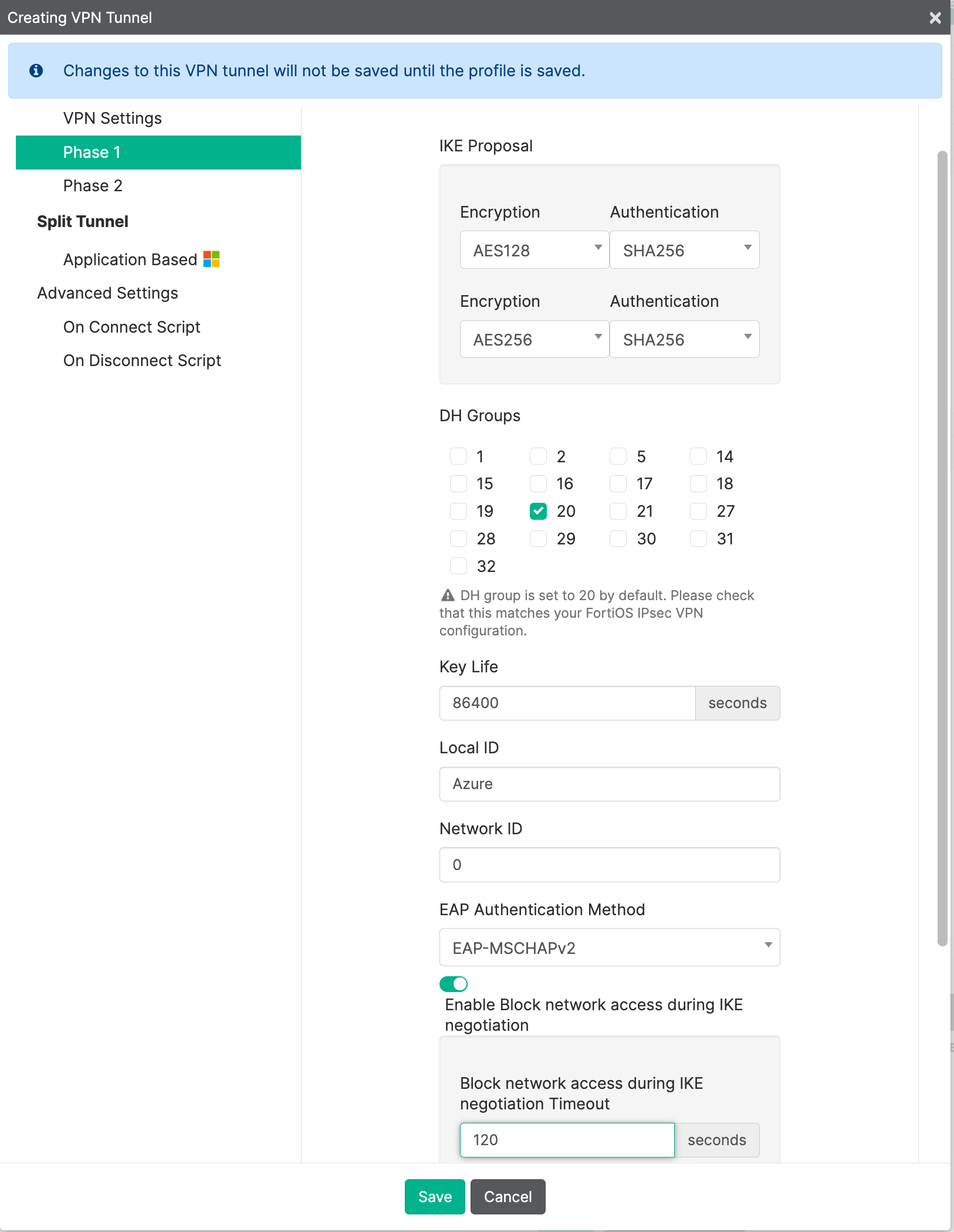
| 配置位置 | 参数 | 值 | 注意 |
|---|---|---|---|
| Phase 1 | Proposal | AES128 / SHA256 | |
| Phase 1 | Proposal | AES256 / SHA256 | |
| Phase 1 | DH Group / Key Life | 20 / 86400 秒 | |
| Phase 1 | Local ID | Azure | 该参数作为隧道指定唯一标识 |
| Phase 1 | EAP Authentication Method | EAP-MSCHAPv2 | |
| Phase 1 | Enable Block network access during IKE negotiation | enable | |
| Phase 1 | Block network access during IKE negotiation Timeout | 120 |
Phase 2
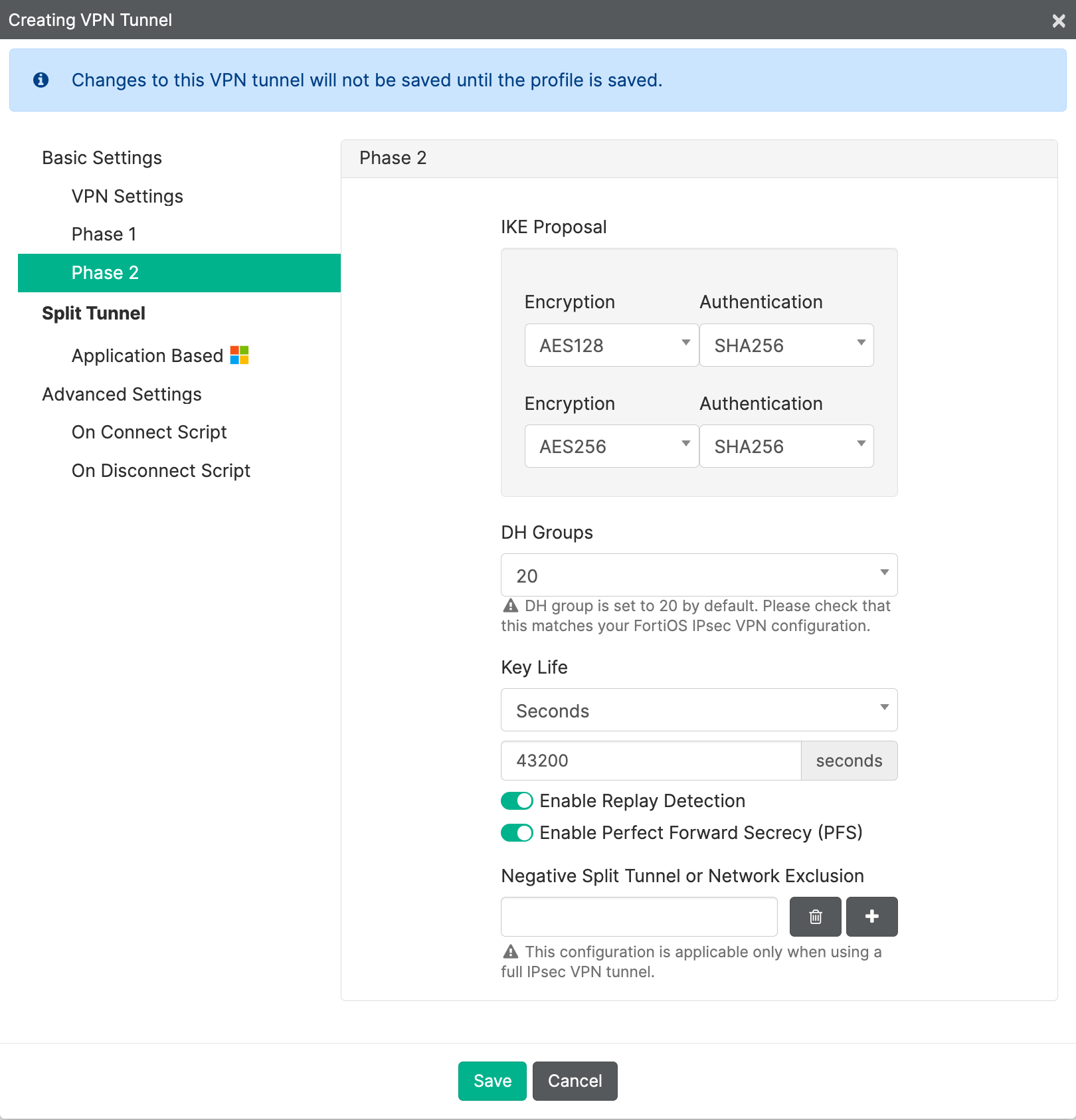
| 配置位置 | 参数 | 值 |
|---|---|---|
| Phase 2 | Proposal | AES128 / SHA256 |
| Phase 2 | Proposal | AES256 / SHA256 |
| Phase 2 | DH Group / Key Life | 20 / 43200 秒 |
| Phase 2 | Perfect Forward Secrecy / Replay Detection | Enable |
Advanced Settings
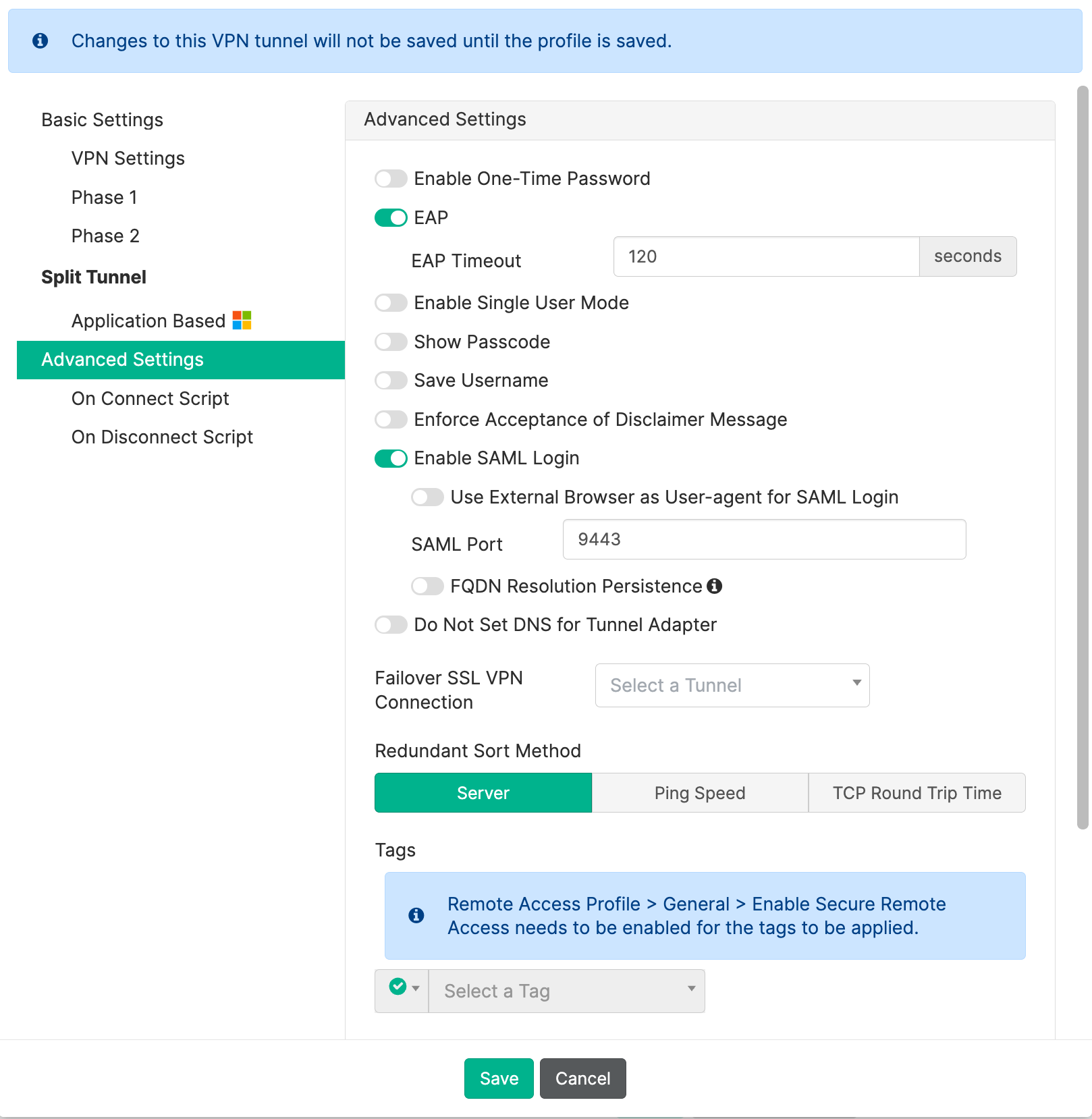
| 配置位置 | 参数 | 值 |
|---|---|---|
| Advanced Settings | Enable SAML Login | Enable |
| Advanced Settings | SAML Port | 9443 |
- 单击Save按钮保存隧道,再单击Remote Access Profile的Save按钮以保存Remote Access Profile配置。
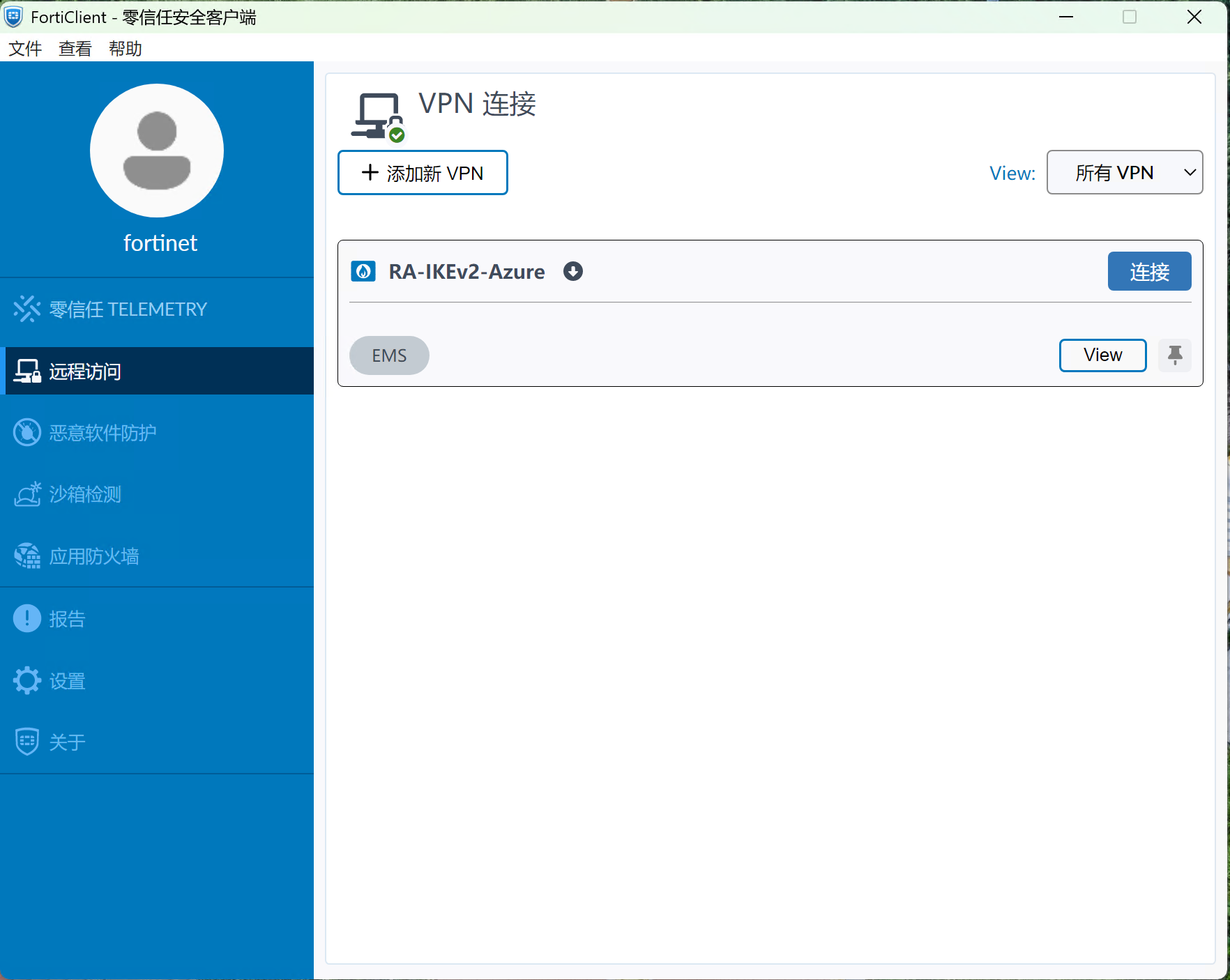
4. 等待FortiClient 更新成功。
FortiClient在更新成功后,显示对应的隧道信息。
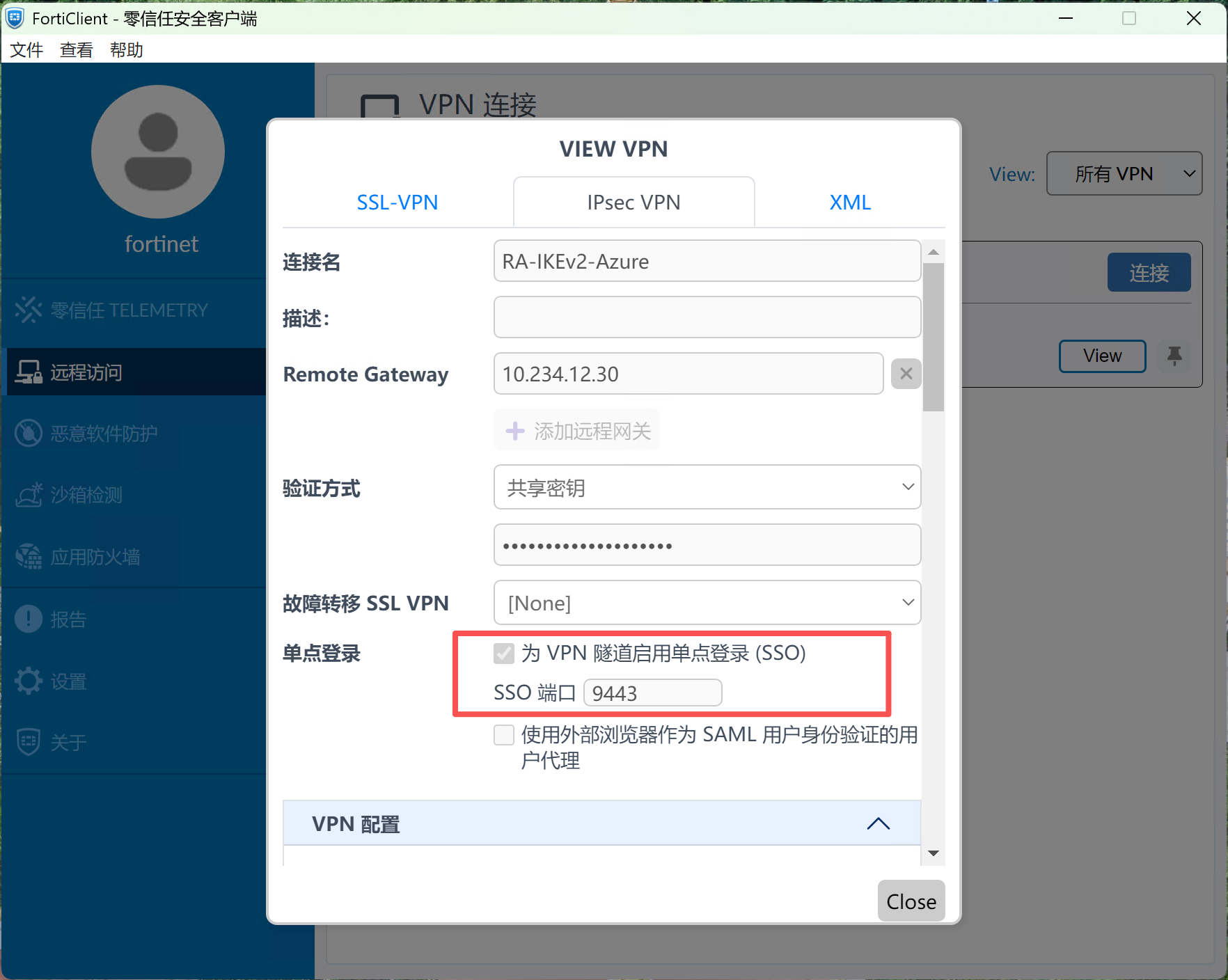
单击View按钮可以看到相关的配置,可以看到单点登录已经被开启。
连接与验证
1. 使用 Entra 账号连接
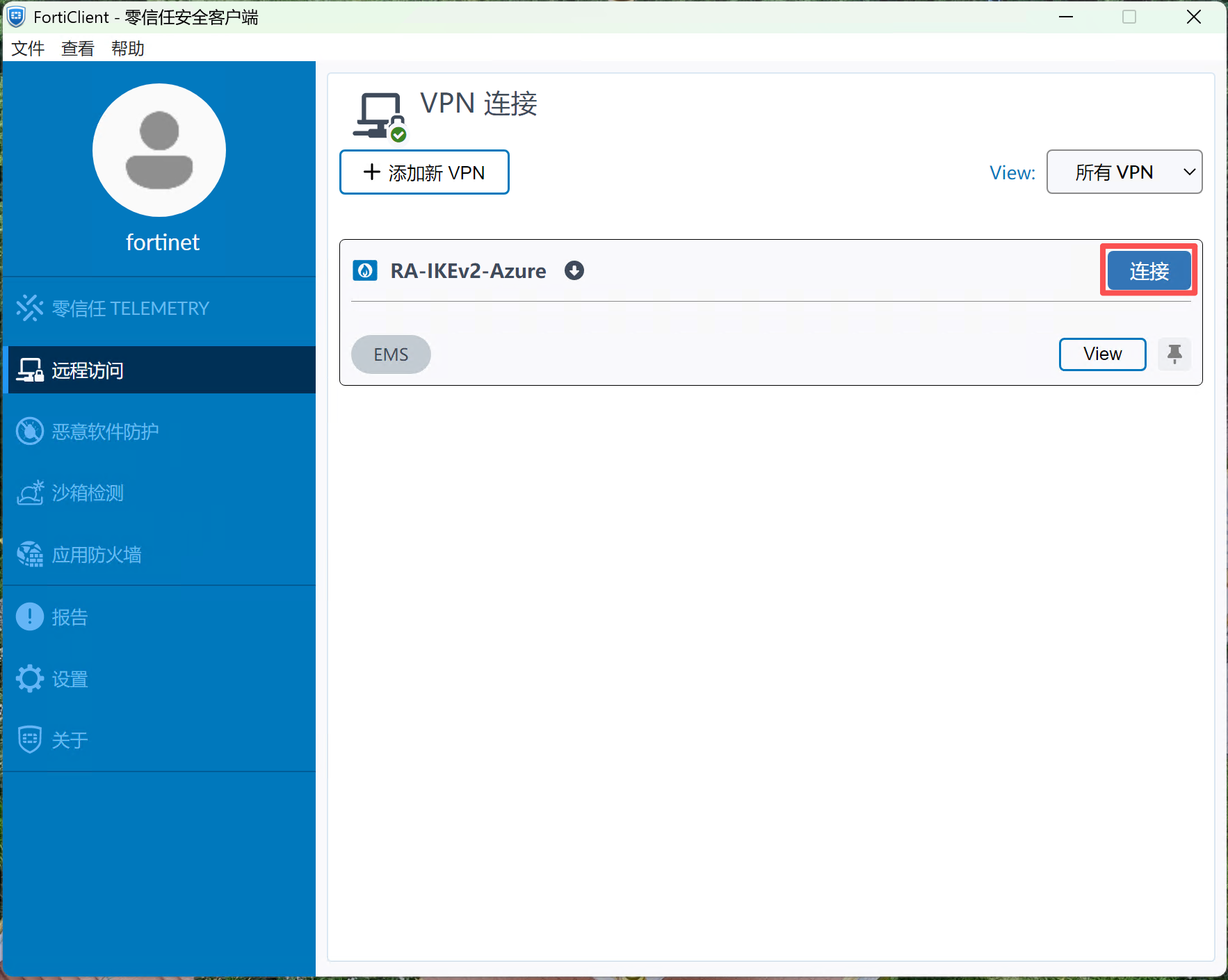
- 打开 FortiClient Remote Access,选择
RA-IKEv2-Azure并连接。
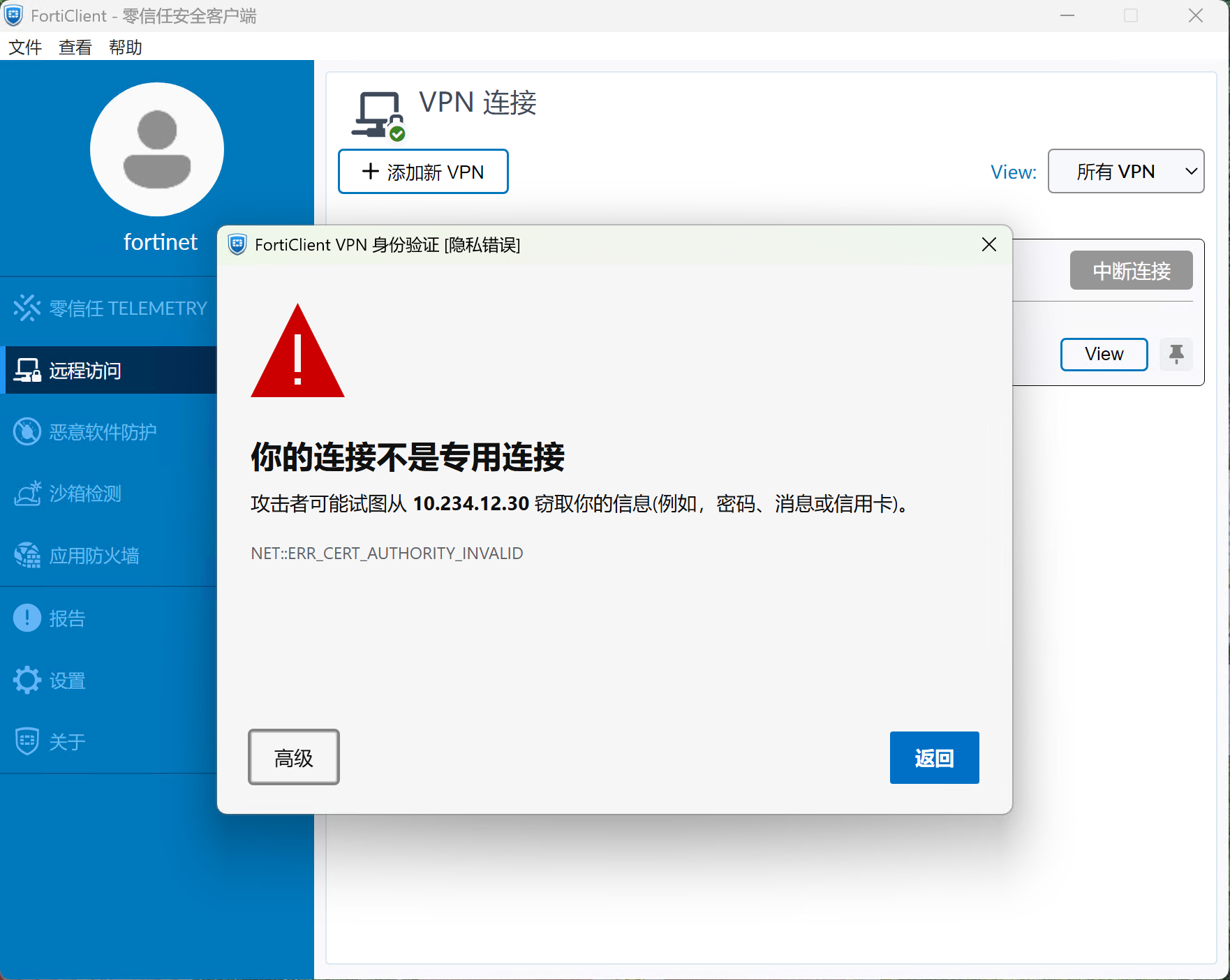
- 信任展示的服务器证书,随后进入 Microsoft 登录页面。(本例没有上传SAML HTTPS 认证服务使用的服务器证书,所以显示证书错误)
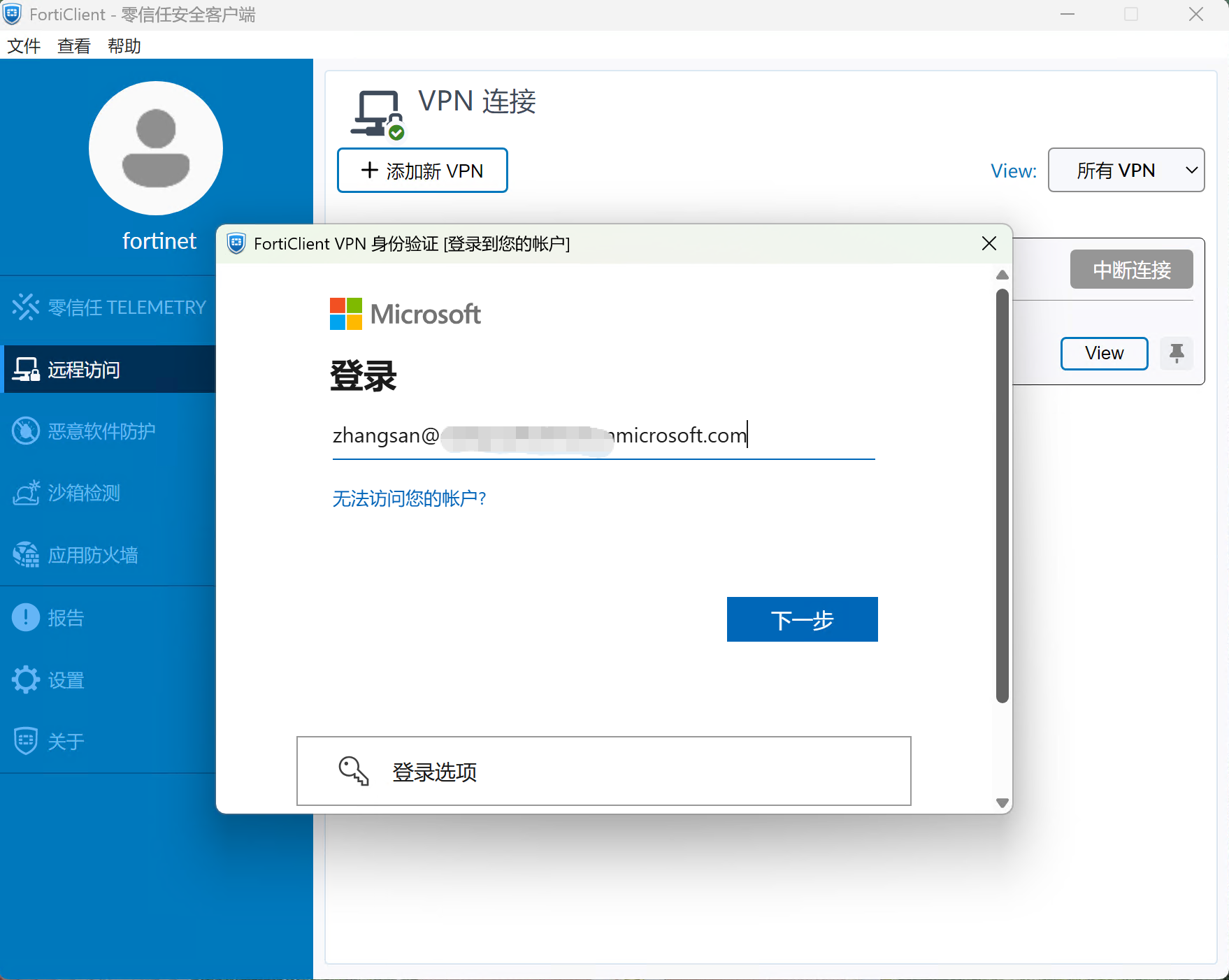
- 使用试点用户 UPN 登录,输入账号名,单击下一步继续。
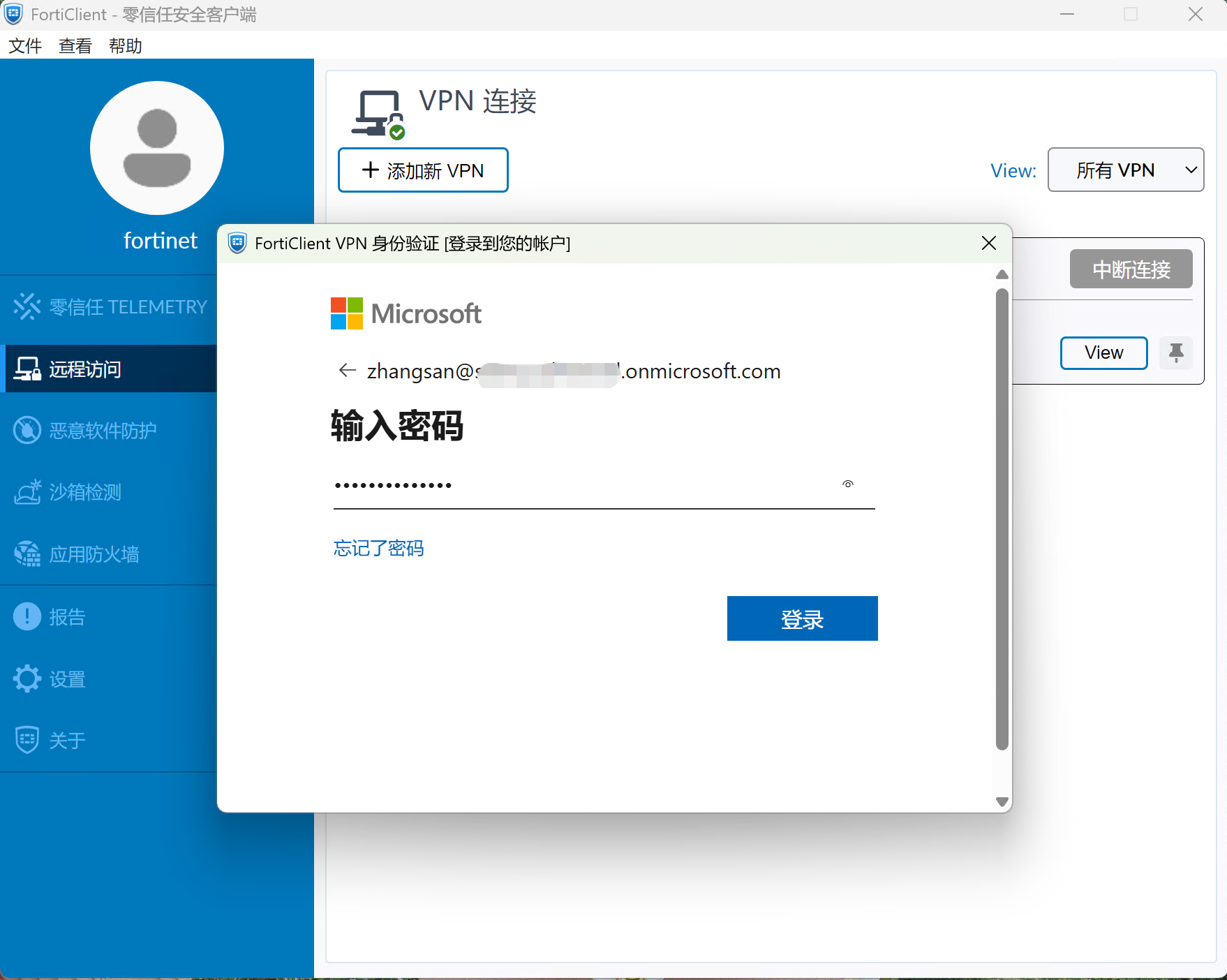
- 输入密码,单击登录按钮继续
- 确认登录窗口返回客户端,VPN 状态变为 Connected。
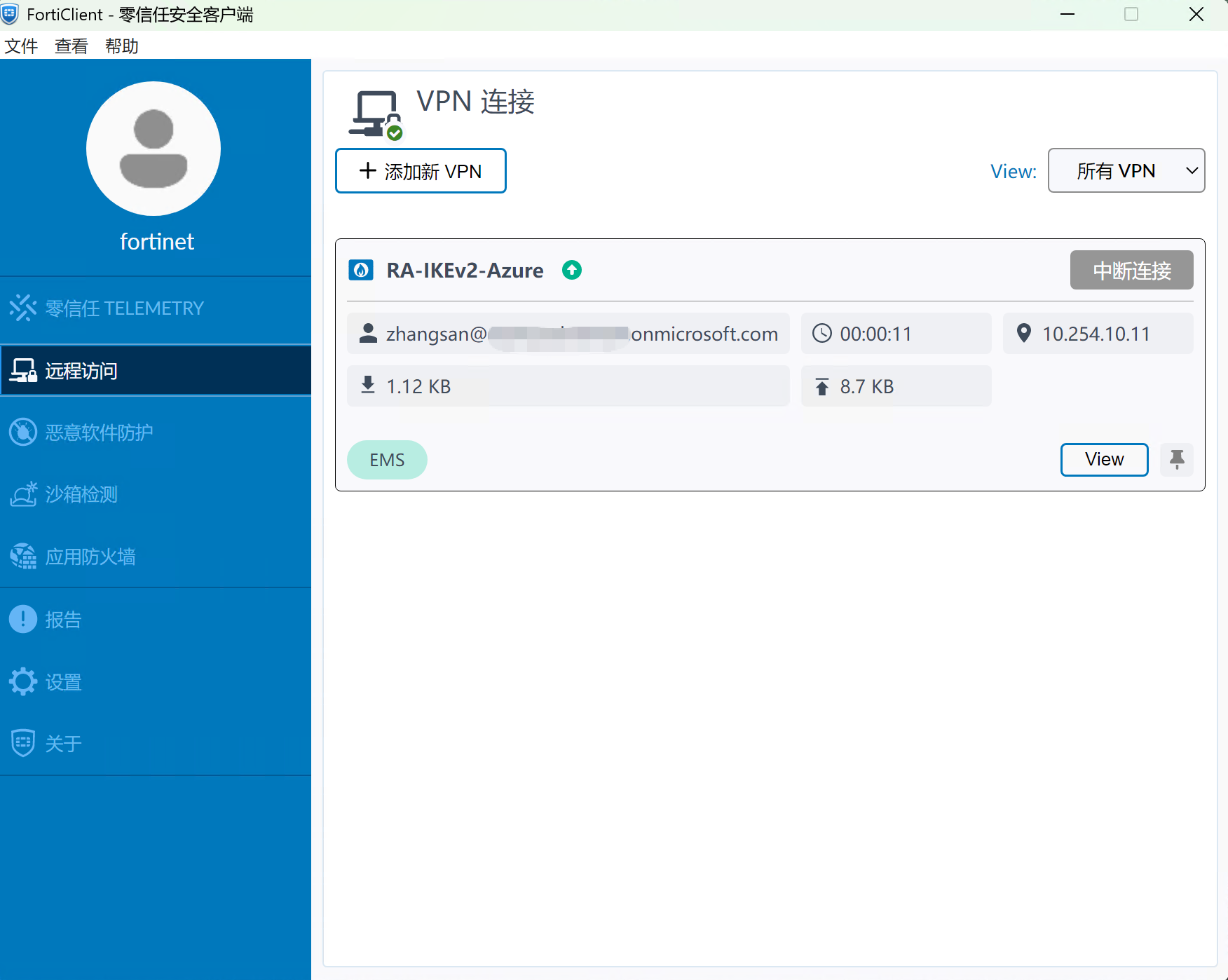
- 客户端应获得
10.254.1.11-10.254.1.20内的地址。
2. 检查客户端地址、DNS、路由
在 Windows PowerShell 中执行ipconfig /all和route print命令确认地址信息和路由:
---------------------------------ipconfig /all---------------------------------
PS C:\WINDOWS\system32> ipconfig /all
……
未知适配器 RA-IKEv2-Azure: <-----IPsec VPN 网卡

   连接特定的 DNS 后缀 . . . . . . . :
   描述. . . . . . . . . . . . . . . : Fortinet VPN-V Network Adapter
   物理地址. . . . . . . . . . . . . : 00-09-0F-FE-00-01
   DHCP 已启用 . . . . . . . . . . . : 否
   自动配置已启用. . . . . . . . . . : 是
   本地链接 IPv6 地址. . . . . . . . : fe80::50e8:9939:3fbe:5097%28(首选)
   IPv4 地址 . . . . . . . . . . . . : 10.254.10.11(首选)
   子网掩码  . . . . . . . . . . . . : 255.255.255.255
   默认网关. . . . . . . . . . . . . : 10.254.10.12
   DNS 服务器  . . . . . . . . . . . : 10.167.12.254
   TCPIP 上的 NetBIOS  . . . . . . . : 已启用

--------------------------------------------------------------------------------


---------------------------------route print------------------------------------
PS C:\WINDOWS\system32> route print
……

IPv4 路由表
===========================================================================
活动路由:
网络目标        网络掩码          网关       接口   跃点数
          0.0.0.0          0.0.0.0      10.234.12.1      10.234.12.200     25
          0.0.0.0          0.0.0.0      10.254.0.12      10.254.0.11     9001
      10.167.12.0    255.255.255.0      10.254.0.12      10.254.0.11        2<-------获取到的隧道分离路由
      10.234.12.0    255.255.255.0            在链路上       10.234.12.200    281
    10.234.12.200  255.255.255.255            在链路上       10.234.12.200    281
     10.234.12.30  255.255.255.255            在链路上       10.234.12.200     26
    10.234.12.255  255.255.255.255            在链路上       10.234.12.200    281
      10.254.0.11  255.255.255.255            在链路上       10.254.0.11      257
        127.0.0.0        255.0.0.0            在链路上         127.0.0.1      331
        127.0.0.1  255.255.255.255            在链路上         127.0.0.1      331
  127.255.255.255  255.255.255.255            在链路上         127.0.0.1      331
        224.0.0.0        240.0.0.0            在链路上         127.0.0.1      331
        224.0.0.0        240.0.0.0            在链路上       10.234.12.200    281
        224.0.0.0        240.0.0.0            在链路上       10.254.0.11      257
  255.255.255.255  255.255.255.255            在链路上         127.0.0.1      331
  255.255.255.255  255.255.255.255            在链路上       10.234.12.200    281
  255.255.255.255  255.255.255.255            在链路上       10.254.0.11      257
===========================================================================
----------------------------------------------------------------------------------
3. 检查目标应用是否正常
通过SSH服务尝试登录到SSH服务器,确认正常连接。
C:\Users\fortinet>ssh fortinet@10.167.12.100
fortinet@10.167.12.100's password:
Welcome to Ubuntu 24.04 LTS (GNU/Linux 6.8.0-31-generic x86_64)
……

Last login: Sun Oct 18 22:53:07 2026 from 10.254.0.11
fortinet@SSHServer:~$
4. 检查 FortiGate 隧道和流量
在 VPN > IPsec Tunnels 查看隧道状态,并结合 VPN 事件和流量日志确认用户、分配地址及策略命中。CLI 可使用以下命令:
get vpn ipsec tunnel summary
diagnose vpn ike gateway list
diagnose vpn tunnel list
参考结果:
VPN-Gateway # get vpn ipsec tunnel summary
'RA-IKEv2-Azure_0' 10.234.12.200:51519  selectors(total,up): 1/1  rx(pkt,err): 333/0  tx(pkt,err): 146/0

VPN-Gateway # diagnose vpn ike gateway list

vd: root/0
name: RA-IKEv2-Azure_0
version: 2
interface: port1 3
addr: 10.234.12.30:4500 -> 10.234.12.200:51519
tun_id: 10.254.10.11/::10.0.0.5
remote_location: 0.0.0.0
network-id: 0
transport: UDP
created: 375s ago
eap-user: zhangsan@xxxxxxxxxxxx.onmicrosoft.com <----登录用户名
2FA: no
groups:
  VPN-AZURE-AD 3 <-------登录用户所在组
peer-id: Azure
peer-id-auth: yes
FortiClient UID: D66214E232194F449E3BB7C1CA0470A7
assigned IPv4 address: 10.254.10.11/255.255.255.255
nat: me peer
pending-queue: 0
PPK: no
IKE SA: created 1/1  established 1/1  time 20/20/20 ms
IPsec SA: created 1/1  established 1/1  time 0/0/0 ms

  id/spi: 11 74a4a3022c3c9282/2e02c5c0b23dc315
  direction: responder
  status: established 375-375s ago = 20ms
  proposal: aes128-sha256
  child: no
  SK_ei: 8d0318fd7e40b7cf-fabacc029e63013d
  SK_er: facddc89bb64da6d-16e8295abf34d2eb
  SK_ai: 95b85e5ac7cf3547-f343c067d1ca65cd-15f2a7f4dd4016f3-5dba12b369cbc2d9
  SK_ar: bd7573f216f66518-5b199246441d48b9-d92a52885a570aae-4633e7edfc8414c9
  PPK: no
  message-id sent/recv: 0/24
  QKD: no
  lifetime/rekey: 86400/85754
  DPD sent/recv: 00000000/00000000
  peer-id: Azure

VPN-Gateway # diagnose vpn tunnel list
list all ipsec tunnel in vd 0
------------------------------------------------------
name=RA-IKEv2-MFA ver=2 serial=1 10.234.12.30:0->0.0.0.0:0 nexthop= tun_id=10.0.0.1 tun_id6=::10.0.0.1 status=up dst_mtu=0 weight=1
bound_if=3 real_if=0 lgwy=static/1 tun=intf mode=dialup/2 encap=none/552 options[0228]=npu frag-rfc  role=primary accept_traffic=1 overlay_id=0

proxyid_num=0 child_num=0 refcnt=2 ilast=43058512 olast=43058512 ad=/0
stat: rxp=369 txp=117 rxb=27326 txb=11547
dpd: mode=on-idle on=0 status=ok idle=60000ms retry=3 count=0 seqno=0
natt: mode=none draft=0 interval=0 remote_port=0
fec: egress=0 ingress=0
------------------------------------------------------
name=RA-IKEv2-Azure_0 ver=2 serial=6 10.234.12.30:4500->10.234.12.200:51519 nexthop=0.0.0.0 tun_id=10.254.10.11 tun_id6=::10.0.0.5 status=up dst_mtu=1500 weight=1
bound_if=3 real_if=3 lgwy=static/1 tun=intf mode=dial_inst/3 encap=none/74664 options[123a8]=npu rgwy-chg rport-chg frag-rfc  run_state=0 role=primary accept_traffic=1 overlay_id=0

parent=RA-IKEv2-Azure index=0
proxyid_num=1 child_num=0 refcnt=6 ilast=0 olast=17 ad=/0
stat: rxp=334 txp=146 rxb=24954 txb=16032
dpd: mode=on-idle on=1 status=ok idle=60000ms retry=3 count=0 seqno=1
natt: mode=keepalive draft=0 interval=10 remote_port=51519
fec: egress=0 ingress=0
proxyid=RA-IKEv2-Azure proto=0 sa=1 ref=28 serial=1 add-route
  src: 0:0.0.0.0-255.255.255.255:0
  dst: 0:10.254.10.11-10.254.10.11:0
  SA:  ref=4 options=20682 type=00 soft=0 mtu=1422 expire=42812/0B replaywin=2048
       seqno=93 esn=0 replaywin_lastseq=0000014e qat=0 rekey=0 hash_search_len=1
  life: type=01 bytes=0/0 timeout=43190/43200
  dec: spi=7a2e75ba esp=aes key=16 499d125fd3242507758e3c2b44d72da5
       ah=sha256 key=32 f7d927a46d0ea663f902a890ba47b3f80e7a3165cb67bb14e2c1c524391f3d2e
  enc: spi=568a843b esp=aes key=16 4f6e00e7182d82e5b99bcf19fc59f1d2
       ah=sha256 key=32 eea431c94fd291c68252512ae9bd5606892cd98c6b599fa072cc5a0099e6cef0
  dec:pkts/bytes=334/24954, enc:pkts/bytes=146/27592
  npu_flag=00 npu_lgwy=0.0.0.0:0 npu_rgwy=0.0.0.0:0
npu_selid=3 dec_npuid=0 enc_npuid=0
------------------------------------------------------
name=RA-IKEv2-Azure ver=2 serial=4 10.234.12.30:0->0.0.0.0:0 nexthop=0.0.0.0 tun_id=10.0.0.2 tun_id6=::10.0.0.2 status=up dst_mtu=0 weight=1
bound_if=3 real_if=0 lgwy=static/1 tun=intf mode=dialup/2 encap=none/552 options[0228]=npu frag-rfc  role=primary accept_traffic=1 overlay_id=0

proxyid_num=0 child_num=1 refcnt=3 ilast=43058512 olast=43058512 ad=/0
stat: rxp=1006 txp=530 rxb=77154 txb=53248
dpd: mode=on-idle on=0 status=ok idle=60000ms retry=3 count=0 seqno=0
natt: mode=none draft=0 interval=0 remote_port=0
fec: egress=0 ingress=0

VPN-Gateway #
更新历史
| Ver | Description | Author | Rev | Date |
|---|---|---|---|---|
| 1.0 | First Complete | ysheng | tanga | 2026.10.21 |