

ICMP Redirect
ICMP Redirect
当 FortiGate 收到数据包后,路由查询结果要求数据包从同一接口转发,并且源主机与下一跳位于同一网段时,FortiGate 可以向源主机发送 ICMP Redirect。该报文通知源主机改用更直接的下一跳,避免后续流量继续绕行 FortiGate。
ICMP Redirect 不只对 Ping 生效。TCP 等 IPv4 流量满足条件时,也可以触发 ICMP Type 5 报文。
重要
- 从 FortiOS 7.4.10、7.6.5 和 8.0.0 开始,
allow-traffic-redirect和ipv6-allow-traffic-redirect的默认值变为disable。设备升级到这些版本或之后版本时,这两个参数也会被设置为disable。因此升级前后的同接口转发和策略匹配行为可能不同。 - 不同源网段和 FortiOS 版本下的完整行为矩阵,请参考“策略与对象 → 同一接口进出的三层转发”章节。
网络拓扑
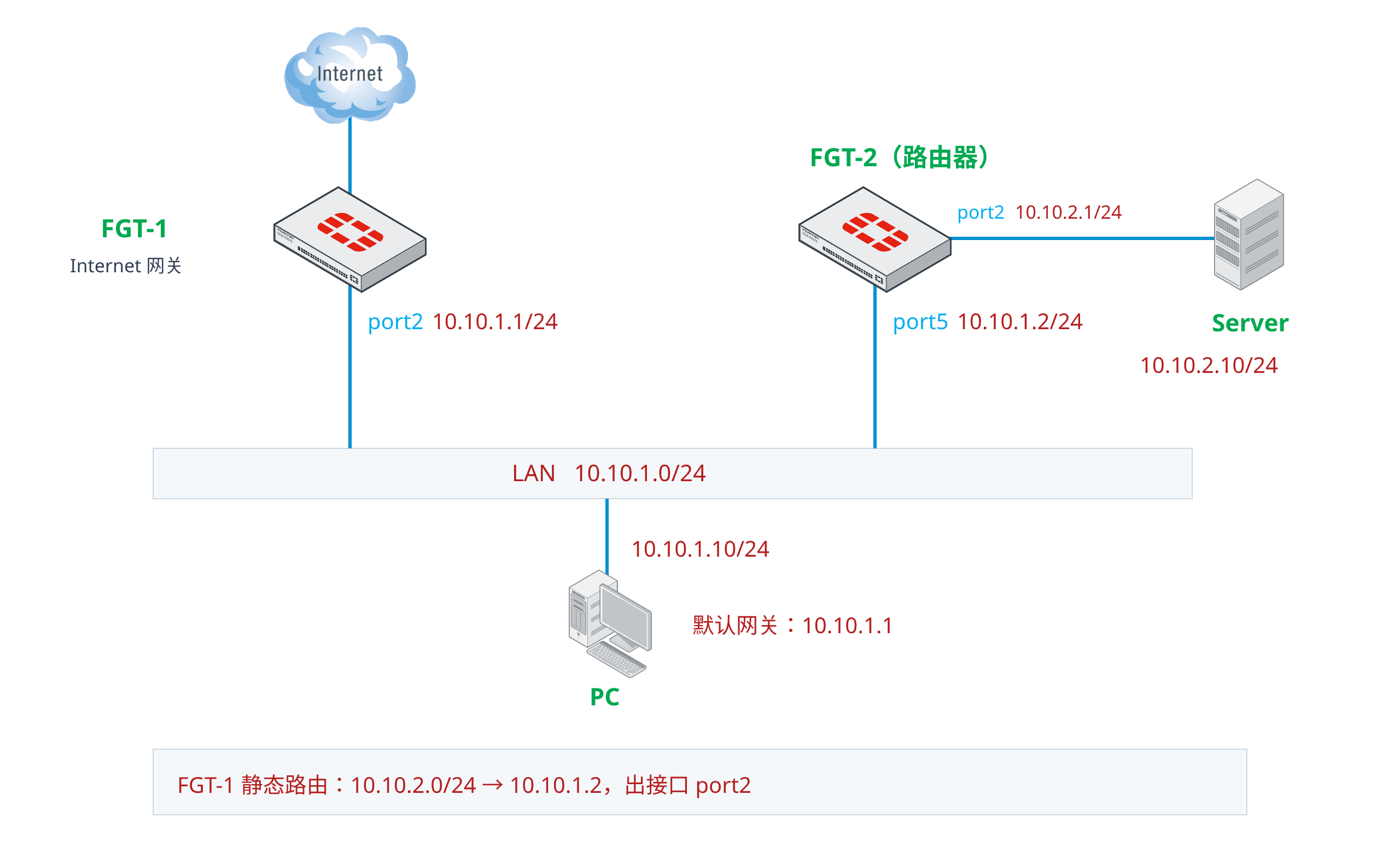
FGT-1 是网段
10.10.1.0/24的 Internet 网关,port2地址为10.10.1.1/24。PC 地址为
10.10.1.10/24,默认网关为 FGT-1 的10.10.1.1。FGT-2 是网段
10.10.2.0/24的路由器,连接 LAN 的port5地址为10.10.1.2/24,连接 Server 网段的port2地址为10.10.2.1/24。Server 地址为
10.10.2.10/24,默认网关为 FGT-2 的10.10.2.1。FGT-1 上存在去往
10.10.2.0/24的静态路由,下一跳为 FGT-2 的10.10.1.2,出接口仍为port2:S 10.10.2.0/24 [10/0] via 10.10.1.2, port2, [1/0]PC 使用 FGT-1 作为默认网关,因此第一次访问 Server 时,数据包先到达 FGT-1。FGT-1 查找路由后发现数据包需要继续从
port2发往 FGT-2,这就形成了策略与对象 → 同一接口进出的三层转发中介绍的转发场景。
开启 ICMP Redirect
ICMP 流量
PC 第一次 Ping Server 时,数据包的处理过程如下:
ICMP Echo Request 从 PC 进入 FGT-1 的
port2。FGT-1 按路由将原始 Echo Request 从
port2转发给 FGT-2。FGT-1 同时向 PC 发送
ICMP Type 5,通知 PC 将10.10.1.2作为去往 Server 的新下一跳。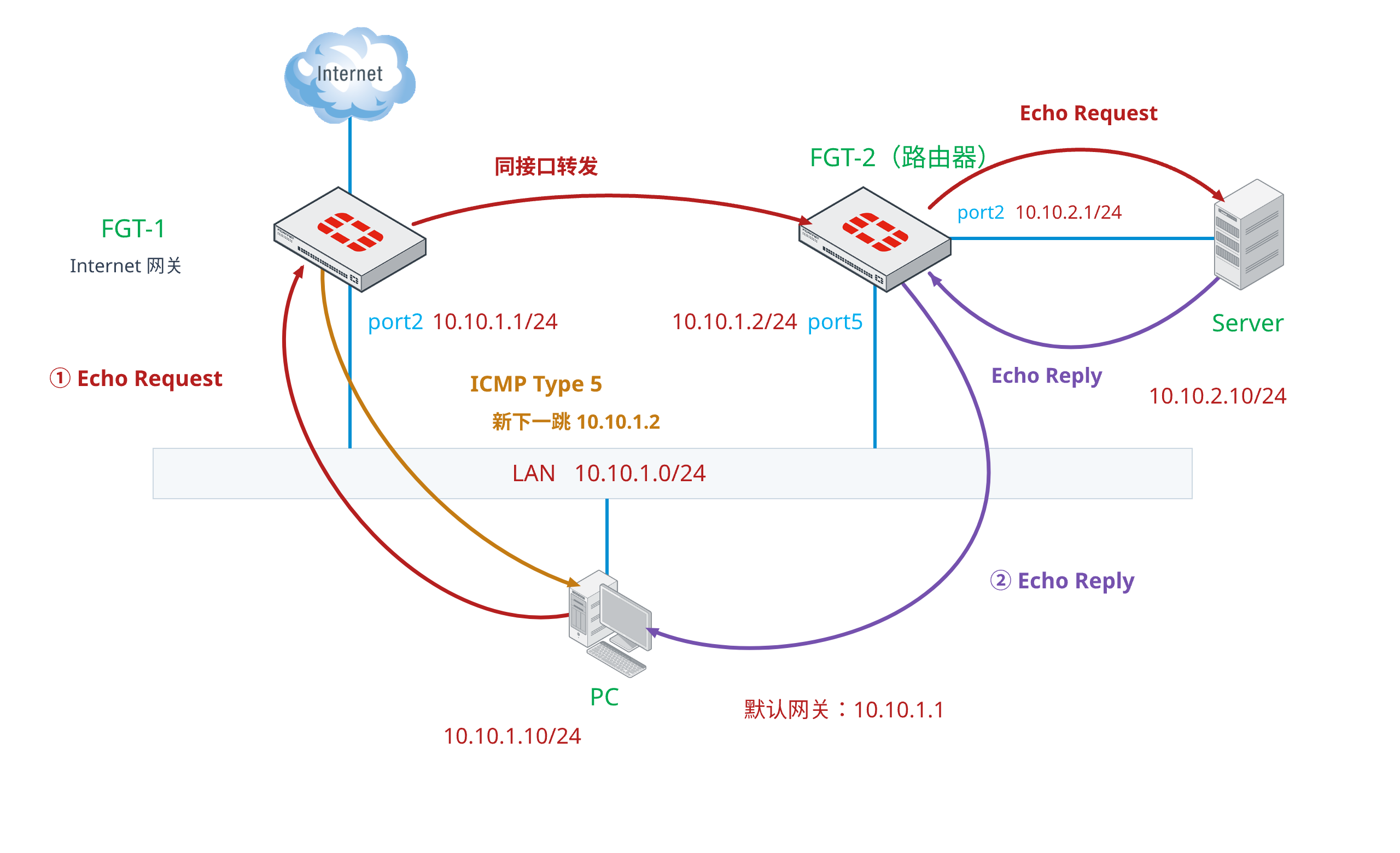
在 FGT-1 上抓取 PC 的 ICMP 流量:
FGT-1 # diagnose sniffer packet any 'host 10.10.1.10 and icmp' 4 0 Using Original Sniffing Mode interfaces=[any] filters=[host 10.10.1.10 and icmp] 11.888385 port2 in 10.10.1.10 -> 10.10.2.10: icmp: echo request 11.888469 port2 out 10.10.1.1 -> 10.10.1.10: icmp: type-#5 11.889242 port2 out 10.10.1.10 -> 10.10.2.10: icmp: echo request- 第一行是 PC 发给 FGT-1 的 Echo Request。
- 第二行是 FGT-1 发给 PC 的 ICMP Redirect。
- 第三行是 FGT-1 按路由转发给 FGT-2 的原始 Echo Request。
在 Wireshark 中展开 ICMP Redirect,可以看到报文类型为
Type 5,Code 为Redirect for host,Gateway Address 为 FGT-2 的10.10.1.2。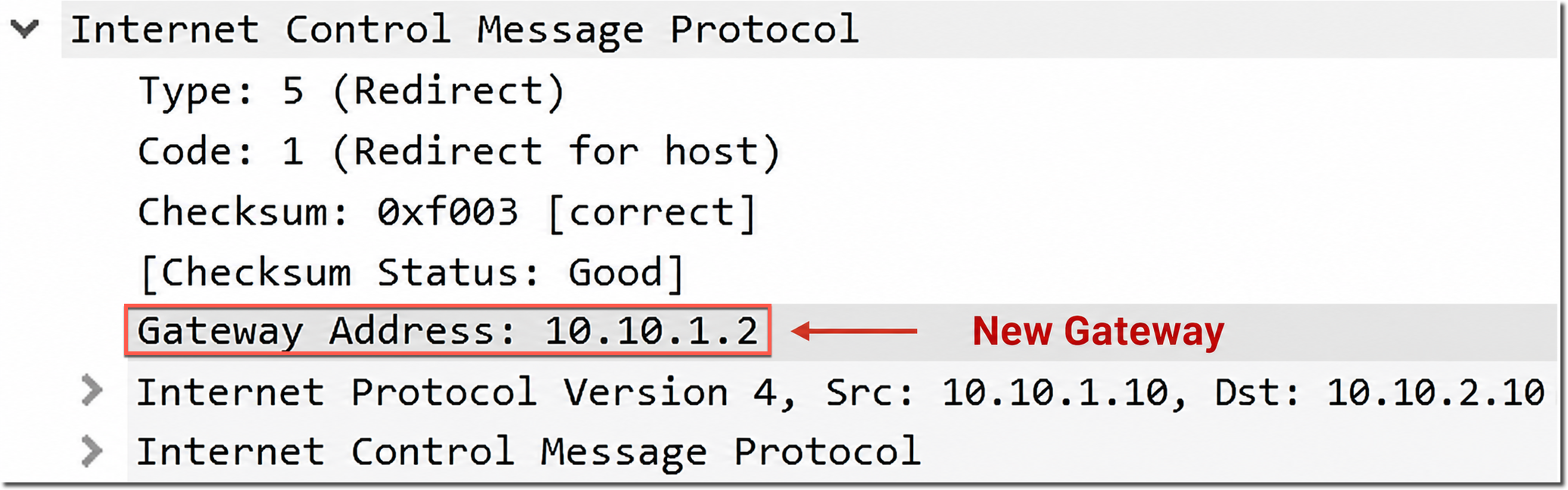
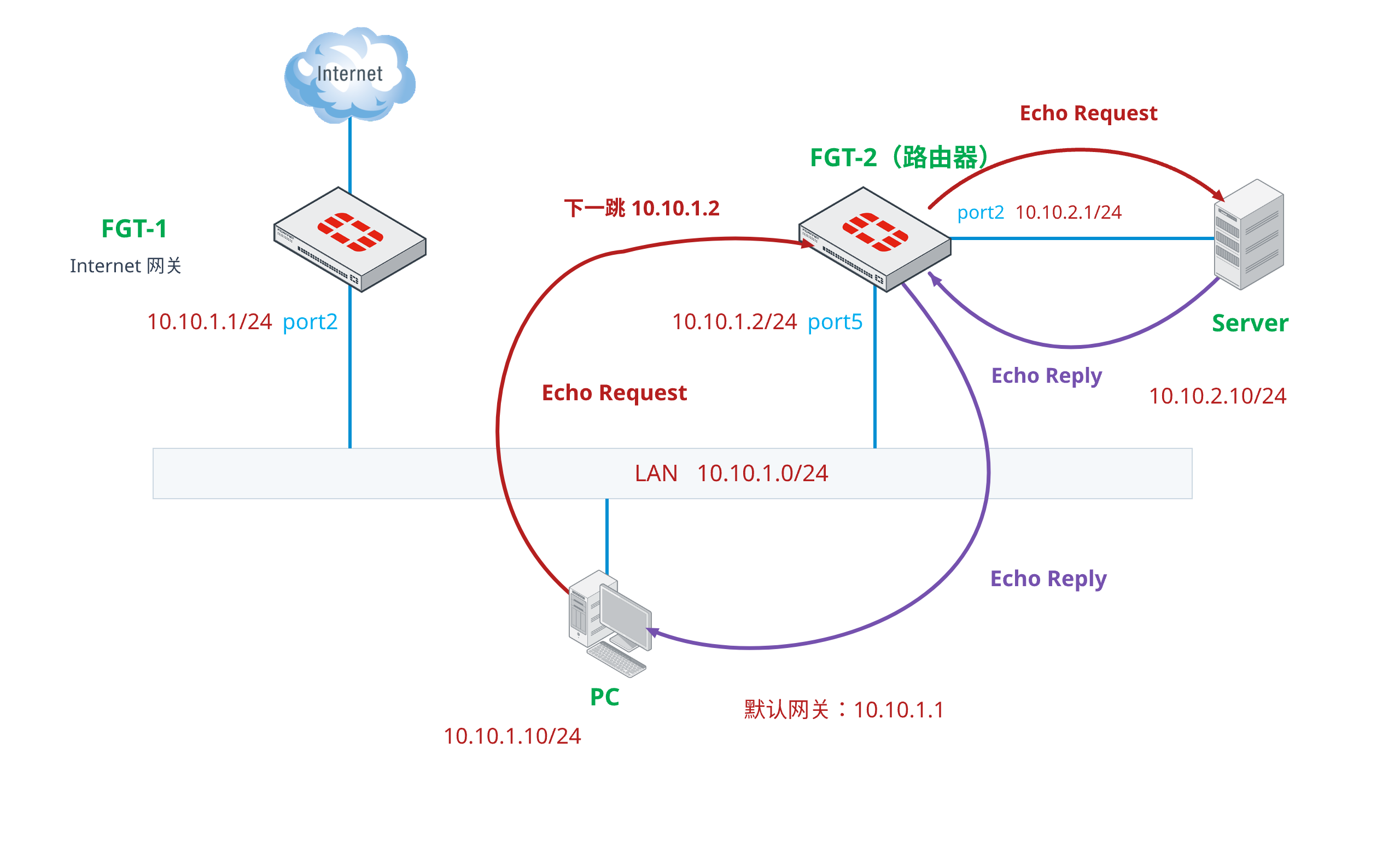
如果 PC 接受该 Redirect,后续去往 Server 的流量会直接发给 FGT-2。此时 FGT-1 不再收到 PC 的后续 Echo Request。
相关信息
ICMP Redirect 只提供下一跳建议。PC 是否接受该报文、是否生成 Redirect 路由缓存以及缓存持续时间,取决于客户端操作系统和本地安全策略。
TCP 流量
ICMP Redirect 也可以由 TCP 流量触发。例如:PC 使用 RDP 访问 Server 时,第一个 TCP SYN 报文先经过 FGT-1,FGT-1 随后向 PC 发送 ICMP Redirect。
Redirect 报文中包含触发通知的原始 IP 头部和部分原始 TCP 报文。下图中的 Gateway Address 为
10.10.1.2,内嵌的原始 TCP 目的端口为3389。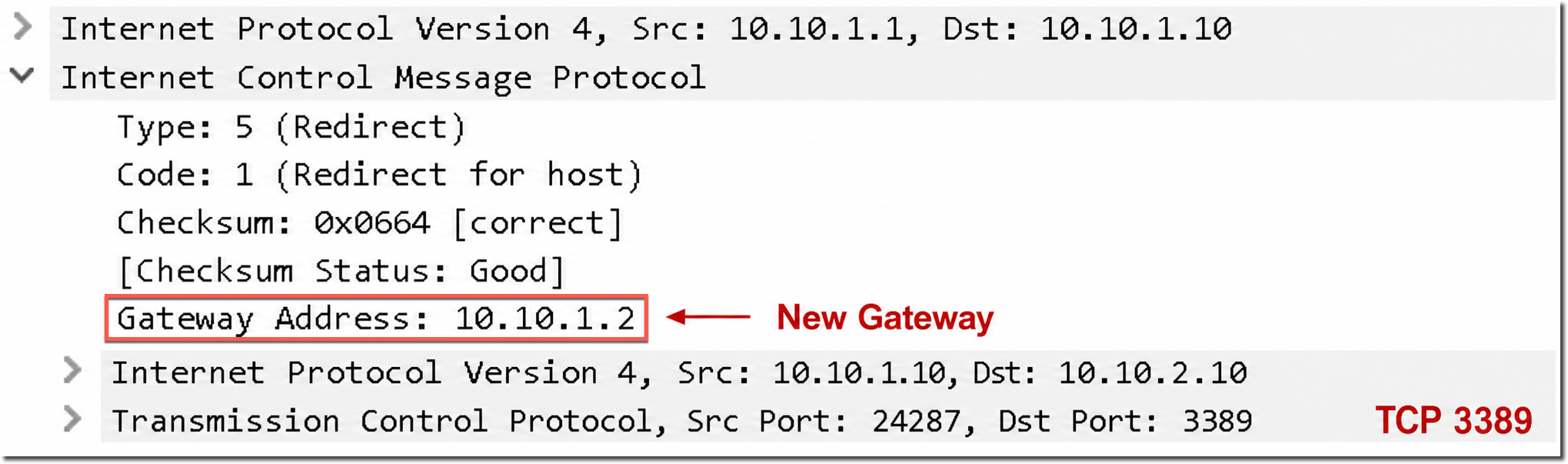
当
allow-traffic-redirect enable时,符合条件的同接口流量不需要防火墙策略放通。Debug Flow 中可以看到 FGT-1 为 TCP SYN 查询到同接口下一跳,但没有出现防火墙策略匹配信息:FGT-1 # id=20085 trace_id=41 func=print_pkt_detail line=5867 msg="vd-root:0 received a packet(proto=6, 10.10.1.10:25281->10.10.2.10:3389) tun_id=0.0.0.0 from port2. flag [S], seq 1392901862, ack 0, win 64240" id=20085 trace_id=41 func=init_ip_session_common line=6046 msg="allocate a new session-000722ab, tun_id=0.0.0.0" id=20085 trace_id=41 func=vf_ip_route_input_common line=2611 msg="find a route: flag=05000000 gw-10.10.1.2 via port2"该输出可以确认路由查询结果的下一跳和出接口。是否需要策略、是否生成流量日志以及不同版本的处理差异,还需要结合
allow-traffic-redirect的实际值判断。
相关配置
ICMP Redirect 的发送、接收和同接口转发由不同参数控制:
参数 配置位置 作用 icmp-send-redirectconfig system interface控制 FortiGate 是否从该接口发送 ICMP Redirect icmp-accept-redirectconfig system interface控制 FortiGate 是否接受从该接口收到的 ICMP Redirect allow-traffic-redirectconfig system global控制 IPv4 同接口转发是否必须匹配防火墙策略 ipv6-allow-traffic-redirectconfig system global控制 IPv6 同接口转发是否必须匹配防火墙策略 接口级发送和接收参数相互独立。例如只需要阻止 FortiGate 向 PC 发送 Redirect 时,可以关闭
icmp-send-redirect,不需要同时关闭icmp-accept-redirect。config system interface edit "port2" set icmp-send-redirect enable set icmp-accept-redirect enable next end
相关信息
不同源网段和 FortiOS 版本下icmp-accept-redirect的完整行为矩阵,请参考“策略与对象 → 同一接口进出的三层转发”章节。
关闭 ICMP Redirect
在 FGT-1 上关闭 ICMP Redirect 的发送和接收,并要求同接口流量匹配防火墙策略:
config system interface
    edit "port2"
        set icmp-send-redirect disable
        set icmp-accept-redirect disable
    next
end

config system global
    set allow-traffic-redirect disable
end
此时 FGT-1 不再向 PC 发送
ICMP Type 5。PC 会继续将去往 Server 的流量发给默认网关 FGT-1,FGT-1 则按路由继续从port2转发给 FGT-2。allow-traffic-redirect disable会要求该流量匹配入接口和出接口均为port2的防火墙策略。Debug Flow 中的Allowed by Policy-1表示示例流量已经通过策略 1:FGT-1 # id=20085 trace_id=51 func=print_pkt_detail line=5867 msg="vd-root:0 received a packet(proto=1, 10.10.1.10:1->10.10.2.10:2048) tun_id=0.0.0.0 from port2. type=8, code=0, id=1, seq=564." id=20085 trace_id=51 func=init_ip_session_common line=6046 msg="allocate a new session-000732eb, tun_id=0.0.0.0" id=20085 trace_id=51 func=vf_ip_route_input_common line=2611 msg="find a route: flag=04000000 gw-10.10.1.2 via port2" id=20085 trace_id=51 func=fw_forward_handler line=881 msg="Allowed by Policy-1:"关闭 Redirect 后的 Sniffer 结果中,每个 Echo Request 都会从
port2进入并再次从port2发出,不再出现icmp: type-#5:FGT-1 # diagnose sniffer packet any 'host 10.10.1.10 and icmp' 4 0 Using Original Sniffing Mode interfaces=[any] filters=[host 10.10.1.10 and icmp] 4.753352 port2 in 10.10.1.10 -> 10.10.2.10: icmp: echo request 4.754127 port2 out 10.10.1.10 -> 10.10.2.10: icmp: echo request 5.767577 port2 in 10.10.1.10 -> 10.10.2.10: icmp: echo request 5.767619 port2 out 10.10.1.10 -> 10.10.2.10: icmp: echo request 6.783534 port2 in 10.10.1.10 -> 10.10.2.10: icmp: echo request 6.783599 port2 out 10.10.1.10 -> 10.10.2.10: icmp: echo request 7.798736 port2 in 10.10.1.10 -> 10.10.2.10: icmp: echo request 7.798771 port2 out 10.10.1.10 -> 10.10.2.10: icmp: echo requestFGT-2 与 PC 位于同一网段,因此 Server 返回的 Echo Reply 可以由 FGT-2 直接发送给 PC,不再经过 FGT-1。
TCP anti-replay 丢包
关闭 ICMP Redirect 后,TCP 流量可能形成不对称路径:
PC 的 SYN 经过 FGT-1 和 FGT-2 到达 Server。
Server 返回的 SYN-ACK 由 FGT-2 直接发送给 PC,没有经过 FGT-1。
PC 的 ACK 仍发送给默认网关 FGT-1。
FGT-1 的会话没有看到 SYN-ACK,仍处于
syn_sent状态,因此将 ACK 判断为可疑报文并由 anti-replay 检查丢弃。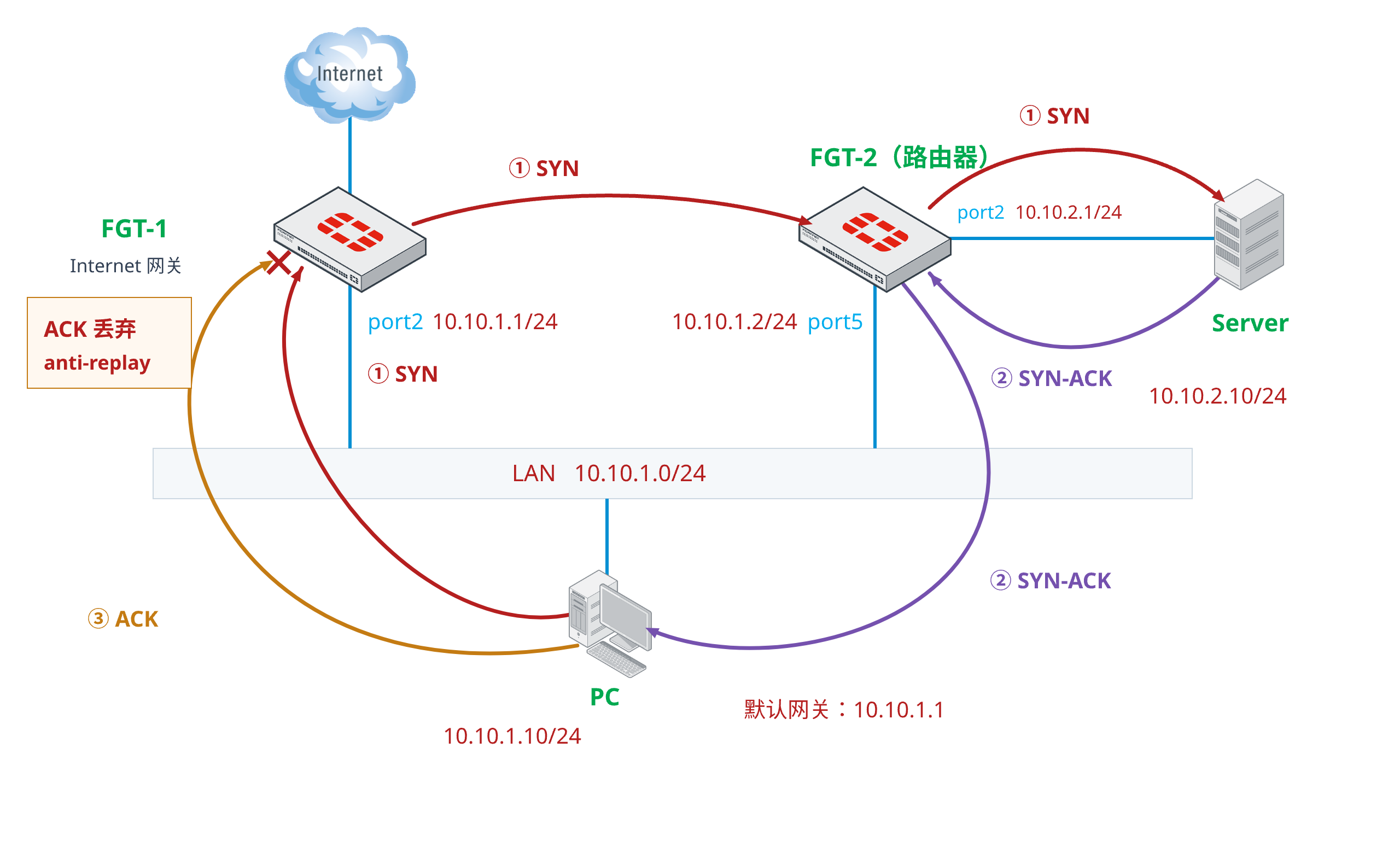
Debug Flow 中的
ack in state syn_sent, suspicious表示 FortiGate 在仅看到 SYN 的会话状态下收到了 ACK,随后出现anti-replay check fails, drop:id=20085 trace_id=12 func=resolve_ip_tuple_fast line=5953 msg="Find an existing session, id-00065de3, original direction" id=20085 trace_id=12 func=tcp_anti_reply line=1054 msg="org dir, ack in state syn_sent, suspicious" id=20085 trace_id=12 func=ip_session_core_in line=6612 msg="anti-replay check fails, drop"该输出可以确认 ACK 是被 anti-replay 检查丢弃,但造成不对称路径的原因仍需要结合路由、客户端 Redirect 状态和网络拓扑确认。
如果当前网络必须保留该不对称路径,可以针对受影响的同接口策略关闭 anti-replay:
config firewall policy
    edit 1
        set anti-replay disable
    next
end
也可以在全局关闭 anti-replay,但这会影响整个 FortiGate 的数据包重放和 TCP 序列检查,不建议使用:
config system global
    set anti-replay disable
end
重要
- 优先调整路由或返回路径,使 TCP 双向报文经过同一组有状态设备。
- 如果必须关闭 anti-replay,应优先限制在受影响的防火墙策略,并在维护窗口内完成业务复测。
- 测试结束后,如果不再需要该配置,应使用
set anti-replay enable恢复策略级检查。全局参数原值为strict时,应使用set anti-replay strict恢复。