

每 IP 整形器
每 IP 整形器
网络需求
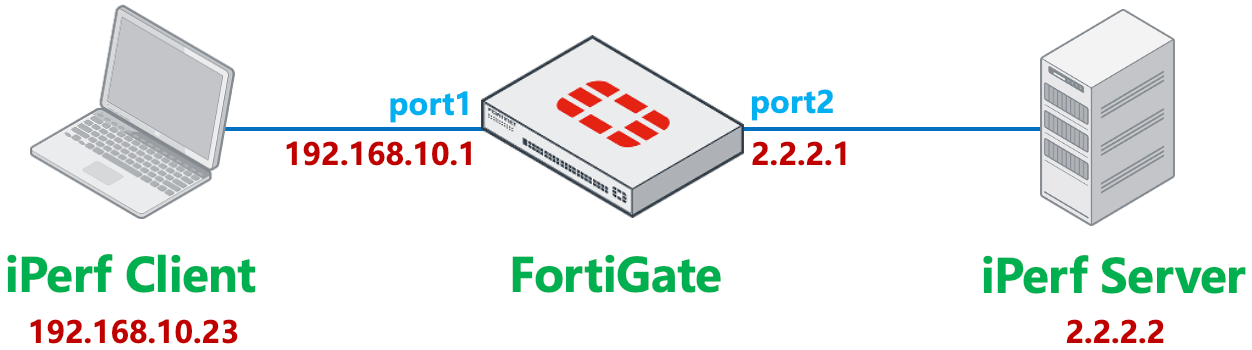
基于每 IP 对客户端进行限速,限制 Iperf Client 传输速度(包括上行和下行速度总和)为 5Mbps。
网络拓扑
配置步骤
进入策略 & 对象 → 流量整形 → 流量整形器,新建流量整形器,选择类型为每 IP 流量整形器,最大带宽配置为 5Mbps。
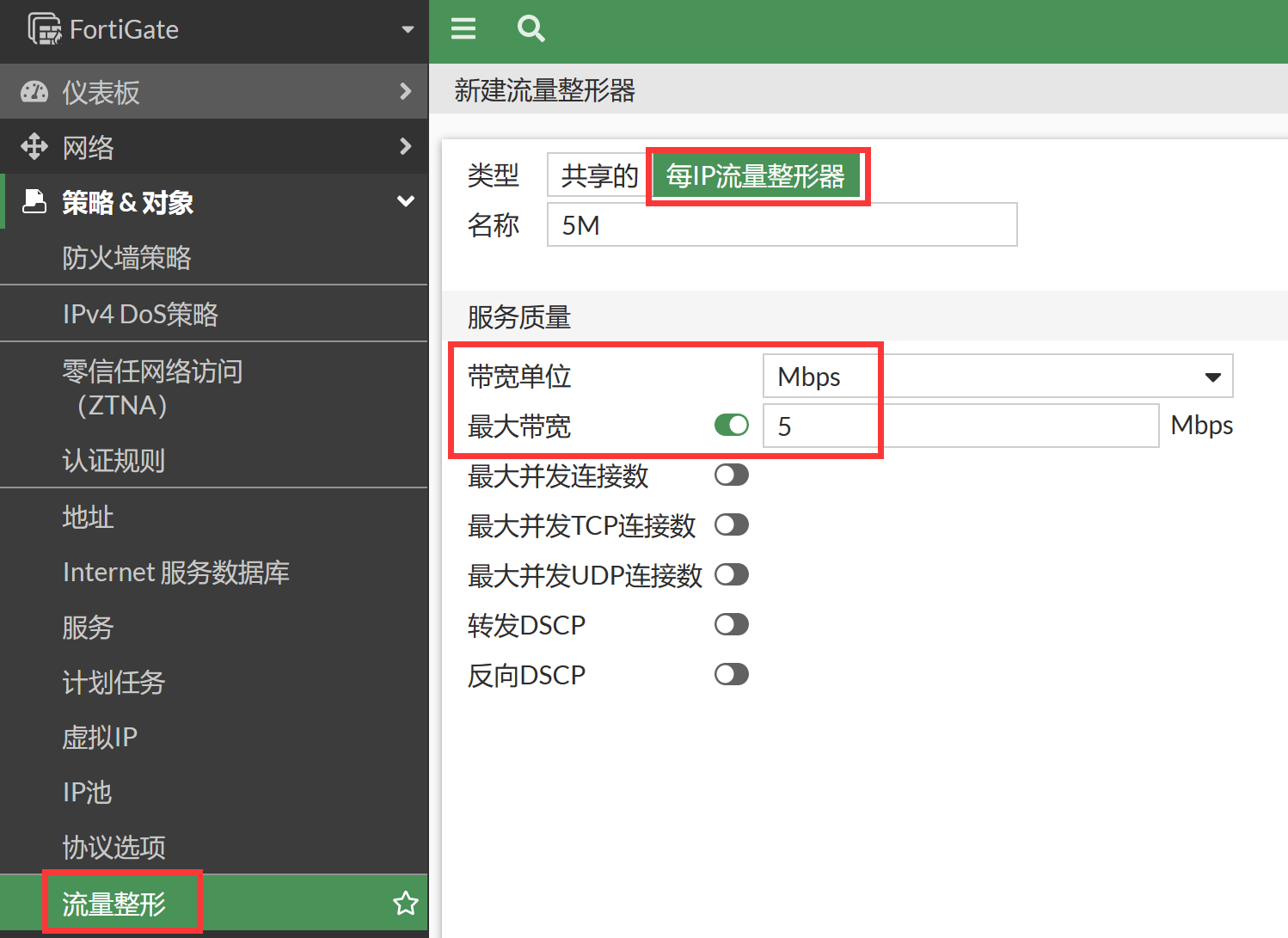
config firewall shaper per-ip-shaper
    edit "5M"
        set max-bandwidth 5
        set bandwidth-unit mbps
    next
end
进入策略 & 对象 → 流量整形 → 流量整策略,新建流量整形策略,源接口为内网口 port1,出接口为 port2,服务配置为 iperf 打流使用的端口,这里以 UDP 5001 为例。开启 Apply Shaper,并引用上步配置的每 IP 限速整形器。
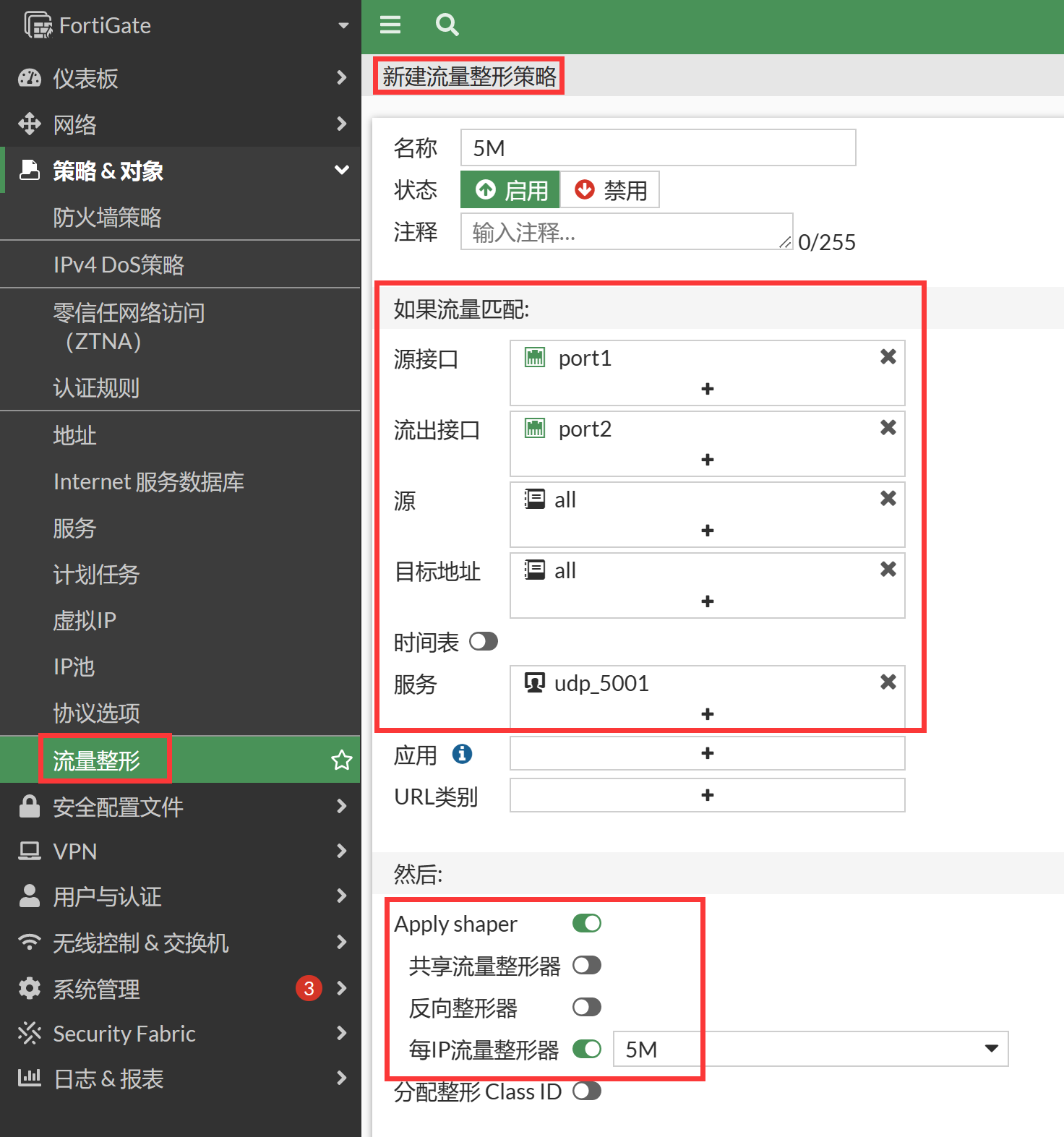
config firewall shaping-policy
    edit 1
        set name "5M"
        set service "udp_5001"
        set srcintf "port1"
        set dstintf "port2"
        set per-ip-shaper "5M"
        set srcaddr "all"
        set dstaddr "all"
    next
end
结果验证
客户端 IPerf 打流测试打 30M 流(上传)。
客户端观察。
C:\iperf-3.1.3-win64>iperf3.exe -c 2.2.2.2 -p 5001 -u -b 30M -l 1K
Connecting to host 2.2.2.2, port 5001
[  4] local 192.168.10.23 port 54998 connected to 2.2.2.2 port 5001
[ ID] Interval           Transfer     Bandwidth       Total Datagrams
[ 4]   0.00-1.00   sec 3.27 MBytes  27.4 Mbits/sec  3350
[ 4]   1.00-2.00   sec 3.53 MBytes  29.6 Mbits/sec  3619
[ 4]   2.00-3.00   sec 3.64 MBytes  30.6 Mbits/sec  3732
[ 4]   3.00-4.00   sec 3.77 MBytes  31.6 Mbits/sec  3860
[ 4]   4.00-5.00   sec 3.42 MBytes  28.7 Mbits/sec  3501
[ 4]   5.00-6.00   sec 3.57 MBytes  30.0 Mbits/sec  3660
[ 4]   6.00-7.00   sec 3.67 MBytes  30.8 Mbits/sec  3763
[  4]   7.00-8.00  sec  3.68 MBytes  30.8 Mbits/sec  3768
[ 4]   8.00-9.00   sec 3.34 MBytes  28.1 Mbits/sec  3421
[ 4]   9.00-10.00  sec 3.56 MBytes  29.8 Mbits/sec  3641
- - - - - - - - - - - - - - - - - - - - - - - - -
[ ID] Interval           Transfer     Bandwidth       Jitter   Lost/Total Datagrams
[ 4]   0.00-10.00  sec 35.5 MBytes  29.7 Mbits/sec  0.180 ms 29610/36310 (82%)
[  4] Sent 36310 datagrams
iperf Done.
UDP 客户端显示的是发送速率
本例使用 UDP 测试,
-b 30M表示客户端持续按约 30Mbps 发送。FortiGate 在转发时丢弃超过整形带宽的数据包,UDP 发送端不会像 TCP 一样因丢包而降低发送速率,因此客户端仍显示约 30Mbps,而不是整形后的 5Mbps。客户端输出中的
29610/36310 (82%)是服务器反馈的丢包统计:36310 个数据报中仅收到 6700 个,按每个数据报 1KB、测试 10 秒计算,实际接收速率约为 5.5Mbps。整形后的有效速率应以服务器端接收结果为准。服务器端观察,接收速率被限制在 5Mbps 左右。
C:\iperf-3.1.3-win64>iperf3.exe -s -p 5001
-----------------------------------------------------------
Server listening on 5001
-----------------------------------------------------------
Accepted connection from 2.2.2.1, port 61145
[ 5] local 2.2.2.2 port 5001 connected to 2.2.2.1 port 54998
[ ID] Interval           Transfer     Bandwidth       Jitter   Lost/Total Datagrams
[ 5]  0.00-1.00   sec  1.07 MBytes 9.00 Mbits/sec  0.159 ms  2162/3262 (66%)
[ 5]   1.00-2.00   sec  616 KBytes  5.05 Mbits/sec  0.186 ms 3071/3687 (83%)
[ 5]   2.00-3.00   sec  635 KBytes  5.21 Mbits/sec  0.153 ms 3072/3707 (83%)
[ 5]   3.00-4.00   sec  654 KBytes  5.36 Mbits/sec  0.138 ms 3127/3781 (83%)
[ 5]   4.00-5.00   sec  597 KBytes  4.89 Mbits/sec  0.160 ms 2989/3586 (83%)
[ 5]   5.00-6.00   sec  621 KBytes  5.09 Mbits/sec  0.117 ms 3049/3670 (83%)
[ 5]   6.00-7.00   sec  642 KBytes  5.25 Mbits/sec  0.141 ms 3148/3790 (83%)
[ 5]   7.00-8.00   sec  632 KBytes  5.18 Mbits/sec  0.107 ms 3074/3706 (83%)
[ 5]   8.00-9.00   sec  587 KBytes  4.80 Mbits/sec  0.160 ms 2851/3438 (83%)
[ 5]   9.00-10.00  sec  615 KBytes  5.04 Mbits/sec  0.187 ms 2961/3576 (83%)
[ 5]  10.00-10.02  sec 1.00 KBytes   409 Kbits/sec  0.180 ms 106/107 (99%)
- - - - - - - - - - - - - - - - - - - - - - - - -
[ ID] Interval           Transfer     Bandwidth       Jitter   Lost/Total Datagrams
[ 5]   0.00-10.02  sec 0.00 Bytes  0.00 bits/sec  0.180 ms 29610/36310 (82%)
-----------------------------------------------------------
查看会话状态,可以看到每 IP 限速的标识信息。
session info: proto=17 proto_state=01 duration=33 expire=160 timeout=0 flags=00000000 sockflag=00000000 sockport=0 av_idx=0 use=4
origin-shaper=
reply-shaper=
per_ip_shaper=5M    //被每IP限速标识
class_id=0 shaping_policy_id=3 ha_id=0 policy_dir=0 tunnel=/ vlan_cos=0/255
state=may_dirty per_ip route_preserve
statistic(bytes/packets/allow_err): org=9691056/9213/1 reply=32/1/1 tuples=2
tx speed(Bps/kbps): 291285/2330 rx speed(Bps/kbps): 0/0
orgin->sink: org pre->post, reply pre->post dev=3->4/4->3 gwy=0.0.0.0/0.0.0.0
hook=post dir=org act=snat 192.168.10.23:49631->2.2.2.2:5001(2.2.2.1:49631)
hook=pre dir=reply act=dnat 2.2.2.2:5001->2.2.2.1:49631(192.168.10.23:49631)
misc=0 policy_id=1 auth_info=0 chk_client_info=0 vd=0
serial=00000e61 tos=ff/ff app_list=0 app=0 url_cat=0
rpdb_link_id = 00000000 ngfwid=n/a
dd_type=0 dd_mode=0

diagnose  firewall shaper  per-ip-shaper list
name 5M
maximum-bandwidth 640 KB/sec
maximum-concurrent-session 0
tos ff/ff
packets dropped 94884
bytes dropped 99717192
addr=192.168.10.23 status: bps=5250320 ses=3
注意事项
每 IP 带宽限速对上行和下行同时生效。只需要配置为 5M,则上行和下行速度总和限速为 5M。
每 IP 整形器与共享整形器的区别
每 IP 流量整形可以限制每个 IP 地址使用的带宽,避免单个用户占用全部可用带宽。除了控制每个 IP 地址可使用的最大带宽外,还可以限制每个 IP 地址的最大并发会话数。例如,将 1Mbps 的每 IP 整形器应用到整个网络时,FortiOS 会为每个用户或 IP 地址分别分配 1Mbps 带宽。即使网络中只有一个用户,该用户也只能使用 1Mbps;如果有 10 个用户,则每个用户均可使用 1Mbps,总出口流量可达到 10Mbps。
使用共享整形器时,所有用户共同使用配置的保证带宽和最大带宽。例如,为所有使用 FTP 服务的 PC 配置 10Mbps 的共享整形器后,所有向 FTP 服务器上传数据的用户共同分享这 10Mbps 带宽。
正向共享整形器对上传方向生效。如需限制从 FTP 服务器下载的速度,必须同时配置反向共享整形器。每 IP 整形器则同时对上传和下载方向实施限速。