EMS的自定义消息
EMS的自定义消息
自定义消息用于向终端用户说明访问受限、隔离或检测失败的原因,以及下一步应如何处理。不同消息位于不同配置页面,触发条件也不相同;修改文字本身不会创建阻断规则、取消隔离或修复终端。
消息类型与配置位置
| 类型 | 入口 | 显示场景 |
|---|---|---|
| VPN 主机检查失败提示 | Endpoint Profiles > Remote Access 中的 VPN 隧道设置 | 因标签访问条件不满足而无法建立所配置的 VPN |
| 安全态势标签通知 | Security Posture Tags > Tags | FortiOS 的相关 ZTNA 拒绝页面展示标签通知信息 |
| 终端隔离消息 | System Settings > Custom Messages | 终端被 EMS 隔离时显示 |
| 网页过滤消息 | System Settings > Custom Messages | FortiClient 的浏览器过滤结果页 |
管理员登录横幅、邀请邮件模板和向终端临时发送的一次性消息是另外的配置,不属于上述四种模板。
编写消息的原则
一条可用的消息应说明三件事:发生了什么、用户可以执行什么动作、无法解决时如何联系支持。不要只写“检查失败”,也不要写入密码、邀请码或内部管理地址。
建议先保存原文,再在测试组修改。联系方式必须是用户在受限状态下仍能使用的方式,例如已发布的服务台电话;隔离后的终端未必能打开在线工单页面。
自定义 VPN 检查失败提示
以下示例针对支持标签检查的 SSL VPN 配置;IPsec 等其他隧道类型先核对其版本是否提供相同字段。
- 在 Endpoint Profiles > Remote Access 编辑测试配置文件。
- 编辑目标 VPN 隧道,在 Advanced Settings 中核对 Tags/Host Tag 的允许或禁止条件。
- 开启 Customize Host Check Fail Warning,输入原因和处理建议。
- 保存隧道,再保存外层配置文件;确认该配置文件被测试终端实际命中的策略引用。
- 等待客户端接收配置,使用符合和不符合条件的测试终端分别验证。

截图用于定位字段,其中的演示文字不建议直接用于生产。可改写为:
Your device does not currently meet the requirements for remote access and cannot connect at this time. Please follow company guidelines to complete the necessary endpoint security updates, and ensure that FortiClient remains connected to the management server. If you are still unable to access the network after performing these updates, please contact the IT Service Desk and provide your device name along with the time the issue occurred.注
- 中文翻译:
当前设备未满足远程接入要求,暂时无法连接。请按公司指引完成终端安全更新,并保持 FortiClient 与管理服务器连接。更新后仍无法接入时,请联系 IT 服务台并提供设备名称和发生时间。 - 自定义消息不能使用中文等其他字符。
这里的消息用于标签检查拒绝,不是所有 VPN 登录失败的通用提示。密码错误、网关不可达或证书问题应按相应原因排查。
安全态势标签的 User Notification Message
EMS 7.4.3 开始调整了标签配置界面,在标签中配置 User Notification Message。此消息可同步到 FortiOS,并在相关 ZTNA 拒绝页面中显示。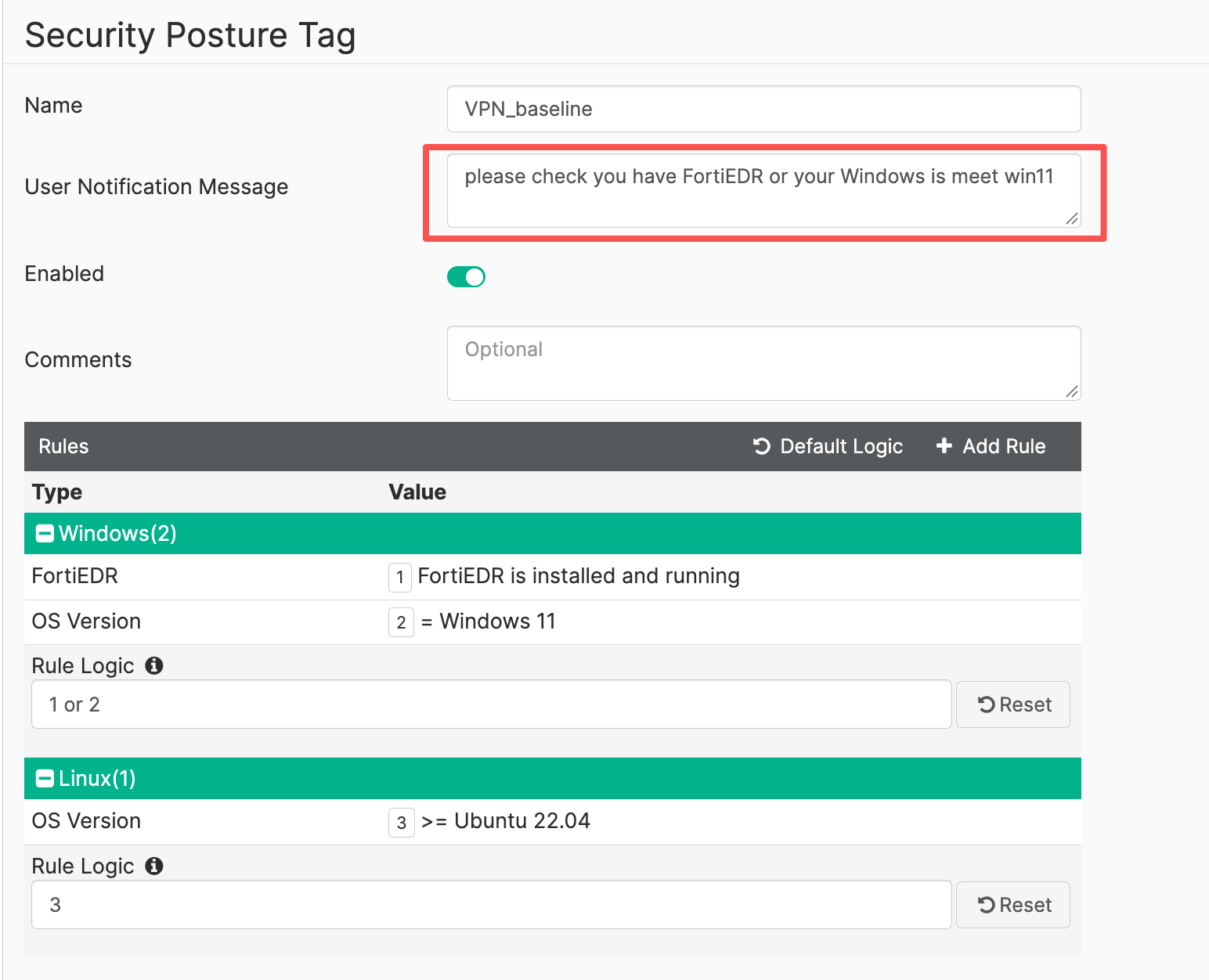
- 打开 Security Posture Tags > Tags,编辑目标标签。
- 核对标签规则含义,再填写与该标签一致的通知文字。
- 保存,等待标签及信息同步到 FortiGate。
- 在 FortiGate 的标签信息及测试 ZTNA 拒绝页面核对内容。
终端隔离消息
- 进入 System Settings > Custom Messages。
- 选择 Endpoint Quarantine Message。
- 输入隔离提示,查看 Preview。该字段最多可以输入 512 个字符,完成后单击Save按钮保存。
- 保存后,仅在已有恢复手段的测试终端上验证隔离与解除隔离。
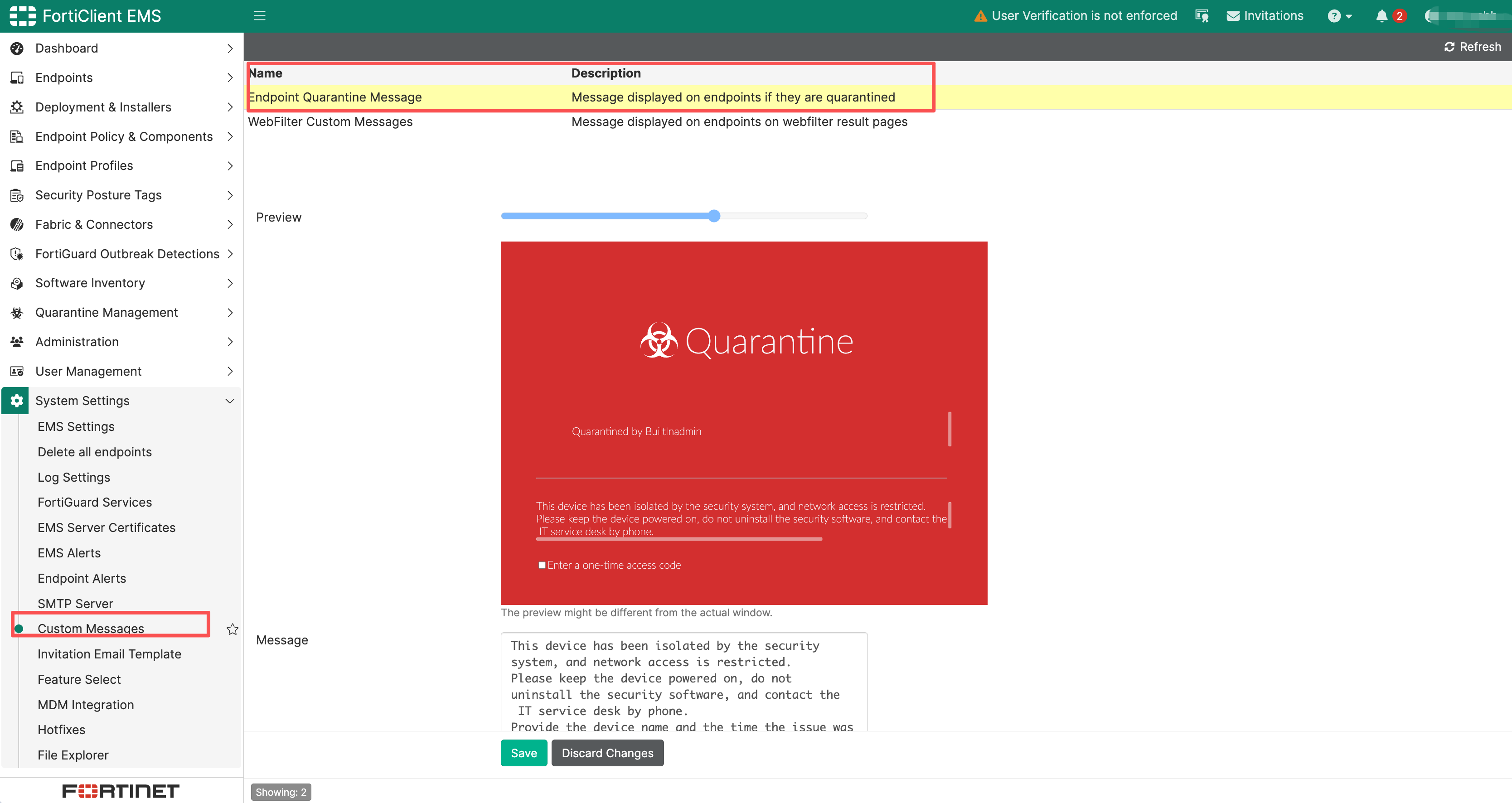
建议文字:
This device has been isolated by the security system, and network access is restricted. Please keep the device powered on, do not uninstall the security software, and contact the IT service desk by phone. Provide the device name and the time the issue was discovered so that an administrator can verify the situation and restore access.注
- 中文翻译:
此设备已被安全系统隔离,网络访问受到限制。请保持设备开机,不要自行卸载安全软件,并通过公司服务台电话联系 IT。请提供设备名称和发现时间,由管理员核查后恢复访问。
隔离测试会影响网络,应准备现场或独立通信方式。预览显示正常只能验证文字排版,实际客户端展示仍需验证。
网页过滤自定义消息
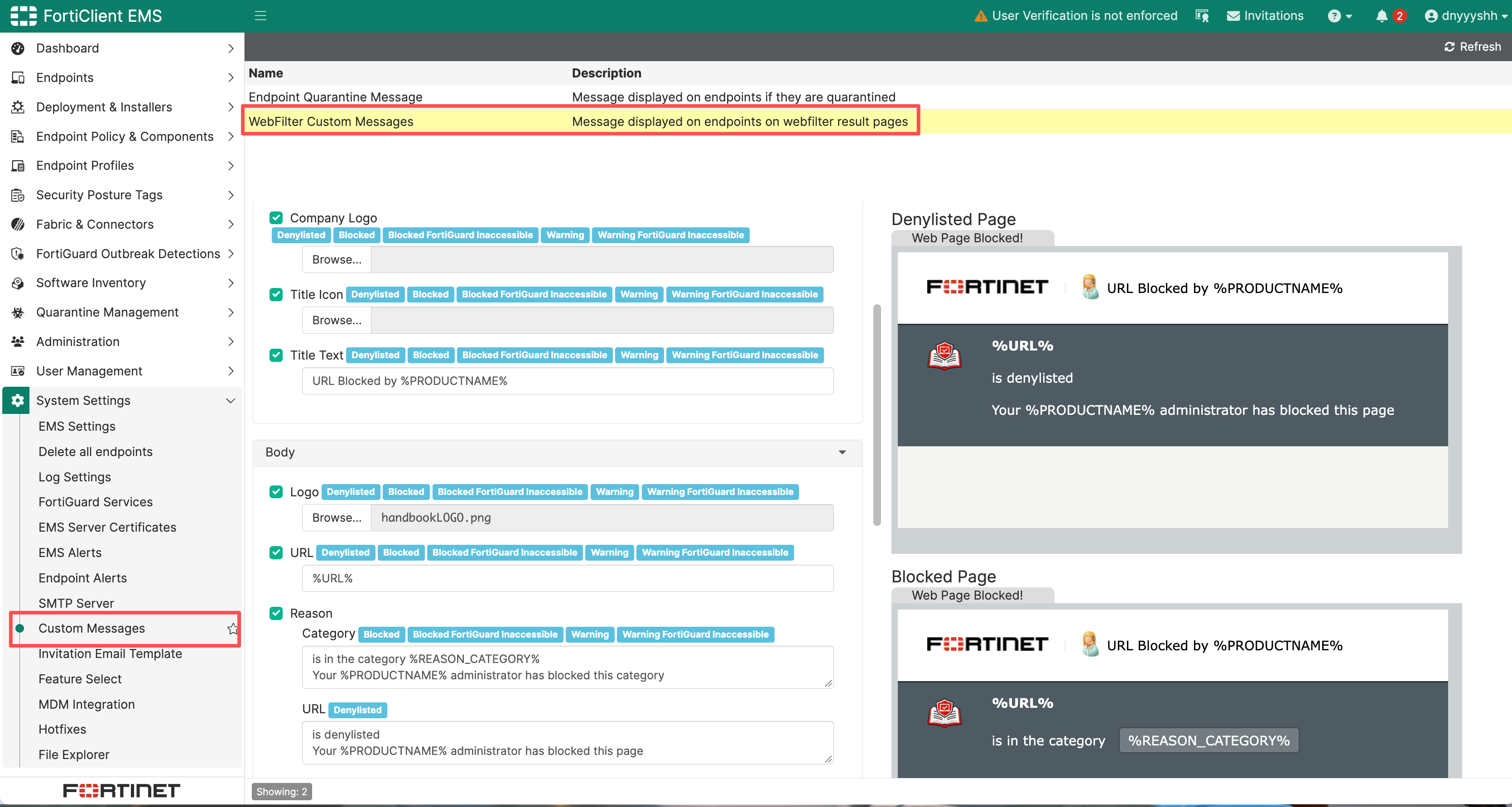
- 在 System Settings > Custom Messages 选择 WebFilter Custom Messages。
- 分别检查阻止列表、分类阻止、警告,以及 FortiGuard 不可达时的阻止/警告页面。
- 按字段标注修改通用或特定页面内容;需要时上传企业标志。
- 查看预览并保存,在测试终端触发相应的过滤结果。
更新历史
| Ver | Description | Author | Rev | Date |
|---|---|---|---|---|
| 1.0 | First Complete | ysheng | tanga | 2026.10.14 |
| 0.1 | Draft Version | - | - | 2026.08.04 |